4 The PROFview XL Application Software User Manual PROFview XL
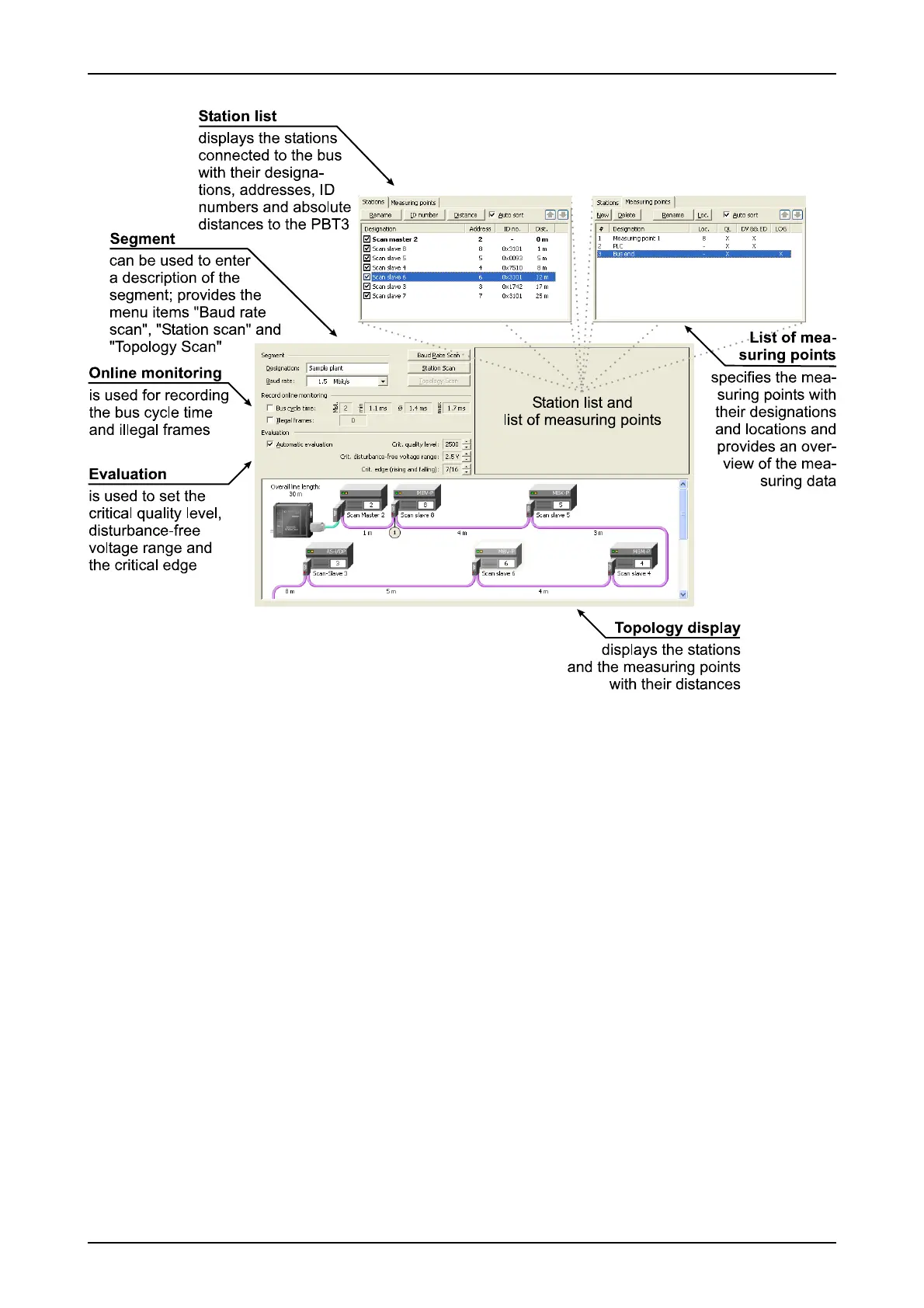
4.5.1.1 Baud rate scan
The PBT can determine the baud rate for a segment automatically provided that the PROFIBUS plant func-
tions correctly (data traffic existing, bus status LED = green). Click on "Baud rate scan"; a dialog box is
opened, displaying the baud rate detected. This can be confirmed and accepted by clicking on the "OK" but-
ton.
Note:
Changing the baud rate will reset the illegal frame counter and the bus cycle time display to "0".
4.5.1.2 Station scan (and detection of duplicated addressing)
The station scan automatically determines all stations transmitting on the bus and enters them in the station
list. In addition, this function carries out a check for duplicated addresses. This function can also be used
when the PBT master simulator is used on an idle plant. In this case, the PBT will determine the device codes
(ID numbers) of the slaves, permitting assignment to the DMF files.
4.5.1.3 Topology scan
The topology scan can be used on an idle PROFIBUS plant (without active master station) to determine the
line lengths between the individual PROFIBUS stations and their topological order with reference to the PBT
18 PROFview XL
Fig. 7: Elements of the "Configure segment" view



 To Next Page