InfiNet Wireless R5000 Technical User Manual
Copyright © 2004-2010 by InfiNet Wireless
48
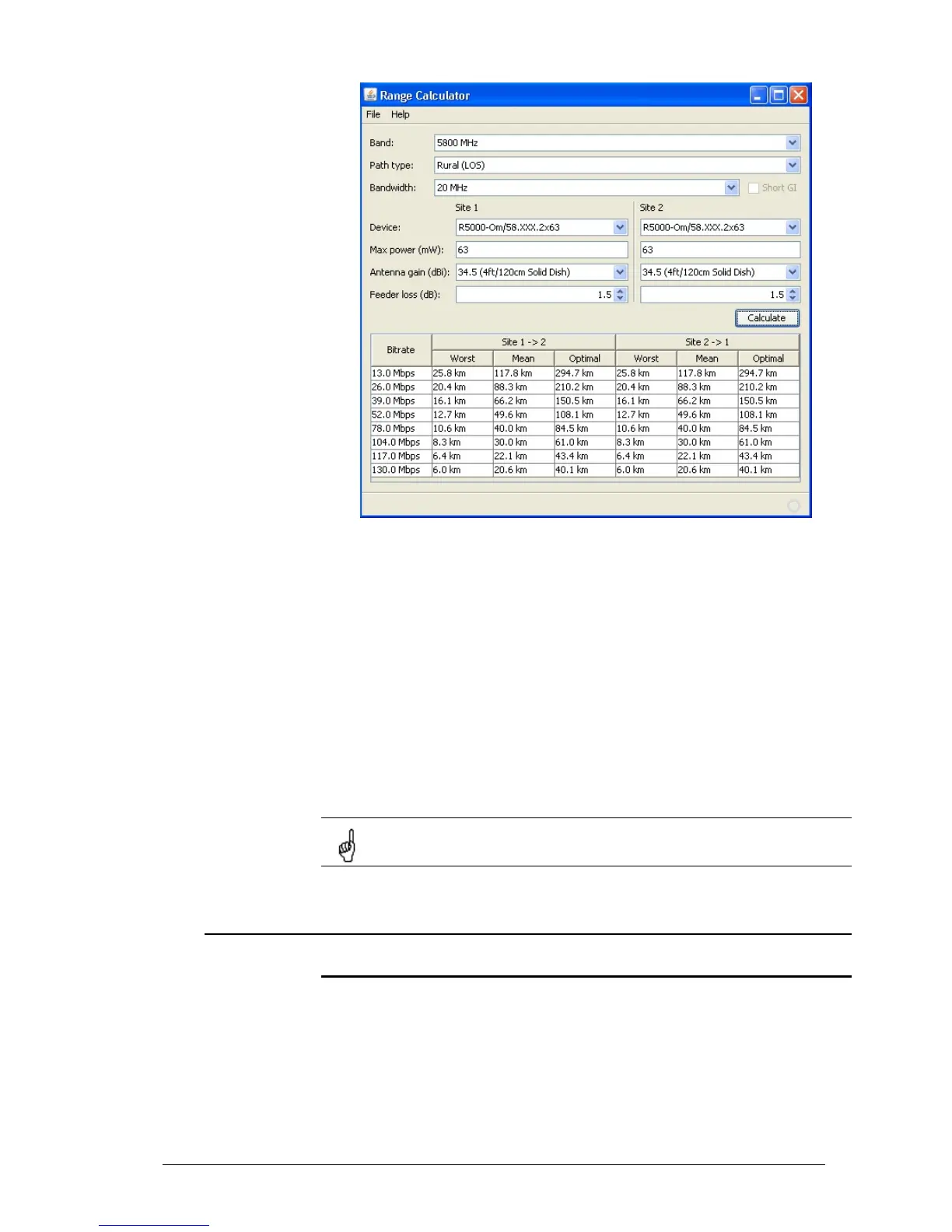
Range/Bitrate calculator view.
To use the calculator:
1. Set needed frequency range in “Band” field.
2. Set NLOS parameters in “Path type” field.
3. Set radio channel width in “Bandwidth” field.
4. For Site 1 and Site 2 define device model, device’s max output, antenna gain
and feeder loss.
5. Press “Calculate” button.
The results will be listed in a table below. For each available Bitrate value you
will see corresponding distances in kilometers for “worst”, “mean” and “optimal”
environment conditions.
Earth surface relief is not taken into account in calculations.
2. Link diagnostic tools
Ltest
Ltest utility allows precise test of a radio link. It is recommended for antenna
alignment when installing a new device or for testing of existing radio link.
Ltest can work in standard, alignment and bandwidth modes.
Standard mode:
In standard mode Ltest measures signal levels, retries, lost packets and acks.
To start Ltest in this mode:



 To Next Page