InfiNet Wireless R5000 Technical User Manual
Copyright © 2004-2010 by InfiNet Wireless
70
4. Device Status
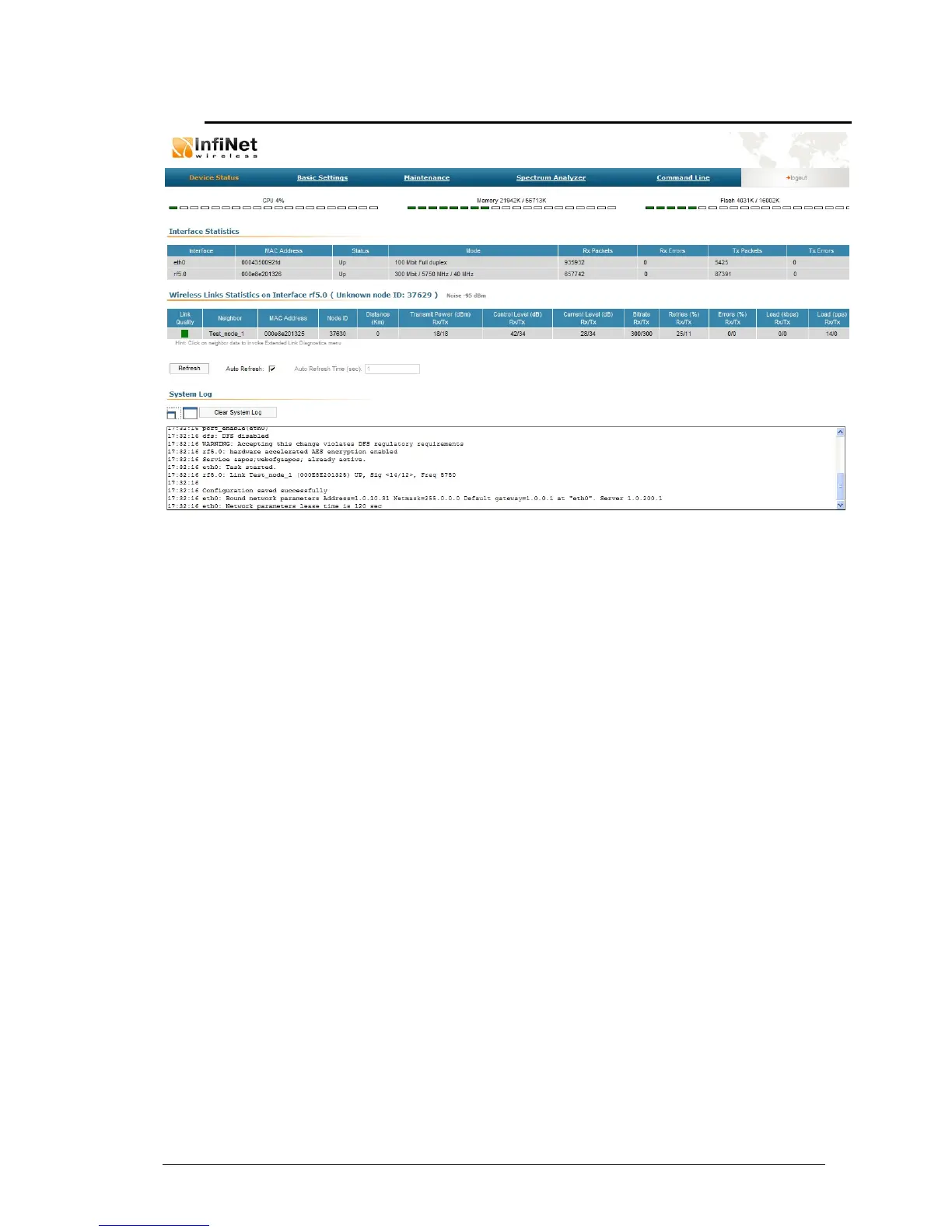
The “Device Status” page allows viewing CPU/memory/flash usage and
monitoring statistics of the unit’s interfaces and radio wireless connections and
using the graphical “Antenna alignment” tool and performing radio link
performance tests and viewing the system log.
The “Interface Statistics” section displays the following parameters of all
available interfaces of the device:
• Interface – the name of the interface
• MAC Address – the MAC-address of the interface
• Status – the status of the interface (Up, Down)
• Mode – main working parameters currently used by the interface for its
operation
• (Rx/Tx) Packets – the number of received/transmitted packets via the
interface
• (Rx/Tx) Errors – the number of errors on the interface when
receiving/transmitting
The “Wireless Links Statistics” section displays all neighboring devices which the
interface (RF or Pseudo-RF) of the given node is connected to. The following
radio link parameters are displayed:
• Link Quality – indicates the quality of the link to a neighboring device:
green – the link has acceptable characteristics, yellow – the link has
significant problems, red – the link has unsatisfactory characteristics.
• Neighbor – the neighbor’s name
• MAC Address – the neighbor’s MAC address
• Node ID – the sequential number of the neighboring node
• Distance – the distance of the link



 To Next Page