InfiNet Wireless R5000 Technical User Manual
Copyright © 2004-2010 by InfiNet Wireless
28
Service cable soldering procedure
“RJ-45” connector
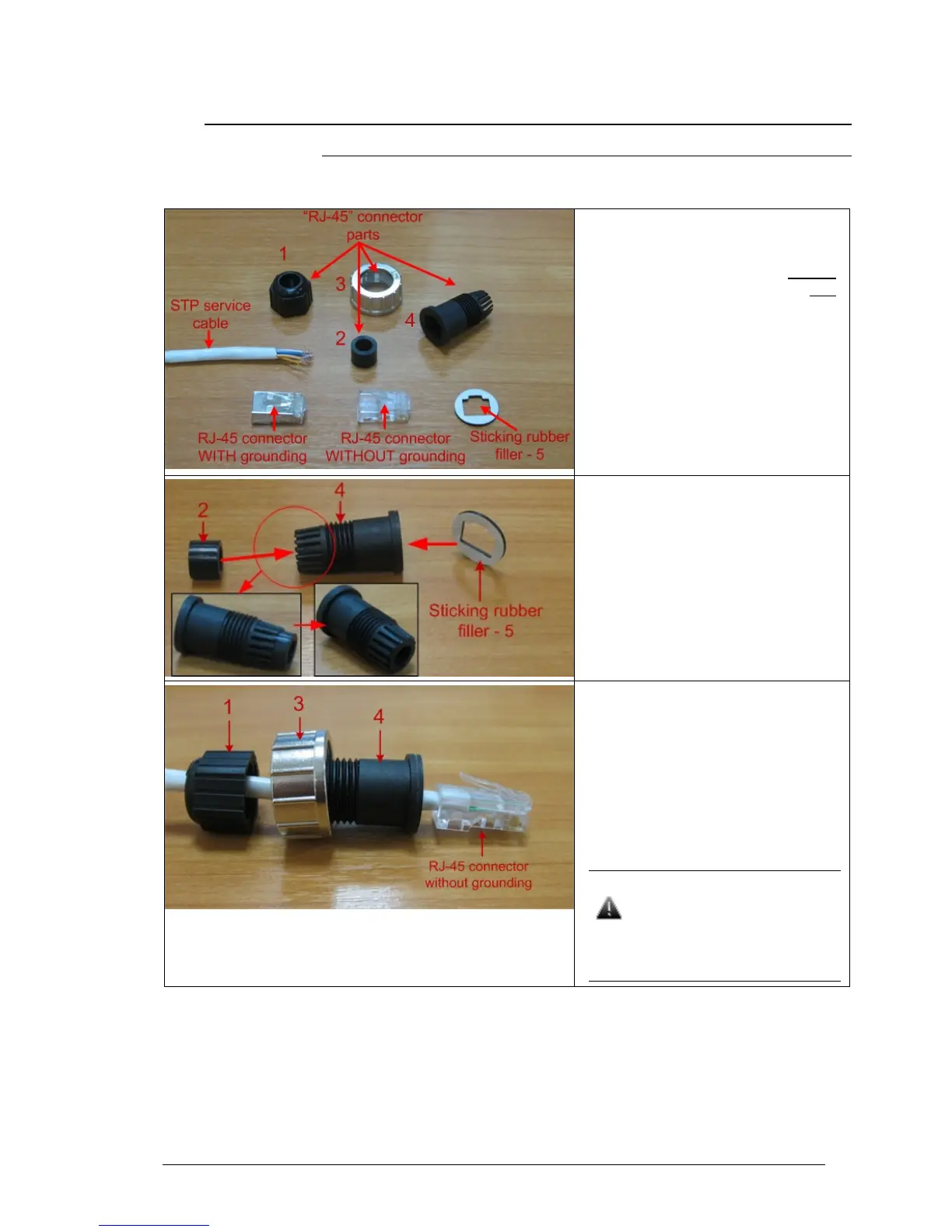
The following instruction shows the “RJ-45” connector soldering procedure.
Step 1. Peel STP service cable and
prepare “RJ-45” connector parts.
Use RJ-45 connector without
grounding here (RJ-45 connector with
grounding is used for connecting
service cable to IDU).
Step 2. Stick rubber filler – 5 on the
Part 4, previously having removed
protective white layer from rubber
filler -5.
Insert Part 2 inside part 4 up to the
stop. Part 2 must be entirely within
Part 4.
Step 3. Put connector parts on the
STP service cable as shown.
Attach RJ-45 connector without
grounding to the STP service cable
according to the “RJ-45” soldering
scheme (in the “Supplementary
information” chapter of this manual)
and crimp the connector using a crimp
tool.
Please tightly crimp the RJ-45
connector. Not crimped or
badly crimped connector
damages the unit when
assembled into it which is not
considered as a warranty case.



 To Next Page