InfiNet Wireless R5000 Technical User Manual
Copyright © 2004-2010 by InfiNet Wireless
54
• sid mode. The sid regime allows estimating the number of currently
operating subscriber groups having different identifiers (SID), and the
efficiency of air links utilization. The analysis is carried out for all network
identifiers at the frequency previously specified for the radio module by
rfconfig command.
Load Meter
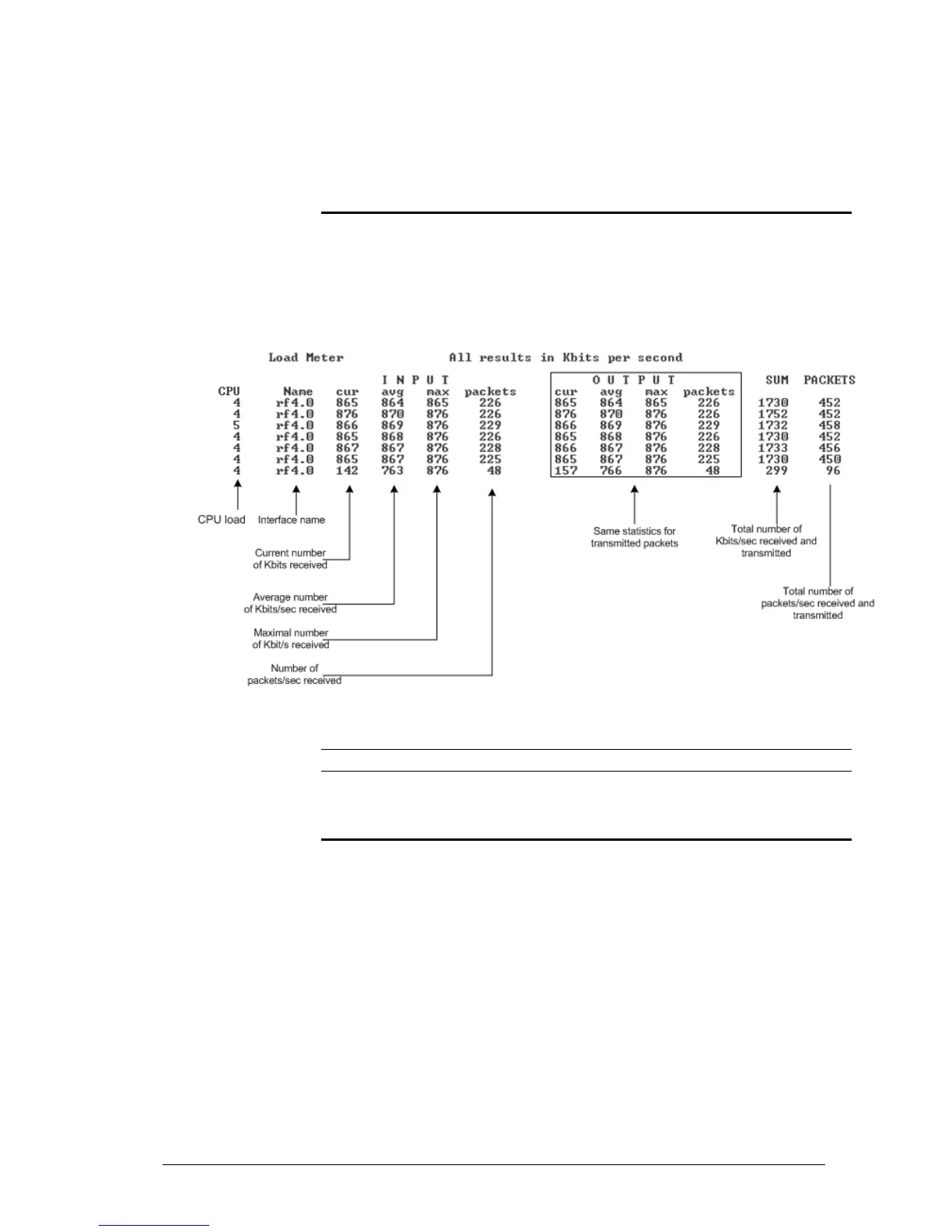
Load meter is a powerful tool that allows estimating the load of a system
interface specified by interface parameter. By default, the information is
displayed on one line and updated every second; the load is measured in
kilobytes.
Below picture shows the load meter output for the radio interface outputted in
line-by-line mode with one second interval.
To run load meter like it is shown above, please type:
loadm –l <IF-NAME>
Acquiring interfaces statistics
Interface statistics can be acquired using netstat module which includes two
modes:
• Routing tables output (using “-r” parameter with the command)
• Interfaces statistics output (using “-i” parameter with the command)
Below picture shows the example of interfaces statistics output.



 To Next Page