Evolve System Operator Manual
Section 4: Device Description
Intensity is changed within the limits allowed for the connected
Applicator. Intensity level settings are changed from 1 to 50
energy levels. The System starts up at minimal intensity level
setting.
Applicators
Status Indicators
(1-6)
These indicators show online the measured skin surface
temperature for each of the connected Applicators. The color of
the buttons is in accordance with the temperature scale above.
The grey color indicates that Applicator is not connected or not
recognized.
Return to the Main Menu to select the Applicator.
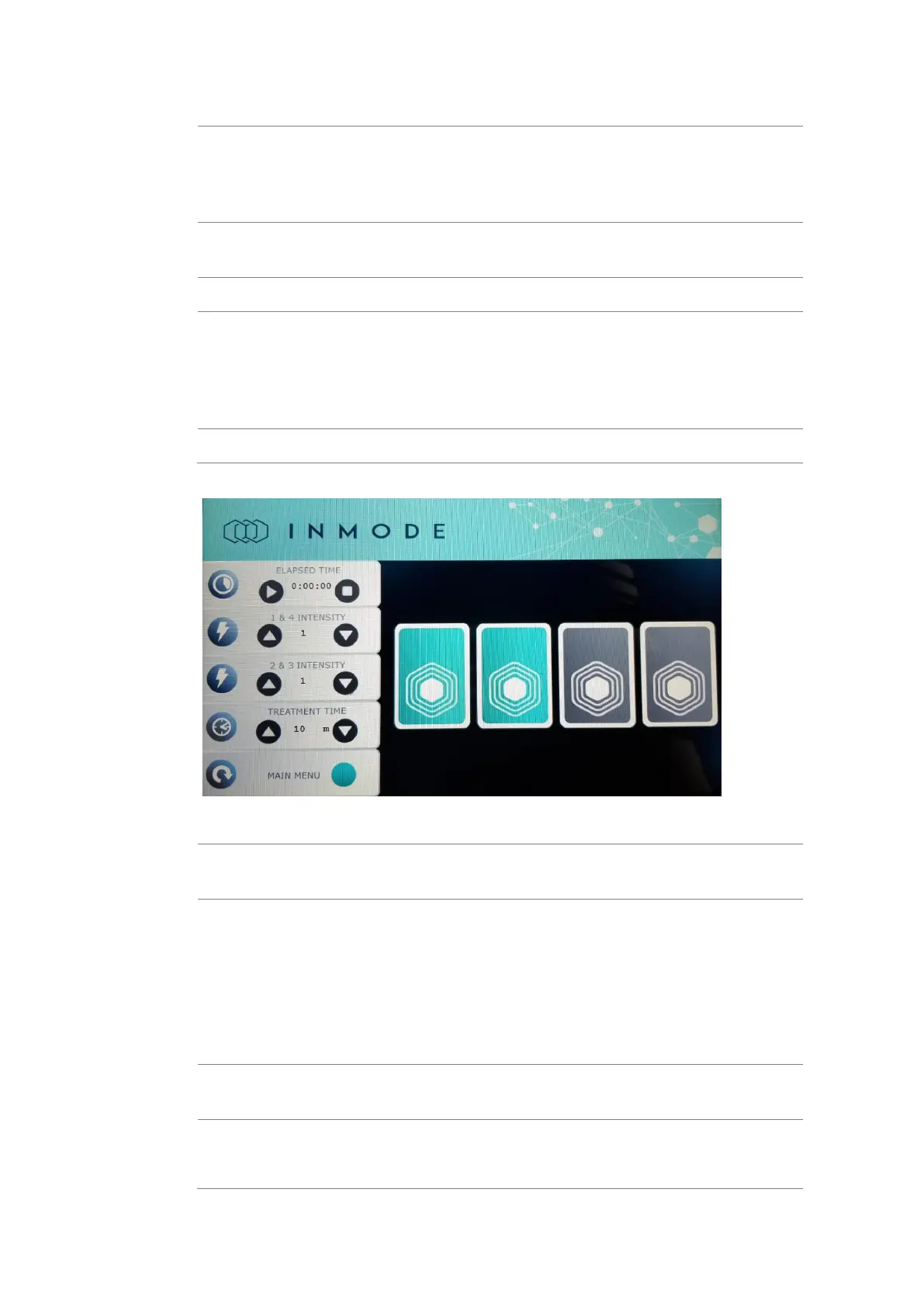
Figure 4-9: Tone Treatment Screen
This indicator shows elapsed time from the beginning of
treatment activation.
This button activates the treatment. After pressing the ‘Start’
button, the system is in ‘Active’ mode. The icon will then change
to ‘Pause’ and clicking on it will pause the treatment (‘Pause’
mode). The ‘Elapsed Time’ counter will not reset while pausing
the treatment.
Any attempt to change the settings during treatment, switches
the system to Pause mode.
This button Stops the treatment and switches the system to
Standby mode. The ‘Elapsed Time’ counter resets.
Intensity is changed within the limits allowed for the connected
Applicator. Intensity level settings are changed from 1 to 50
energy levels and can be adjusted separately per pair of



 To Next Page