Controller CO3000
1.19 Auto-Tilt Settings
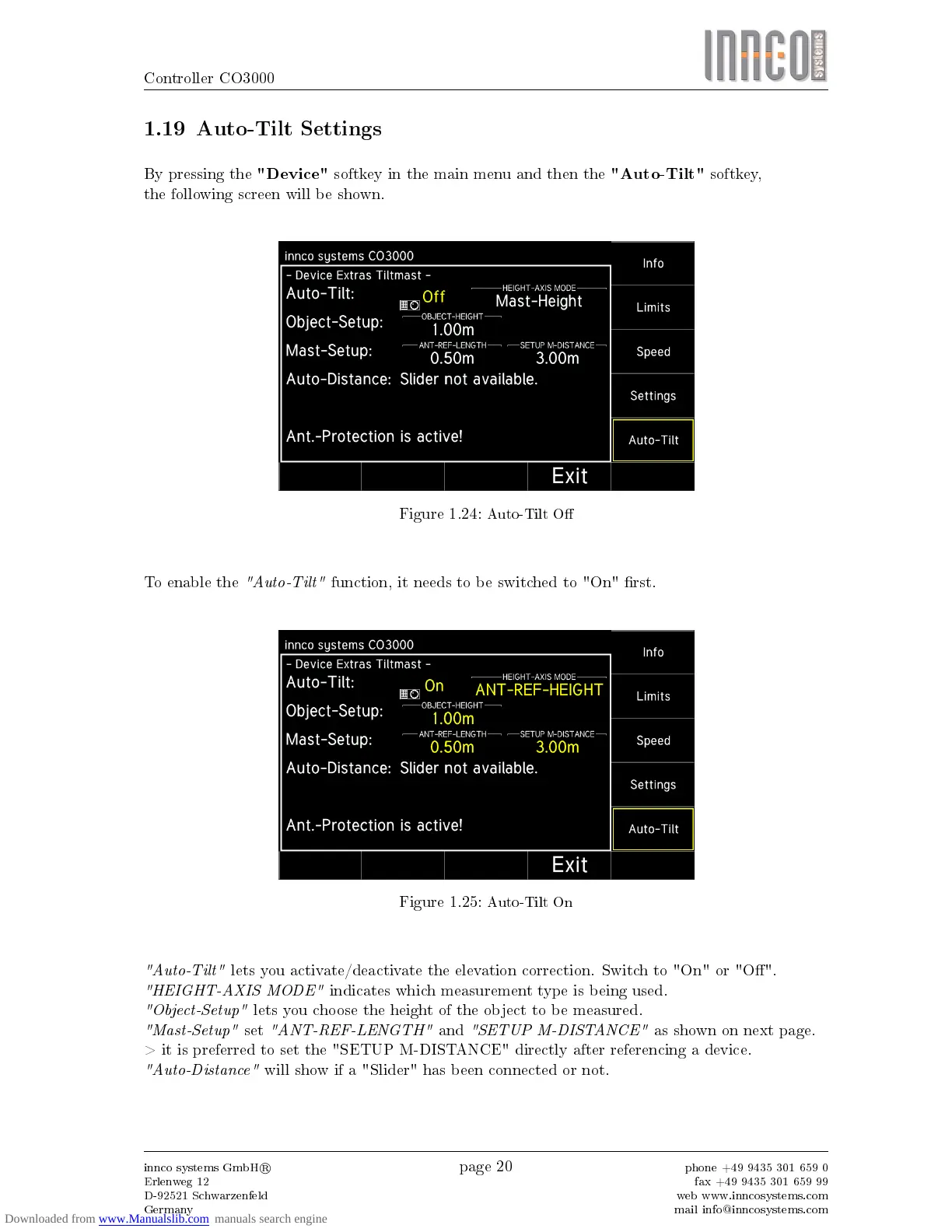
By pressing the
"Device"
softkey in the main menu and then the
"Auto-Tilt"
softkey,
the following screen will be shown.
Figure 1.24:
Auto-Tilt O
To enable the
"Auto-Tilt"
function, it needs to be switched to "On" rst.
Figure 1.25:
Auto-Tilt On
"Auto-Tilt"
lets you activate/deactivate the elevation correction. Switch to "On" or "O".
"HEIGHT-AXIS MODE"
indicates which measurement type is being used.
"Object-Setup"
lets you choose the height of the object to be measured.
"Mast-Setup"
set
"ANT-REF-LENGTH"
and
"SETUP M-DISTANCE"
as shown on next page.
> it is preferred to set the "SETUP M-DISTANCE" directly after referencing a device.
"Auto-Distance"
will show if a "Slider" has been connected or not.
innco systems GmbH
R
Erlenweg 12
D-92521 Schwarzenfeld
Germany
page 20
phone +49 9435 301 659 0
fax +49 9435 301 659 99
web www.inncosystems.com
mail info@inncosystems.com


 To Next Page