Using the Tablet
VIEWING SCAN RESULTS
33
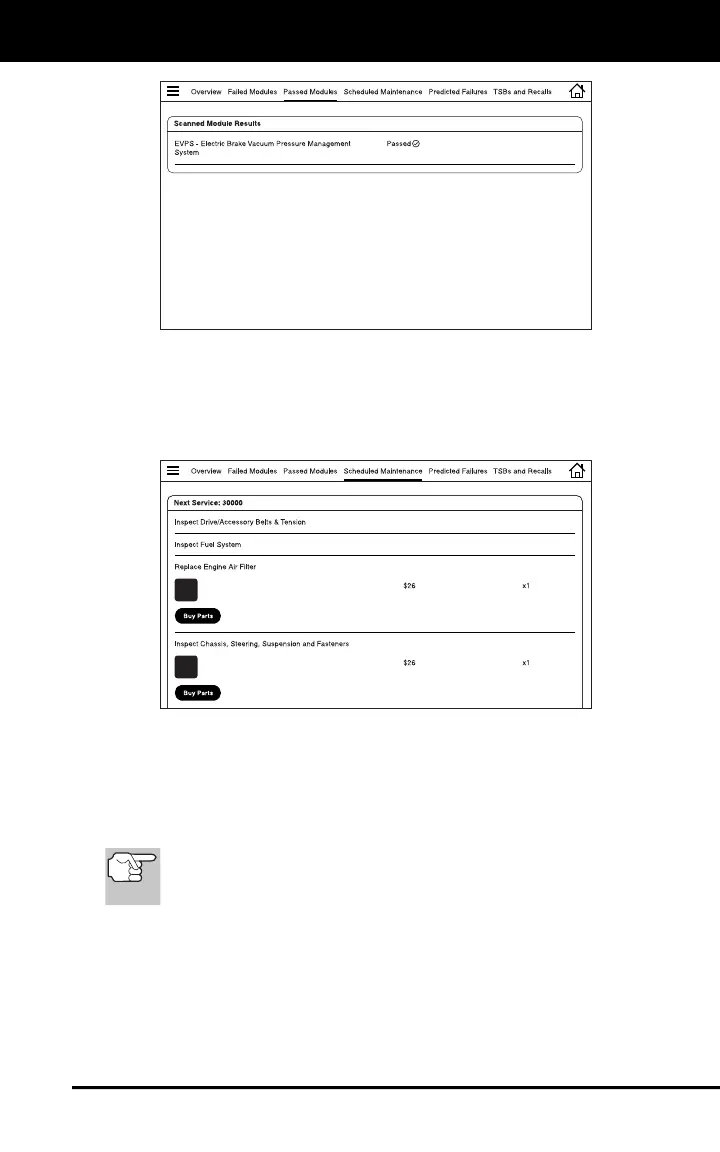
Scheduled Maintenance
The Scheduled Maintenance page provides a listing of scheduled
maintenance procedures due at the next service interval. The Next
Service field shows the odometer reading at which the associated
service procedures are due.
Each entry in the list shows a scheduled inspection or repair/
replacement procedure. In cases of replacement procedures, the entry
shows the required replacement part(s), the “per unit” part cost, and the
number of parts required for the procedure.
Tap the Buy Parts button to access the web page for your preferred
parts supplier.
The tablet uses the value entered in the Retailer section of the
Settings page to determine your preferred parts supplier (see
SETTINGS on page 65).
Predicted Failures
The Predicted Failure page provides a listing of components and
systems that may experience a failure within the next 12 month period.


 To Next Page