Scan Tool Controls
CONTROLS AND INDICATORS
2
CONTROLS AND INDICATORS
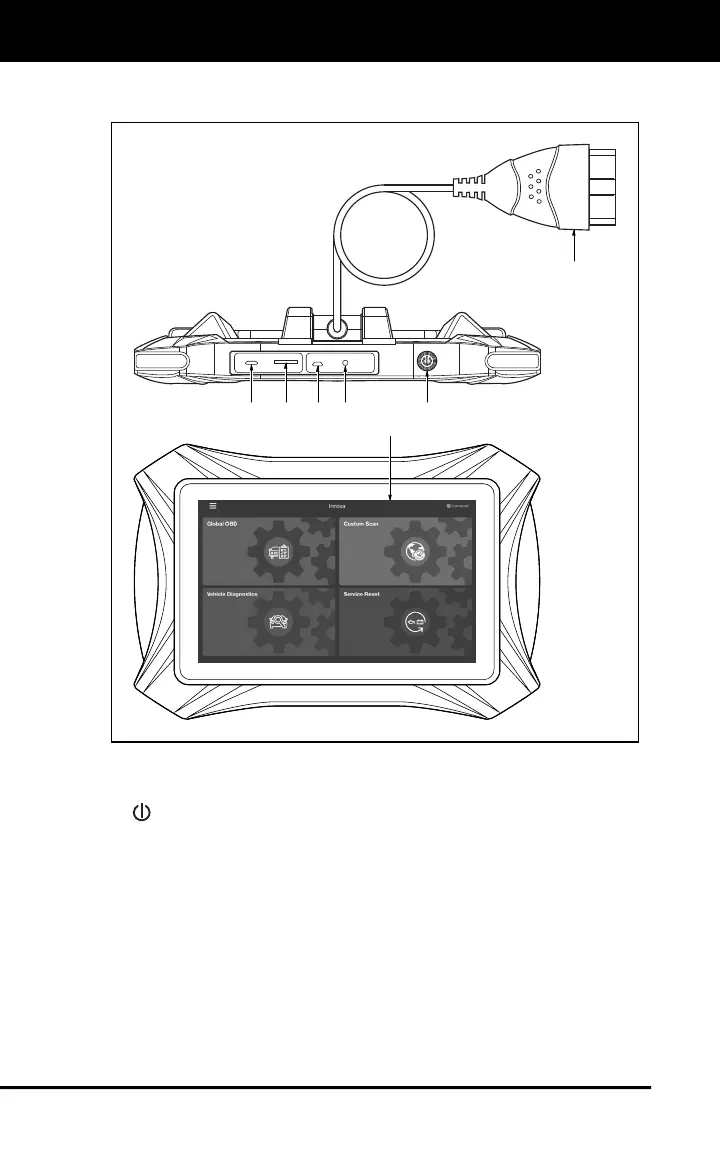
Figure 1. Controls and Indicators
See Figure 1 for the locations of items 1 through 7, below.
1.
POWER button - Turns the tablet “On” and “Off.” When tablet is
off, press and hold for approximately 3 seconds to turn on. When
tablet is on, press and hold for approximately three seconds to
display the “power down” options menu (See Power Up and Power
Off on page 3).
2. USB Port – Supports charging of the tablet battery using USB cable
and power adapter.
3. TF-Card port – Supports installation of a TF card (extensible
memory card) (functionality is currently disabled).
2345 1
6
7



 To Next Page