Additional Tests
SETTINGS
70
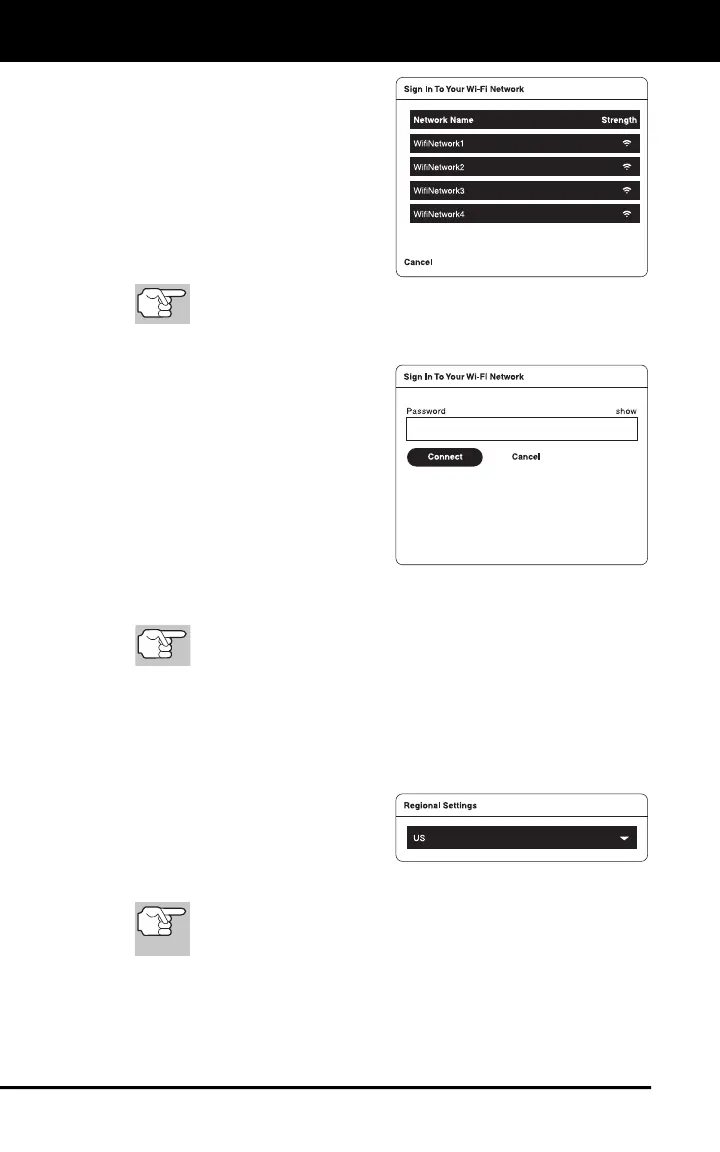
2. Tap Change Network.
The Sign In To Your Wi-Fi
Network dialog displays.
The dialog lists all available
Wi-Fi networks within
range of the tablet.
3. Swipe up or down to scroll to
the desired Wi-Fi network, then
tap the network name.
To cancel changes and retain your current network
connection, tap Cancel to return to the Wifi Settings field.
The Enter Password dialog displays.
4. Tap the Password text box,
then enter the Wi-Fi network
password using the keyboard
(see USING THE KEYBOARD
on page 4).
As you type, the password
displays as a series of bullets
by default. Tap show to show
the password as you type.
Tap hide to display the
password as bullets.
5. When the password has been entered, tap the Connect button to
save your changes and connect to the selected Wi-Fi network.
Tap Cancel to cancel your changes and return to the Sign In
To Your Wi-Fi Network dialog to select a different network.
The screen returns to the Wifi Settings field, with the network
name shown in the upper left corner of the Wifi Settings field.
Configuring Regional Settings
1. Scroll the Settings page to the Regional Settings field.
2. Tap the currently selected unit of
measurement to display the
Select Unit of Measurement
menu. Select the radio button for
the desired unit of measurement,
then tap OK.
Click CANCEL to close the Select Unit of Measurement
menu and retain the previously selected unit of
measurement.


 To Next Page