Additional Tests
THE HISTORY PAGE - CONTACTING TECHNICAL SUPPORT
63
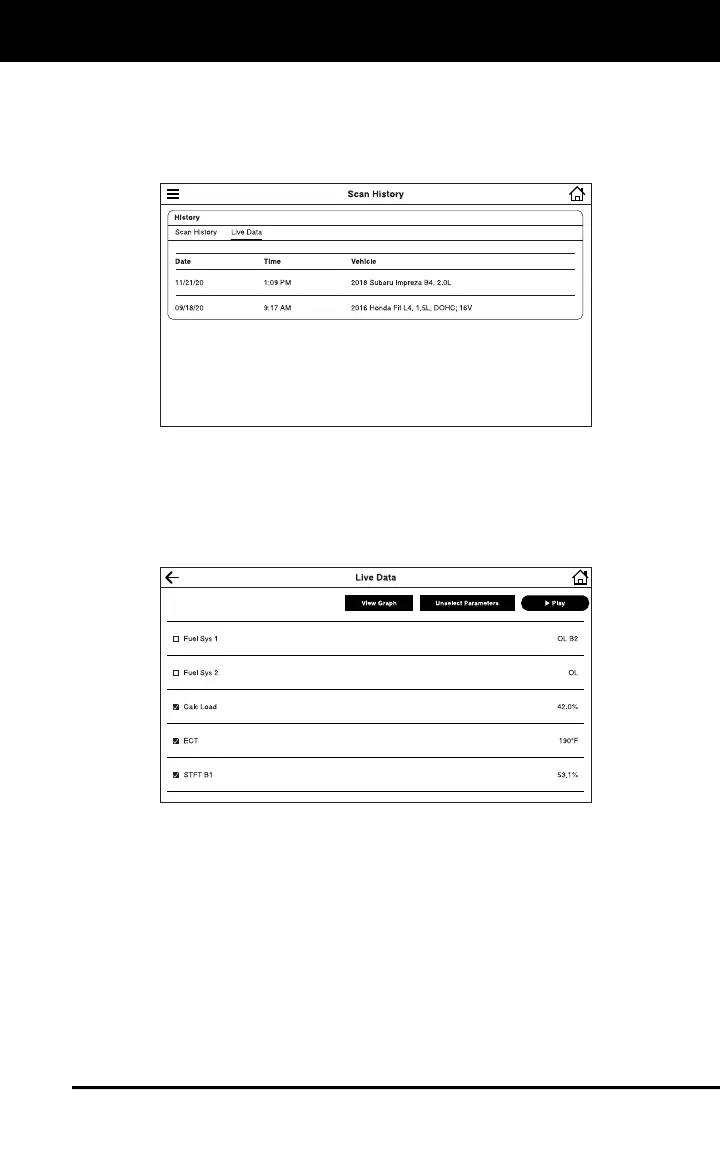
The Live Data Tab
Entries on the Live Data tab are listed in reverse chronological order
(most recent scan first). Each entry in the list provides the following
information:
Date – The date on which the recording was made.
Time – The time at which the recording was made.
Vehicle – The year, make, model and engine size of the vehicle for
which the recording was made.
Tap an entry on the Live Data tab play back recorded data.
Tap Play to start the playback.
Tap Pause to pause the playback.
Tap Stop to stop the playback.
If desired, use the View Table and View Graph buttons to toggle the
display between graph mode and tabular mode during playback.
CONTACTING TECHNICAL SUPPORT
The Support option in the Main Menu lets you send an email to Innova
Technical Support, or report an issue.


 To Next Page