Additional Tests
SETTINGS
71
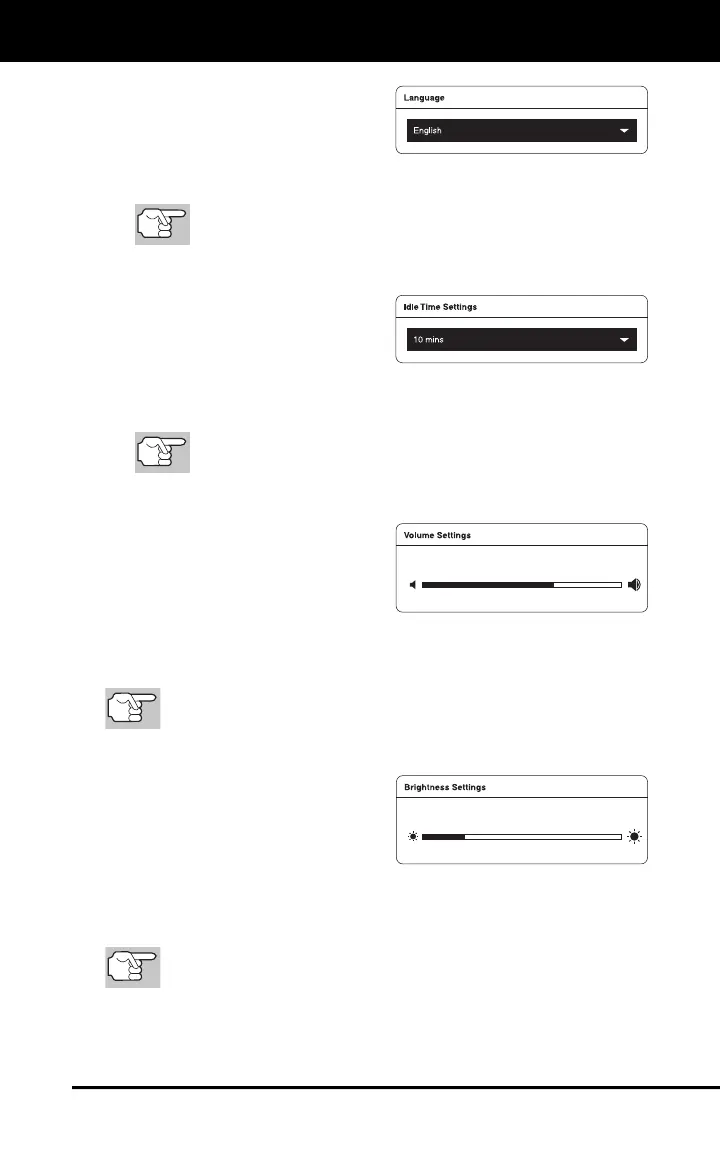
Setting the Display Language
1. Scroll the Settings page to the
Language field.
2. Tap the currently active language to display the Select Language
menu. Select the radio button for the desired language, then tap OK.
Click CANCEL to close the Select Language menu and
retain the previously selected display language.
The display refreshes to show text in the selected language.
Idle Time Settings
1. Scroll the Settings page to the
Idle Time Settings field.
2. Tap the currently active idle time value to display the Select Idle
Time menu. Select the radio button for the desired idle time value,
then tap OK.
Click CANCEL to close the Select Idle Time menu and
retain the previously selected idle time value.
Adjusting Speaker Volume
1. Scroll the Settings page to the
Volume Settings field.
2. Use the Volume “slider” to
increase or decrease speaker
volume:
Touch and slide right to make the volume louder.
Touch and slide left to make the volume softer.
The current Volume setting shows above the slider as you adjust
the slider position.
Adjusting Display Brightness
1. Scroll the Settings page to the
Brightness Settings field.
2. Use the Brightness “slider” to
increase or decrease display
brightness:
Touch and slide right to make the display brighter.
Touch and slide left to make the display darker.
The current Brightness setting shows above the slider as you
adjust the slider position.


 To Next Page