Scan Tool Controls
DISPLAY FUNCTIONS
5
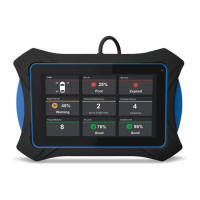
Main Menu
Lets you view test results stored in the tablet’s
memory, contact Innova Technical Support, locate a vehicle’s
Data Link Connector (DLC), and configure the tablet for your
particular needs (see THE MAIN MENU on page 60).
Global OBD
Lets you perform a Global OBD2 scan of the
vehicle under test (see on page ).
Custom Scan
Performs a “custom” scan of one or more use
-
selected modules/systems. See SETTINGS on page 65 to
configure Custom Scan parameters.
ehicle Diagnostics
Lets you perform a Network Scan or
perform a scan of a single selected module, view Live Data,
and/or perform actuator or special tests for the selected module
(see on page ).
Service Reset
Offers up to seven options for performing
service reset procedures (see PERFORMING SERVICE
RESETS on page 48).


 To Next Page