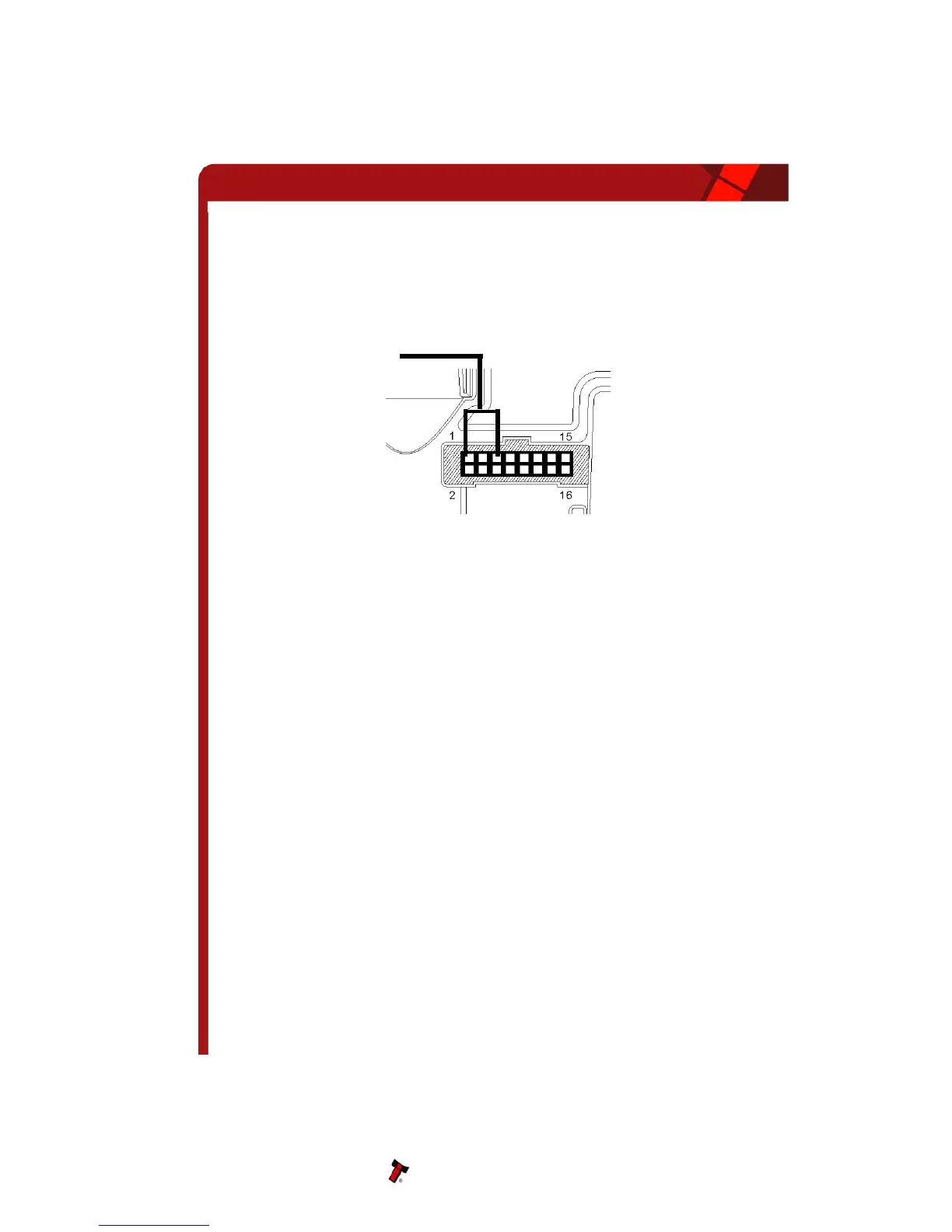
Figure 8 - ccTalk Connection Pins on the NV10
The default encryption key will be set to the key code printed on the label
on the NV10. If the key is changed to a new stored key by the host
machine, the key can be reset to the default by the following the steps
below.
• Power off NV10.
• Set all 4 DIPswitches to the Up position.
• Apply power (no ccTalk comms).
• Red LED will now be flashing.
• Set DIP switches 1 and 2 down.
•
The code is now reset.
6.9 CASH CODE SERIAL PROTOCOL – ccNET
The NV10 supports the ccNet serial protocol for easy interfacing with host machines that
support this protocol.
To use ccNet mode DIPswitches 3 and 4 must be in the Up position to select ‘Special’
mode on the validator and the CCN option of the interface firmware must be loaded into
the NV10.
DIPswitch 2 is used to select default Baud rate – Down = 9600 UP = 19200
Pin out connections on NV10 for ccNet are the same as for SSP.
Note: For detailed information and full protocol specification, please refer to the CashCode
specification
ccTalk Bus
Pin 1 – TX
Pin 5 - RX
NV10 Operations Manual 21
Copyright Innovative Technology Ltd 2008 GA333-5


 To Next Page