Copyright Innovative Technology Ltd 2008 GA333-5
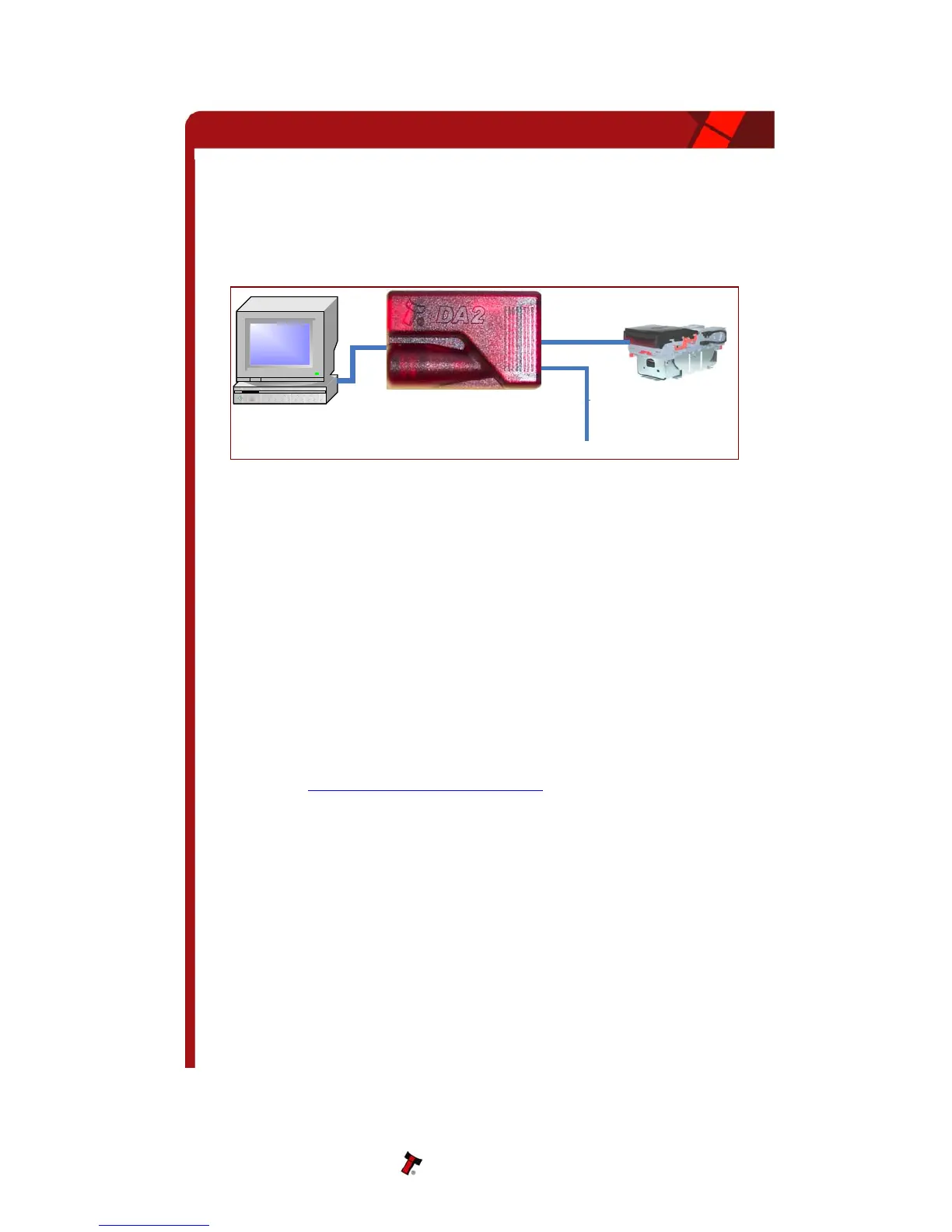
Connecting a DA2 to a validator and PC
refer to Appendix F. Details of how to install
lug the USB type Connector into the USB port of the PC. Once the connections have
Figure 17 - Connecting DA2 to a NV10 and PC for upgrading Software Installation
oftware Installation
BNV Download Manager Software insert the CDROM into the
ar.
151.
A2 - To install the ITL BNV Download Manager Software insert the CDROM into the
ar.
OTE: All files contained on the CD are available from the ITL website:
pport@innovative-technology.co.uk
For the PC system specification and set up
the DA2 are provided in the Support CD.
P
been made install the appropriate software for the validator you are using.
S
DA1 - To install the ITL
correct PC drive. The CD should automatically run and an installation menu will appe
Double click the ITL BNV Download Manager and follow the on-screen instructions. You
can also install the Currency files, Firmware files and the Technical Manuals for each
specific product as well as other generic documentation.
The Quick Start Guide for the DA1 is document number GA
D
correct PC drive. The CD should automatically run and an installation menu will appe
Double click DA2 installation guide (GA338) and follow the instructions relating to your
specific Operating System.
N
www.innovative-technology.co.uk
Please contact
su
, if you require further assistance.
NV10 Operations Manual 36
PC Serial Port
Validator
+12V DC
DA2 Adapter Board


 To Next Page