24
NEA - ICU Montage- und Betriebsanleitung
NEA - ICU Mounting and Operating Instructions
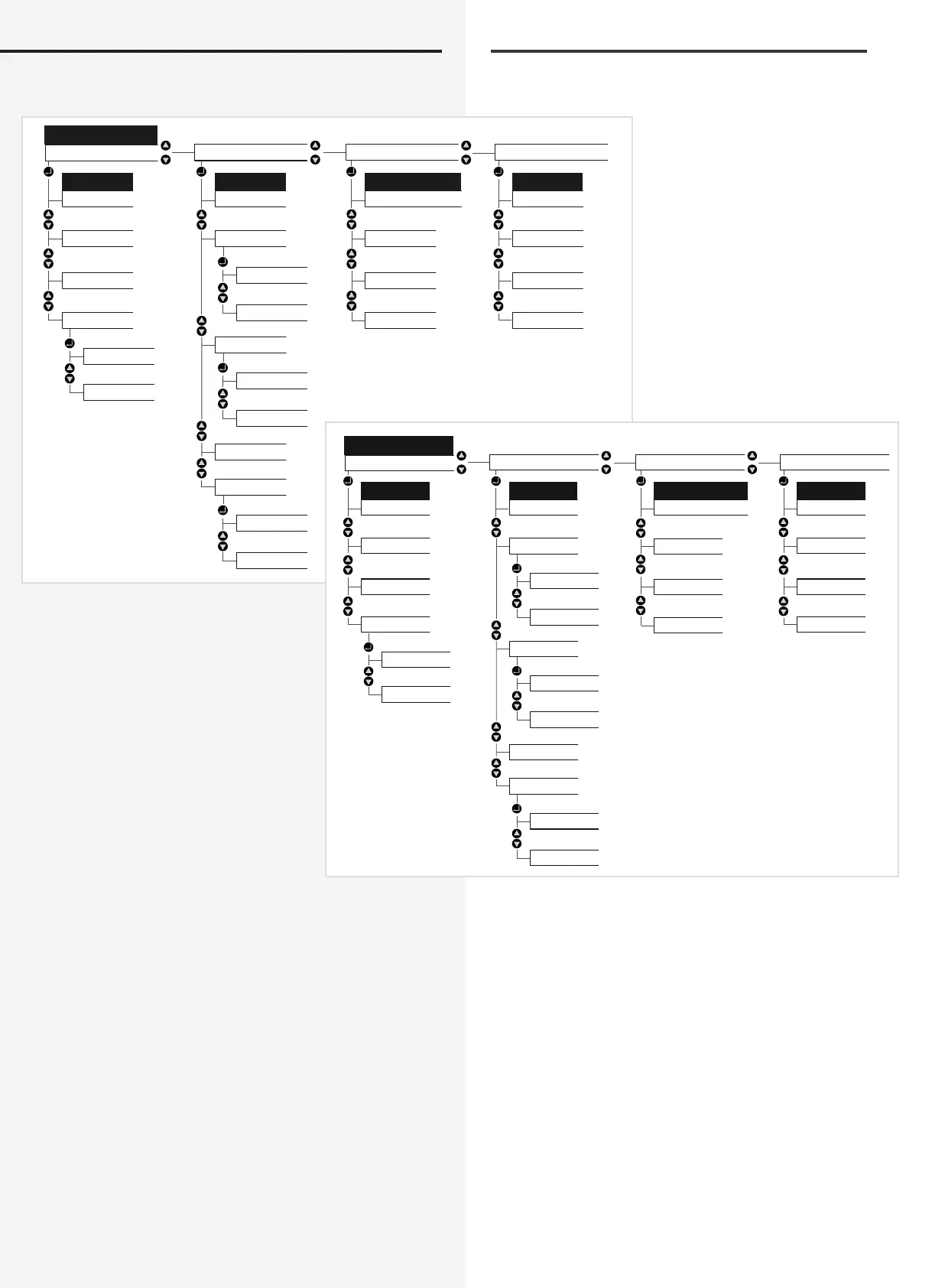
9. Menüstruktur
10. Inbetriebnahme des NEA - ICU
Bei der Erstinbetriebnahme startet das Gerät nach dem
Anlegen der Versorgungsspannung selbstständig. Im
Auslieferungszustand ist DHCP aktiv, somit wird dem
Controller automatisch eine IP-Adresse zugewiesen.
Datum und Uhrzeit sind im Auslieferungszustand vorein-
gestellt.
Nachdem dem das Modul hochgefahren ist, kann im
Display der aktuelle Systemstatus eingesehen werden.
22.08.2008 15:30
Status
NEA
Funktionen
NEA
Funktionen
Start FT
Komplett
Line/Ard.
Blockieren
Freigabe
Learnmode
Information
Programmierung USB
USB
Konfig. laden
Konfig. speichern
Störungsinformation
Prüfbuch
Information
Störungen
Passwort
Datum+Uhrzeit
Defaultparameter
Steuerteil
Programmierung
Steuerteil
Anzeigen
Löschen
Leuchten
Prüfbuch
Ext. Komponenten
Belegung
Status
Software Version
IP
9. Menu structure
10. Commissioning the NEA - ICU
When commissioning for the rst time, the device starts
up automatically as soon as voltage is suppled. Since
the factory setting for DHCP is active, the controller is
automatically assigned an IP address. Date and time are
pre-set.
Once the module has ramped up, the current system
status can be studied on the display.
NEA
Start FT
Line/Ard.
Learnmode
Information
USB
USBInformation
Defaultparameter
Ext. Komponenten
Status
Software Version
IP
Functions
Blocking
Release
Complete
Failure
Controller
Controller
Date+Time
Password
Load config.
Save config.
Failure info
Logbook
Luminaires
Adresses
Logbook
Show
Programming
Functions
Programming


 To Next Page