35
NEA - ICU Montage- und Betriebsanleitung
NEA - ICU Mounting and Operating Instructions
11.2.5. Logbook
11.2.5.1. Show logbook
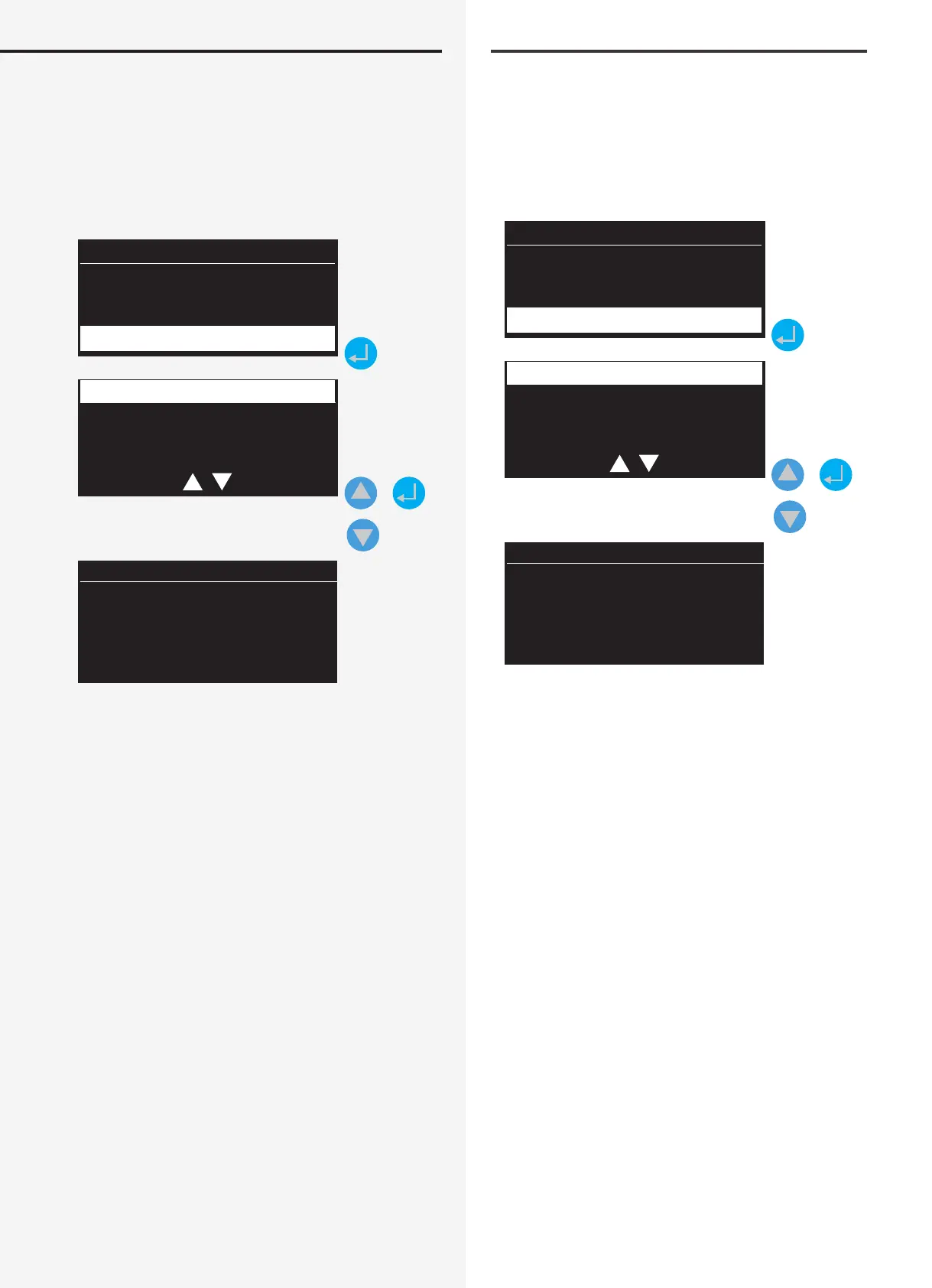
Select “Logbook” in the Information menu. Conrm
with the Return key to open the sub-menu, where you
can use the navigation keys to select “Show” or “Delete”.
Selecting “Show” loads the information from the control-
ler’s logbook entries.
Date Time
Information
Logbook
Show
Delete
+
Entry no.: 141
14/05/2015 15:20
Line 1 Add.: 12
Communication
connection
OK
All events, such as status changes and test results, are
stored in the logbook.
The last entries are displayed in clear text, including date,
time and entry number. The entry number is visible in
the top line. The date and time of the event are in the
line underneath. The relevant component is also dis-
played in clear text, together with its destination.
Use the “Scroll” keys to leaf through all entries.
11.2.5.2. Delete logbook
Select “Logbook” in the Information menu. Conrm with
the Return key to open the sub-menu, where you can
use the navigation keys to select “Show” or “Delete”. After
selecting “Delete” a conrmation dialogue appears that
you can conrm with “OK”. All of the information stored
in the logbook is irrevocably deleted.
You can abort deletion and return to the main menu by
pressing the “ESC” key.
11.2.5. Prüfbuch
11.2.5.1. Prüfbuch anzeigen
Wählen Sie im Menü Information die Rubrik „Prüfbuch“
aus. Durch Bestätigen mit der Eingabetaste gelangen Sie
in das Untermenü, in dem mittels Navigationstasten zwi-
schen „Anzeigen“ und „Löschen“ selektiert werden kann.
Nach Auswahl „Anzeigen“, gelangen Sie in die Informati-
onen der Prüfbucheinträge des Controllers.
Datum Uhrzeit
Information
Prüfbuch
Anzeigen
Löschen
+
Eintrag Nr.: 141
14.05.2015 15:20
Line 1 Adr.: 12
Kommunikations-
verbindung
in Ordnung
Im Prüfbuch des Controllers werden alle Ereignisse, wie
Zustandsänderungen und Testergebnisse gespeichert.
Beim Aufrufen werden die aktuellsten Einträge als Klar-
text mit Datum, Uhrzeit und Eintragsnummer angezeigt.
In oberster Zeile ist die Eintrag-Nummer zu erkennen.
Darunter das Datum und die Uhrzeit des Events. Weiter-
hin wird die betroene Komponente sowie deren Zielort
im Klartext angezeigt.
Alle Einträge können mittels der beiden „Scroll-Tasten“
durchgeblättert werden.
11.2.5.2. Prüfbuch löschen
Wählen Sie im Menü Information die Rubrik „Prüfbuch“
aus. Durch Bestätigen mit der Eingabetaste gelangen Sie
in das Untermenü, in dem mittels Navigationstasten zwi-
schen „Anzeigen“ und „Löschen“ selektiert werden kann.
Nach Auswahl „Löschen“, werden Sie in eine Sicherheits-
abfrage geführt, die Sie mit „Return“ bestätigen können.
Somit werden unwiderruich alle Informationen, die im
Prüfbuch gespeichert sind, gelöscht.
Durch Betätigen der „ESC“ Taste wird der Löschvorgang
abgebrochen und das Hauptmenü aufgerufen.


 To Next Page