41
NEA - ICU Montage- und Betriebsanleitung
NEA - ICU Mounting and Operating Instructions
Ebenso ist es möglich, eine erstellte Kongurationsdatei
über die Kongurationssoftware in den Controller ein-
zuspielen. Bei dieser Art der Programmierung ist für den
Datentransfer der Kongurationsdatei die Verwendung
eines USB Speichermediums nicht erforderlich.
Nähere Informationen sind der Bedienungsanlei-
tung INOTEC Anlagen Kongurator (Artikelnum-
mer 708211) zu entnehmen.
11.5. Visualisierung (INOView):
Die Visualisierungssoftware INOView dient zur Überwa-
chung und stellt den Zustand des Controllers dar. Im
Störungsfall kann mit Hilfe von INOView eine Fehlerana-
lyse des Systems durchgeführt werden. Die Anbindung
der Software erfolgt über die im Controller integrierte
Netzwerkschnittstelle oder eine optional erhältliche
RTG-Karte, die am „Line 3“ (RTG passiv) entsprechend zu
kongurieren ist.
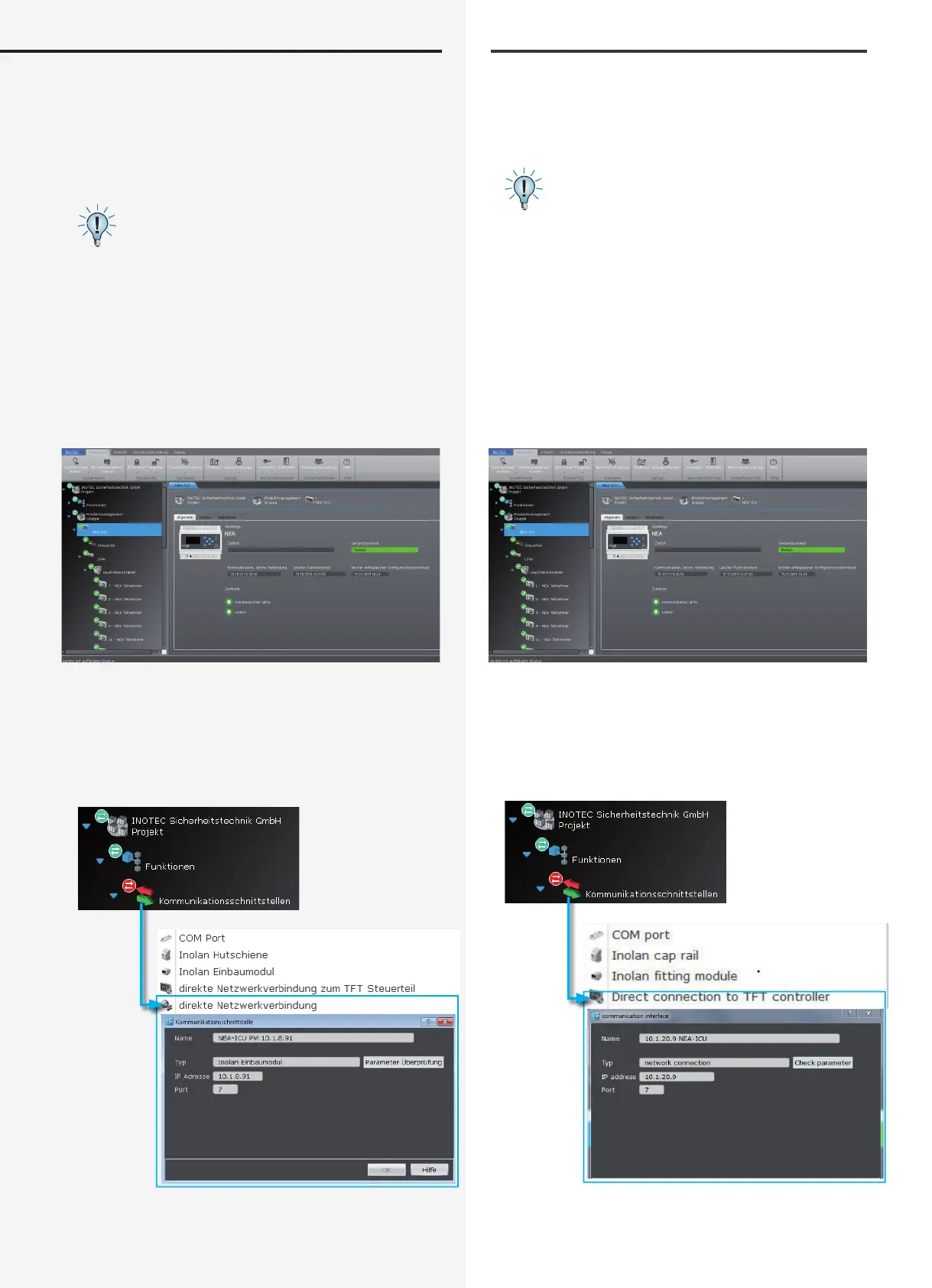
Sofern der NEA - ICU an die INOView angebunden wird,
ist die Kommunikationsschnittstelle „direkte Netzwerk-
verbindung“ über das Kontextmenü zu wählen. Nach
Eingabe der entsprechenden IP Adresse und Prüfung
der korrekten Parameter, steht diese Schnittstelle zur
aktiven Anbindung an den Controller zur Verfügung.
the controller. A USB ash memory is not necessary for
transferring the conguration le when using this type
of programming.
For more information, please refer to the INOTEC
System Congurator Manual (art. no. 708211).
11.5. Visualisation (INOView):
INOView is a visualisation program for monitoring and
representing controller status. In the event of a failure,
INOView can help with the system fault analysis. The
software is connected through the controller’s network
interface or an optional RTG card that must be cong-
ured accordingly on “Line 3” (RTG passive).
If the NEA - ICU is connected to INOView, “Direct network
connection” must be selected as the communication
interface in the context menu. Once the appropriate IP
address has been entered, and the correct parameters
veried, this interface is available for active connection
to the controller.


 To Next Page