NEA - ICU Montage- und Betriebsanleitung
NEA - ICU Mounting and Operating Instructions
46
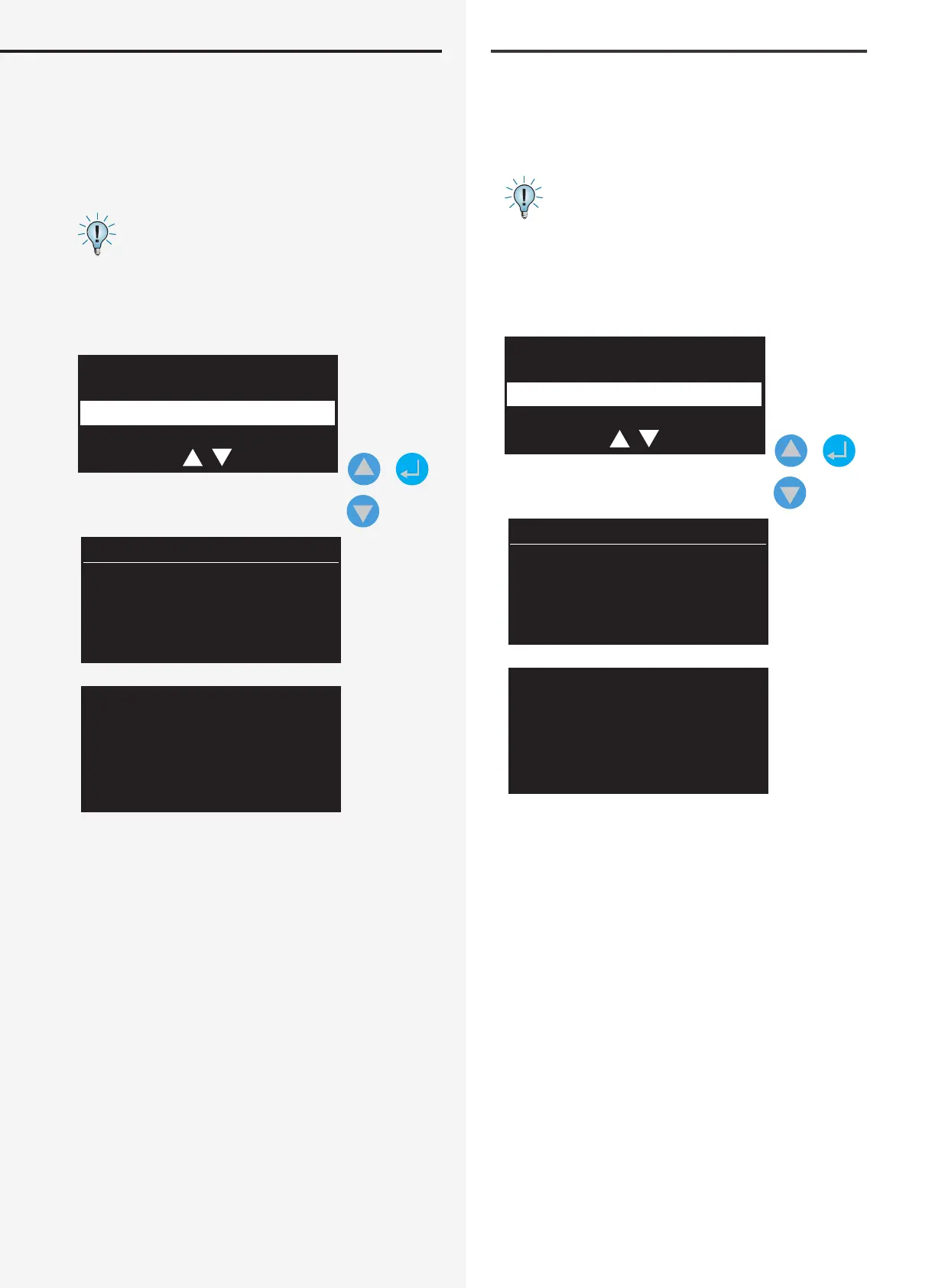
11.6.6. Save logbook entries
Select “Logbook” to save the logbook to the USB ash
memory. The name of the le you want to save is pre-
assigned and shown on the display as “LOGBOOK”. You
can use the navigation keys to change this name.
See Section 10.6.2 Folder structure
Next, you will be asked to connect the USB stick to the
controller. The le is automatically saved as a *.TXT le to
the “LOGBOOK” folder on the ash memory.
Config. save
Failure info
Logbook
+
LOGBOOK
USB stick
Connect
11.6.7. Update
The NEA - ICU can be updated to a new rmware version.
The new rmware is easily loaded onto the device using
a USB stick.
11.6.7.1. Folder structure
The Bootloader expects to nd a folder called “INOHEX”
in the USB ash memory’s path. The program le (*.hex)
with the new software version is assigned to this folder.
11.6.6. Prüfbucheinträge speichern
Um das Prüfbuch auf dem USB-Speichermedium zu
sichern, ist der Menüeintrag „Prüfbuch“ entsprechend
auszuwählen. Der Dateiname der zu speichernden Datei
ist vorgegeben und wird im Display mit „PRBUCH“ ange-
zeigt. Dieser Name kann mittels der Navigationstasten
geändert werden.
Siehe hierzu Kapitel 10.6.2 Verzeichnisstruktur
Im nächsten Schritt werden Sie aufgefordert, den USB-
Stick mit dem Controller zu verbinden. Die Datei wird
jetzt automatisch auf dem Speichermedium in dem
Verzeichnis „LOGBOOK“ als *.TXT File gespeichert.
Konfig. speichern
Störungsinfo
Prüfbuch
+
PRBUCH
USB Stick
verbinden
11.6.7. Update
Mittels einem Softwareupdate ist es möglich, das NEA -
ICU mit einer neuen Firmware-Version zu versorgen. Mit
einem USB-Stick kann die neue Firmware einfach auf das
Gerät geladen werden.
11.6.7.1. Verzeichnisstruktur
Der Bootloader erwartet in dem Laufwerkspfad des
USB-Speichermediums einen Ordner mit dem Verzeich-
nisnamen „INOHEX“. Diesem Ordner wird die Programm-
datei (*.hex) mit dem zu übertragenden Softwarestand
zugeordnet.


 To Next Page