43
NEA - ICU Montage- und Betriebsanleitung
NEA - ICU Mounting and Operating Instructions
11.6.2. File formats
File names must not exceed 8 characters. These charac-
ters must be capital letters or numbers. Special charac-
ters or umlauts are not permissible in names.
File endings:
Conguration les XXXXXXXX.CFG
Software updates XXXXXXXX.HEX
Logbooks and failure printouts XXXXXXXX.TXT
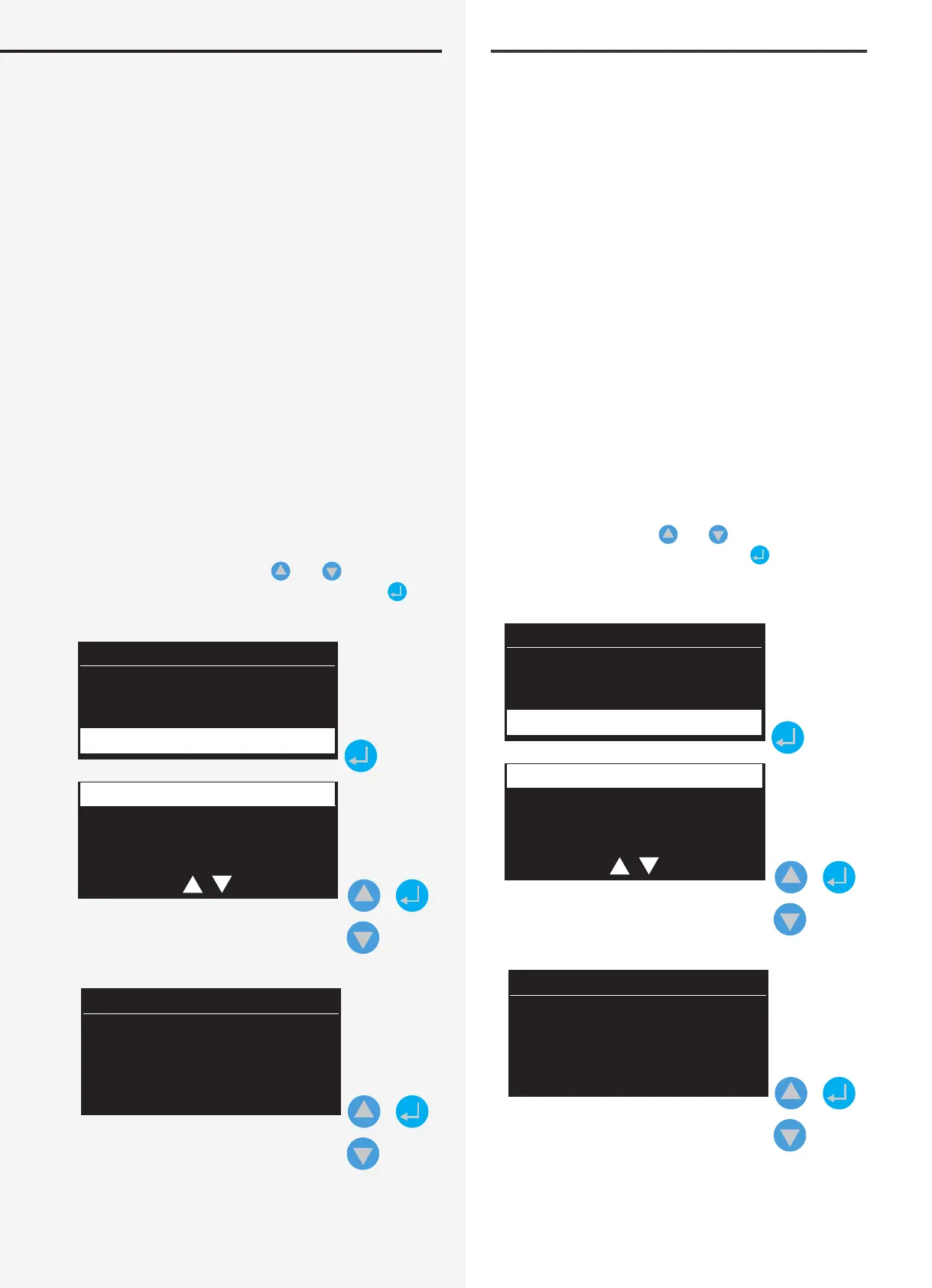
11.6.3. Load conguration
Insert the USB stick into the controller’s USB port. Select
“USB” in the menu. Conrm with the Return key to open
the sub-menu, where you can use the navigation keys to
select “Load conguration”, “Save conguration”, “Failure
information” or “Logbook”. After selecting “Load congu-
ration”, you will be taken to a menu for loading a con-
guration le from an external USB ash memory. The
status report “Connect USB stick” appears on the display.
The controller loads the conguration les (*.cfg) from
the “CONF_RD” folder on the ash memory.
Use the navigation keys
and to select the appro-
priate conguration, and conrm with . The congu-
ration is loaded and the system restarts.
Date Time
Status
NEA
USB
Open file
Save file
Failure inform.
+
*.CFG
*.CFG
+
11.6.2. Dateiformate
Die Vergabe der Dateinamen ist auf 8 Zeichen begrenzt.
Diese Zeichen dürfen lediglich aus Großbuchstaben und
Zahlen bestehen. Sonderzeichen sowie Umlaute sind für
die Bezeichnung nicht vorgesehen.
Dateiendungen:
Kongurationsdateien XXXXXXXX.CFG
Softwareupdate XXXXXXXX.HEX
Prüfbücher und Störausdrucke XXXXXXXX.TXT
11.6.3. Konguration laden
Verbinden Sie den USB Stick mit dem USB Port des Con-
trollers. Wählen Sie im Menü die Rubrik „USB“ aus. Durch
Bestätigen mit der Eingabetaste gelangen Sie in das
Untermenü, in dem mittels Navigationstasten zwischen
„Kong. laden“, „Kong. Speichern“, „Störungsinfo“ und
„Prüfbuch“ ausgewählt werden kann. Nach Auswahl
„Kong. laden“, werden Sie in ein Menü für das Laden
einer Kongurationsdatei eines externen USB Speicher-
mediums geführt. Im Display erhalten Sie die Status-
meldung „USB Stick verbinden“. Der Controller ruft aus
dem Ordner „CONF_RD“ des Speichermediums die zur
Verfügung stehenden Kongurationsdateien (*.cfg) auf.
Mittels den Navigationstasten
und ist die ent-
sprechende Konguration auszuwählen und mit zu
bestätigen. Die Konguration wird geladen, das System
neu gestartet.
Datum Uhrzeit
Status
NEA
USB
Konfig. laden
Konfig. speichern
Störungsinfo
+
*.CFG
*.CFG
+


 To Next Page