31
NEA - ICU Montage- und Betriebsanleitung
NEA - ICU Mounting and Operating Instructions
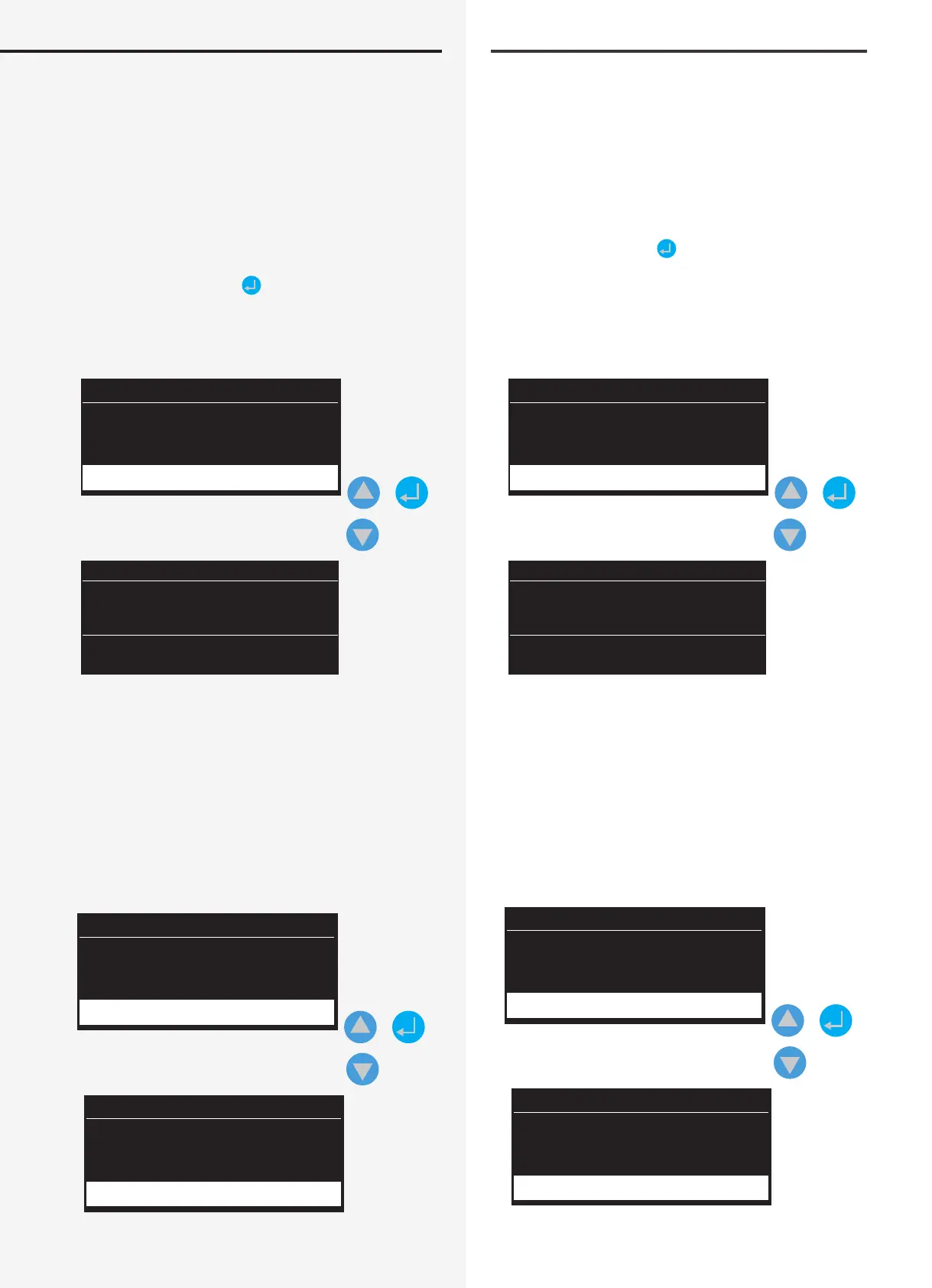
11.2.1. Failure
The system displays failures of relevant luminaire ad-
dresses detected by the controller in the “line”.
After selecting the “Information” menu by pressing the
conrmation key, the navigation keys can be used to
select the “Failure” menu. The display shows “Failure”
backed in yellow. After selecting the function by press-
ing the appropriate key
, the corresponding menu is
loaded and present failures displayed.
After loading the present failures, information can be
studied down to the level of individual luminaires.
Date Time
Information
Failure
+
Line: 1 Add. 1
Workshop
Luminaire failure
Line: 1 Add. 2
Lobby
Luminaire failure
The controller returns to the main menu when the ESC
key is pressed.
11.2.2. Controller
11.2.2.1. Software version
The software release status is stored in the “Software ver-
sion” sub-menu. Use the navigation keys to select it.
Date Time
Information
Control unit
+
NEA - ICU
V 1.0
3/2015
Software version
11.2.1. Störung
Die Störungen, die der Controller in der „Line“, an den
jeweiligen Leuchtenadressen erkannt hat, werden ange-
zeigt.
Sofern das Menü „Information“ durch die Bestätigungs-
taste gewählt wurde, kann mittels Navigationstasten
das Menü „Störung“ ausgewählt werden. Im Display
erscheint der Eintrag „Störung“, der in einem gelben
Farbmodus hinterlegt ist. Durch Anwahl dieser Funktion,
mit entsprechender Taste
, startet das gleichnamige
Menü und vorliegende Störungen werden angezeigt.
Nach Aufruf der vorliegenden Störungen können
Informationen bis hin zur Leuchtenebene eingesehen
werden.
Datum Uhrzeit
Information
Störung
+
Line: 1 Adr. 1
Werkstatt
Leuchtenstörung
Line: 1 Adr. 2
Lobby
Leuchtenstörung
Durch Betätigen der ESC Taste schaltet der Controller
wieder zurück in das Hauptmenü.
11.2.2. Steuerteil
11.2.2.1. Software Version
Im Untermenü „Software Version“ sind Informationen
zum Softwarestand hinterlegt. Dieser kann über die
Navigationstasten erreicht werden.
Datum Uhrzeit
Information
Steuerteil
+
NEA - ICU
V 1.0
3/2015
Software Version


 To Next Page