17
Connecting Your Speakers
—Continued
Connecting the Speaker Cables
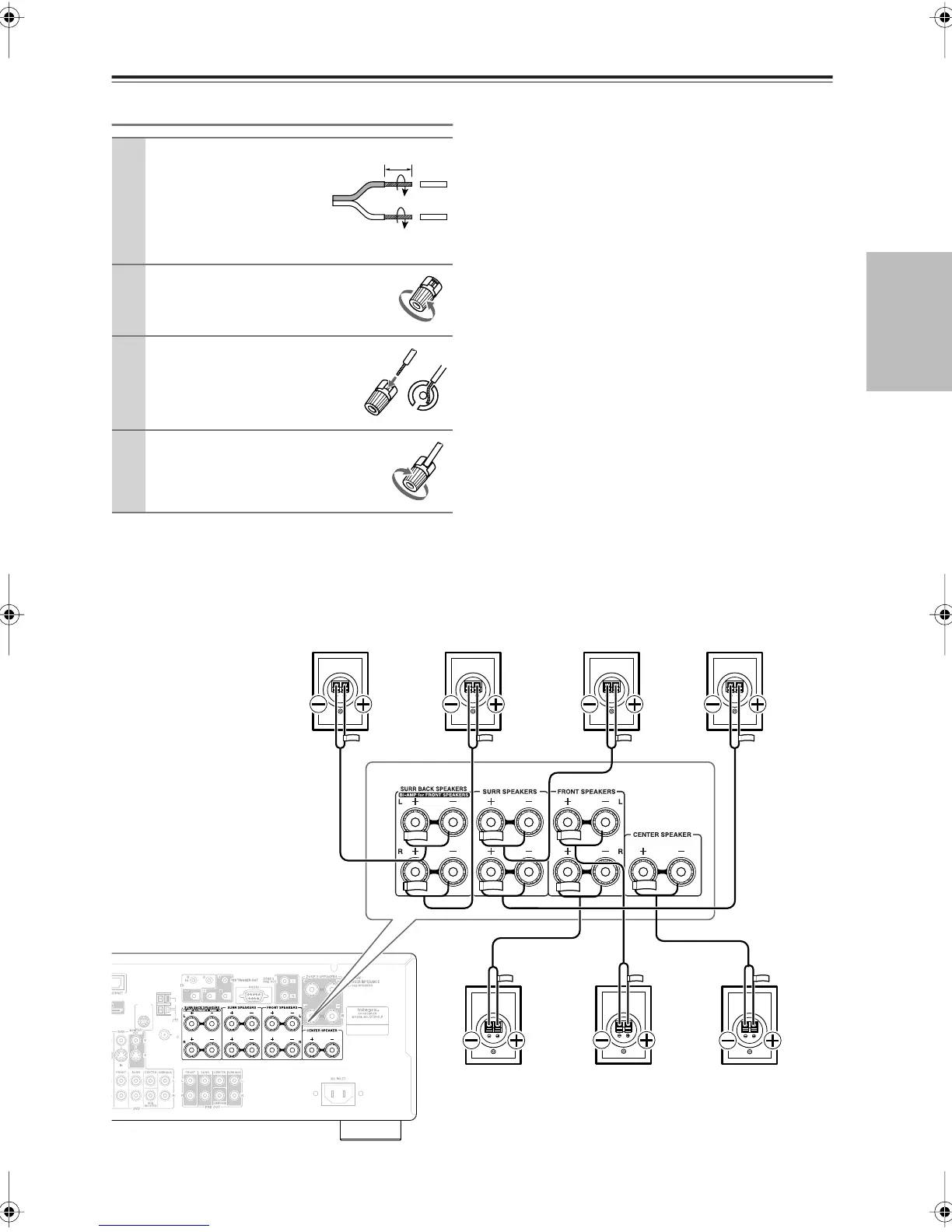
The following illustration shows which speaker should be connected to each pair of terminals.
If you’re using only one surround back speaker, connect it to the left (L) SURR BACK SPEAKERS terminals.
1
Strip about 5/8" (15
mm) of insulation from
the ends of the
speaker cables, and
twist the bare wires
tightly, as shown.
2
Unscrew the terminal.
3
Fully insert the bare wire.
4
Screw the terminal tight.
5/8" (15 mm)
ANTENNA
FM
AM
75
SIRIUS
Surround back
left speaker
Surround back
right speaker
Front left
speaker
Front right
speaker
Center
speaker
Surround right
speaker
Surround left
speaker
DTR-5.9En.book Page 17 Tuesday, April 15, 2008 9:53 AM



 To Next Page