124
Zone 2 and Zone 3
In addition to your main listening room, you can also enjoy playback in two other rooms, or as we call them, Zone 2
and Zone 3. And, you can select a different source for each room.
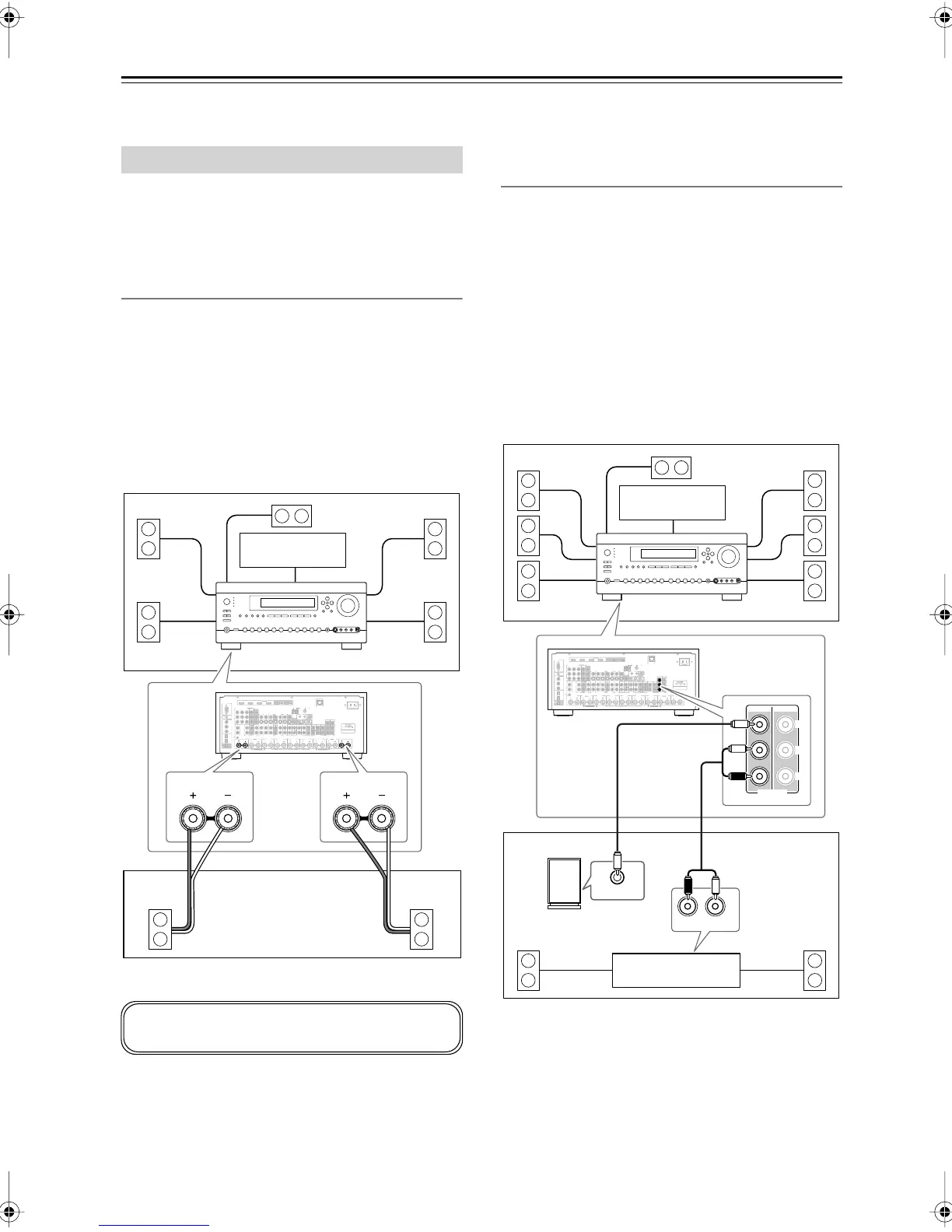
There are two ways you can connect Zone 2 speakers:
1. Connect them directly to the AV receiver.
2. Connect them to an amp in Zone 2.
Connecting Your Zone 2 Speakers Directly
to the AV receiver
This setup allows 5.1-channel playback in your main
room and 2-channel stereo playback in Zone 2, with a
different source in each room. This is called Powered
Zone 2, as the Zone 2 speakers are powered by the AV
receiver. Note that when Powered Zone 2 is turned off,
you can enjoy 7.1-channel playback in your main room.
Hookup
• Connect your Zone 2 speakers to the AV receiver’s
ZONE 2 L/R speaker terminals.
Note:
•With this setup, the Zone 2 volume is controlled by the
AV receiver.
Connecting Your Zone 2 Speakers to an
Amp in Zone 2
This setup allows 7.1-channel playback in your main lis-
tening room and 2-channel stereo playback in Zone 2,
with a different source in each room.
Hookup
• Use an RCA audio cable to connect the AV receiver’s
ZONE 2 PRE OUT L/R jacks to an analog audio input
on your Zone 2 amp.
• Use an RCA audio cable to connect the AV receiver’s
ZONE 2 PRE OUT SW jack to the line input on a
powered subwoofer in Zone 2.
• Connect your Zone 2 speakers to the speaker termi-
nals on your Zone 2 amp.
Note:
•With the default settings, the Zone 2 volume must be
set on the Zone 2 amp. If your Zone 2 amp has no vol-
ume control, set the Zone 2 Out setting to Variable so
that you can set the Zone 2 volume on the AV receiver
(see page 127).
Connecting Zone 2
FRONT L
(BTL)
FRONT R
(BTL)
V
S
MONITOR
OUT
ZONE 2
OUT
RS232
DIGITAL
COAXIAL
OPTICAL
REMOTE
CONTROL
IN 1
IN 1
IN 2
IN IN IN IN
PHONO
ZONE2 L
FRONT R FRONT LSURR R CENTER SURR L
SURR BACK R
CD TAPE AUX 1
GAME/TV
GAME/TV CBL/SAT
CBL/SAT
AUX 1 VCR/DVR
VCR/DVR DVD
DVD
GND
IN 2
IN 3
LL
RR
ASSIGNABLE
(DVD)
(CBL/SAT)
(VCR/DVR)
(GAME/TV)
(CD)
OUT
OUT
IN IN
OUT
IN IN FRONT FRONTCENTER
SUBWOOFER SUBWOOFER
CENTERSURR SURR
MULTI CH
PRE OUT
SURR BACK SURR BACK
AC INLET
Bi-AMP
SURR BACK L
Bi-AMP
ETHERNET
HDMI
IN 1IN 2IN 3IN 4
ASSIGNABLE
OUT
MAIN
OUT
SUB
ZONE2 R
AM
ANTENNA
FM75
COMPONENT VIDEO
ASSIGNABLE
IN 3
Y
C
B
/P
B
C
R
/P
R
IN 2 IN
1(DVD)
MONITOR
OUT 1
MONITOR OUT 2
/ZONE 2 OUT
V
S
ZONE 2 ZONE 3
PRE OUT
L
R
SW
AB
IR
12V TRIGGER OUT
B
OUT
C
ZONE2 R ZONE2 L
LR
Main room
TV
Zone 2
AV receiver
You must set the Powered Zone 2 setting to Act
(Activated) to use this setup (see page 126).
FRONT L
(BTL)
FRONT R
(BTL)
V
S
MONITOR
OUT
ZONE 2
OUT
RS232
DIGITAL
COAXIAL
OPTICAL
REMOTE
CONTROL
IN 1
IN 1
IN 2
IN IN IN IN
PHONO
ZONE2 L
FRONT R FRONT LSURR R CENTER SURR L
SURR BACK R
CD TAPE AUX 1
GAME/TV
GAME/TV CBL/SAT
CBL/SAT
AUX 1 VCR/DVR
VCR/DVR DVD
DVD
GND
IN 2
IN 3
LL
RR
ASSIGNABLE
(DVD)
(CBL/SAT)
(VCR/DVR)
(GAME/TV)
(CD)
OUT
OUT
IN IN
OUT
IN IN FRONT FRONTCENTER
SUBWOOFER SUBWOOFER
CENTERSURR SURR
MULTI CH
PRE OUT
SURR BACK SURR BACK
AC INLET
Bi-AMP
SURR BACK L
Bi-AMP
ETHERNET
HDMI
IN 1IN 2IN 3IN 4
ASSIGNABLE
OUT
MAIN
OUT
SUB
ZONE2 R
AM
ANTENNA
FM75
COMPONENT VIDEO
ASSIGNABLE
IN 3
Y
C
B
/P
B
C
R
/P
R
IN 2 IN
1(DVD)
MONITOR
OUT 1
MONITOR OUT 2
/ZONE 2 OUT
V
S
ZONE 2 ZONE 3
PRE OUT
L
R
SW
AB
IR
12V TRIGGER OUT
B
OUT
C
R
L
IN
LINE INPUT
ZONE 2 ZONE 3
PRE OUT
L
R
SW
Main room
Zone 2
Receiver/
integrated amp
AV receiver
Powered
subwoofer
TV
DTR-8.8En.book Page 124 Friday, February 15, 2008 1:17 PM



 To Next Page