62
Playing Your AV Components
Basic AV Receiver Operation
3
1
+
-
On Standby
TV
Input
TV CH
TV VOL
--
/
---
10 11 12
D.TUN
+10
0
Clear
123
456
789
Input Selector
VCR
/
DVR CBL
/
SAT
DVD
Tape
Tuner
CD
Phono Net/USB
Game
/
TV
Macro
123
VCRDVD
CDR/MD/Dock
CD
Zone
2
Remote Mode
Dimmer
Tape/AMP
Sleep
Receiver
TV
Net/USB
Cable
VOL
CH
Disc
Album
+
-
Enter
T
o
p
M
e
n
u
M
e
n
u
Display Muting
E
x
i
t
G
u
i
d
e
Prev
CH
R
e
t
u
r
n
S
e
t
u
p
SAT
Zone
3
AUX 1 AUX 2
3
1
1
1
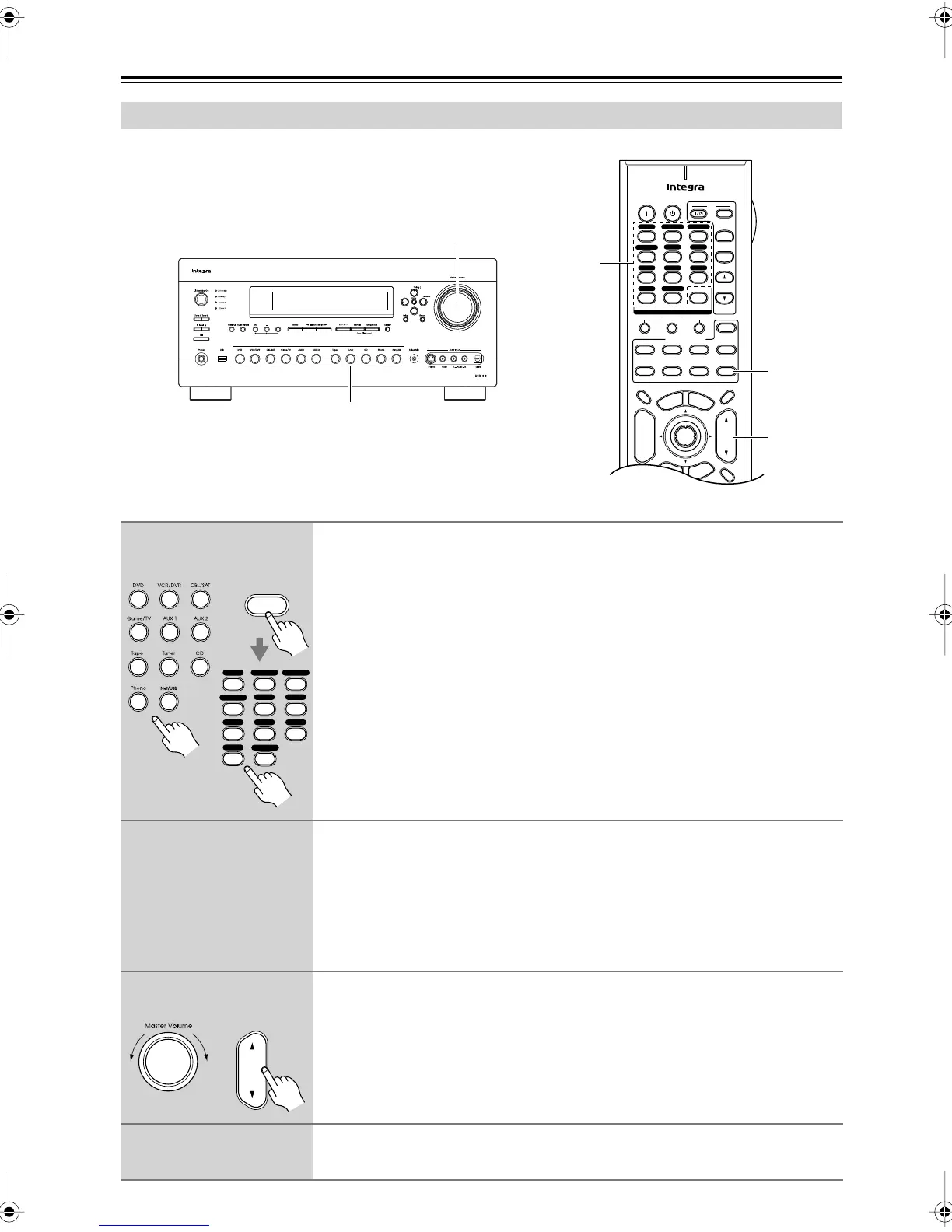
Use the AV receiver’s input selector buttons to select an input source.
To select an input source with the remote controller, press its [Receiver]
Remote Mode button, and then use its Input Selector buttons.
Press the [Net/USB] button repeatedly to select Server, USB, or Internet radio.
2
Start playback on the source component.
To watch a DVD or other video source, on your TV, select the video input that’s con-
nected to the AV receiver’s COMPONENT VIDEO MONITOR OUT 1, COMPO-
NENT VIDEO MONITOR OUT 2/ZONE 2 OUT, HDMI OUT MAIN, HDMI OUT
SUB, or MONITOR OUT.
On some DVD players, you may need to change the digital or HDMI audio output
settings.
3
To adjust the volume, use the Master Volume control or the remote con-
troller’s [VOL] button.
Since the AV receiver is designed for home theaters, it has a wide volume range for
precise adjustment. The volume can be set to –
∞
dB, –81.5 dB, –81.0 dB through
+18.0 dB (with Volume Display setting on page 111 set to Relative).
4
Select a listening mode and enjoy!
See “Using the Listening Modes” on page 88.
Receiver
+10
123
456
789
VCR
/
DVR CBL
/
SAT
DVD
Tape
Tuner
CD
Phono
Game
/
TV
AUX 1 AUX 2
0
Net/USB
Remote
controller
AV receiver
VOL
Remote
controller
AV receiver
DTR-8.8En.book Page 62 Friday, February 15, 2008 1:17 PM



 To Next Page