40
Connecting Your Components
—Continued
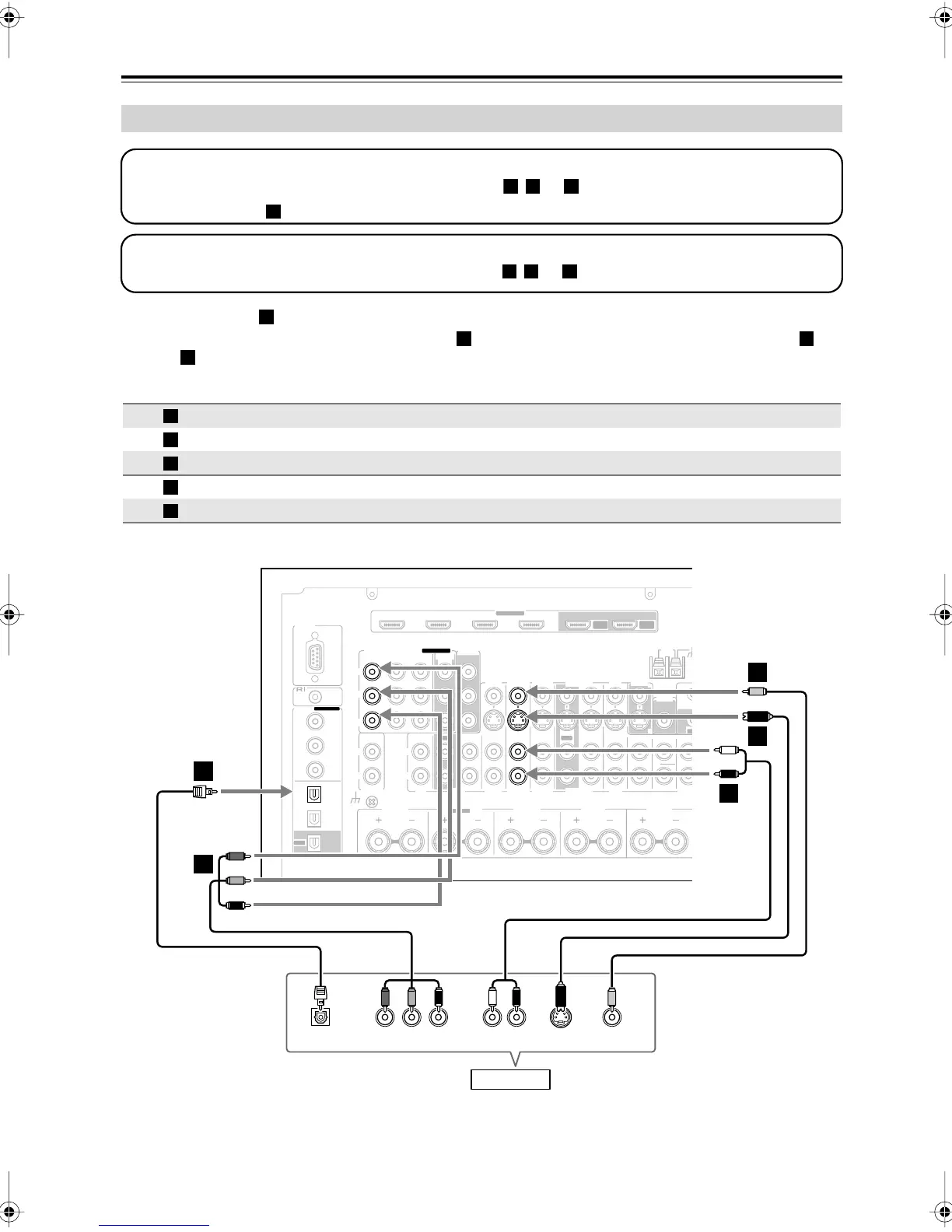
•With connection , you can listen to and record audio from your game console or listen in Zone 2 or Zone 3.
•To enjoy Dolby Digital and DTS, use connection . (To record or listen in Zone 2 or Zone 3 as well, use
and .)
Connecting a Game Console
Connection AV receiver Signal flow Game console Picture quality
COMPONENT VIDEO IN 3
⇐
Component video output
Best
GAME/TV IN S
⇐
S-Video output Better
GAME/TV IN V
⇐
Composite video output
Standard
GAME/TV IN L/R
⇐
Analog audio L/R output
DIGITAL OPTICAL IN 1
⇐
Digital coaxial output
Step 1: Video Connection
Choose a video connection that matches your game console ( , , or
), and then make the connection.
If you use connection , you must connect the AV receiver to your TV with the same type of connection.
B C
A
Step 2: Audio Connection
Choose an audio connection that matches your DVD player ( , , or ), and then make the connection.
b c
a
b a
b
A
B
C
a
b
GND
HDMI
IN 1IN 2IN 3IN 4
ASSIGNABLE
OUT
MAIN
OUT
SUB
RS232
DIGITAL
COAXIAL
OPTICAL
REMOTE
CONTROL
IN 1
IN 1
IN 2
IN IN IN IN
PHONO
CD TAPE AUX 1
GAME/TV
GAME/TV CBL/SAT
CBL/SAT
AUX 1 VCR/DVR
VCR/DVR DVD
DVD
IN 2
IN 3
LL
V
S
RR
ASSIGNABLE
(DVD)
(CBL/SAT)
(VCR/DVR)
(GAME/TV)
(CD)
OUT
COMPONENT VIDEO
ASSIGNABLE
IN 3
Y
C
B
/P
B
C
R
/P
R
IN 2 IN
1(DVD)
MONITOR
OUT 1
OUT
IN IN
OUT
IN IN FRONT FRONTCENTER
SUBWOOFER SUBWOOFER
CENTERSURR SURR
MULTI CH
PRE OUT
SURR BACK SURR BACK
AM
ANTENNA
FM75
MONITOR OUT 2
/ZONE 2 OUT
AB
IR
12V TRIGGER OUT
IN
AB
OUT
V
S
MONITOR
OUT
ZONE 2
OUT
C
ZONE2 R FRONT R FRONT LSURR R CENTER SURR L
SURR BACK R
Bi-AMP
YPB
COMPONENT VIDEO OUT
P
R S VIDEO
OUT
AUDIO
OUT
VIDEO
OUT
LR
OPTICAL
OUT
b
A
B
C
B
a
C
Game Console
DTR-8.8En.book Page 40 Friday, February 15, 2008 1:17 PM



 To Next Page