127
Zone 2 and Zone 3
—Continued
If you’ve connected your Zone 2 or Zone 3 speakers to
an amp with no volume control, set the Zone 2 Out or
Zone 3 Out setting, respectively, to Variable so that you
can set the zone’s volume, balance, and tone on the AV
receiver.
Note:
• This procedure can also be performed on the AV
receiver by using its [Setup], [Enter], and arrow but-
tons.
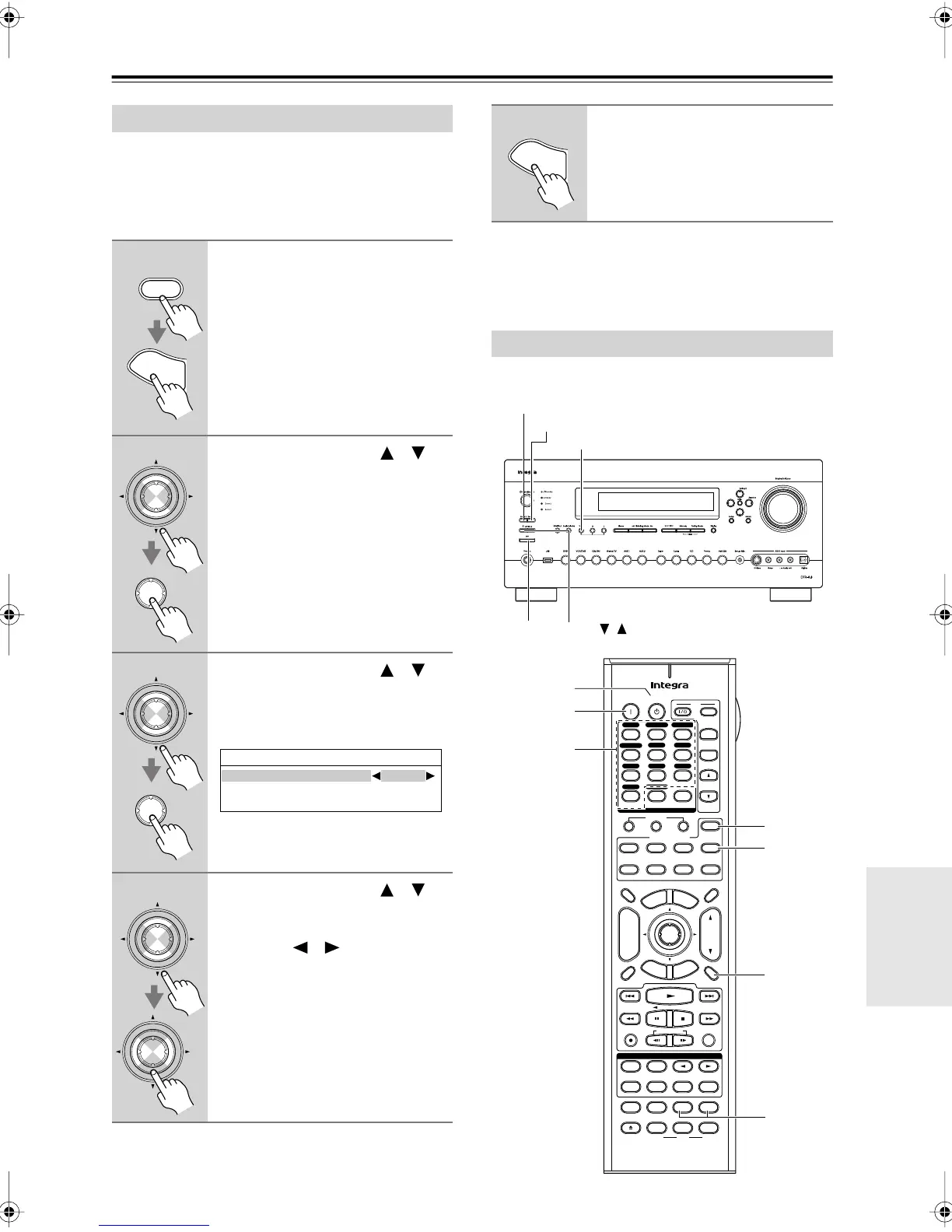
This section explains how to use Zone 2 and Zone 3.
Zone 2/Zone 3 Out Settings
1
Press the [Receiver] Remote
Mode button, followed by the
[Setup] button.
The main menu appears onscreen.
2
Use the Up and Down [ ]/[ ]
buttons to select “7. Hardware
Setup,” and then press [Enter].
The Hardware Setup menu appears.
3
Use the Up and Down [ ]/[ ]
buttons to select “2. Zone 2/
Zone 3,” and then press [Enter].
The Zone 2/Zone 3 screen appears.
4
Use the Up and Down [ ]/[ ]
buttons to select “Zone 2 Out” or
“Zone 3 Out,” and use the Left
and Right [ ]/[ ] buttons to
select:
Fixed:
The Zone 2 or Zone 3 volume
must be set on the amp in that
zone.
Variable:
The Zone 2 or Zone 3 vol-
ume can be set on the AV
receiver.
Receiver
S
e
t
u
p
Enter
Enter
Enter
Enter
7-2.Zone2/Zone3
Powered Zone2
Not Act
Zone2 Out Fixed
Zone3 Out Fixed
Enter
Enter
5
Press the [Setup] button.
Setup closes.
Using Zone 2 and Zone 3
S
e
t
u
p
Zone 3
Zone 2
Tone
Off
Level
,
+
-
On Standby
TV
Input
TV CH
TV VOL
--
/
---
10 11 12
D.TUN
+10
0
Clear
123
456
789
Input Selector
VCR
/
DVR CBL
/
SAT
DVD
Tape
Tuner
CD
Phono Net/USB
Game
/
TV
Macro
123
VCRDVD
CDR/MD/Dock
CD
Zone
2
Remote Mode
Dimmer
Tape/AMP
Sleep
Receiver
TV
Net/USB
Cable
VOL
CH
Disc
Album
+
-
Enter
T
o
p
M
e
n
u
M
e
n
u
Display Muting
E
x
i
t
G
u
i
d
e
Prev
CH
R
e
t
u
r
n
S
e
t
u
p
RC-688M
Audio
Repeat
Play Mode
Open/Close
Listening Mode
DVD HDD
Playlist
RandomRec
Test Tone
CH Sel
Direct
Stereo
Level
+
Level
-
L Night
Audio Sel
THX All ST
Re-EQ
Subtitle
Video Off
VCR
Surround
SAT
Zone
3
AUX 1 AUX 2
Zone3
Zone2
Muting
On
Standby
Level–,
Level+
Input
Selector
DTR-8.8En.book Page 127 Friday, February 15, 2008 1:17 PM



 To Next Page