v240M – Marine Satellite Communication System
154
Administration
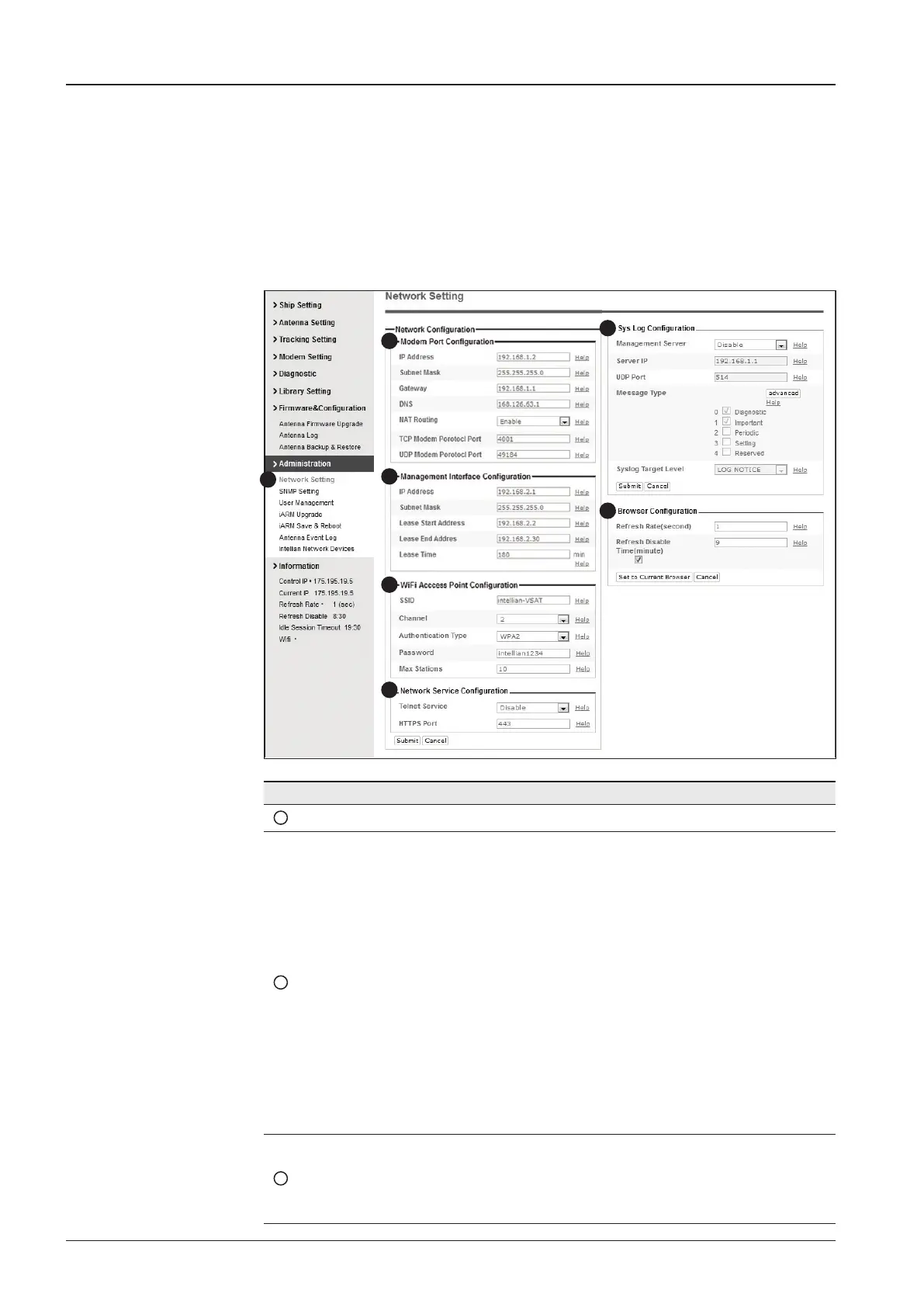
Network Setting
1
3
4
5
6
7
2
No. Item Description
1
Network Setting Enter network setting page.
2
Modem Port
Conguration
Modify the ACU’s Internal IP address and press the Submit button.
Go to the “Save & Reboot” page and press the Save & Reboot
button to validate the changes.
- IP Address : Factory default(Primary:192.168.0.223)/
(Secondary:10.10.1.1).
- Subnet Mask : Factory default(255.255.255.0).
- Gateway : Factory default(192.168.0.254).
- DNS : Current default DNS Address is assigned to.
- NAT Routing : Enable/Disable NAT routing.
- TCP Modem Protocol Port : TCP port number for modem
protocols using TCP as transport.
- UDP Modem Protocol Port : UDP port number for modem
protocols using UDP as transport.
3
Management
Interface
Conguration
Modify Management Port’s network conguration and press the
Submit button. Go to the “Save & Reboot” page and press the
Save & Reboot button to validate the changes.



 To Next Page
 Loading...










