Chapter 4 — Managing, Upgrading, and Troubleshooting the IF30
56 IF30 Fixed Reader User’s Manual
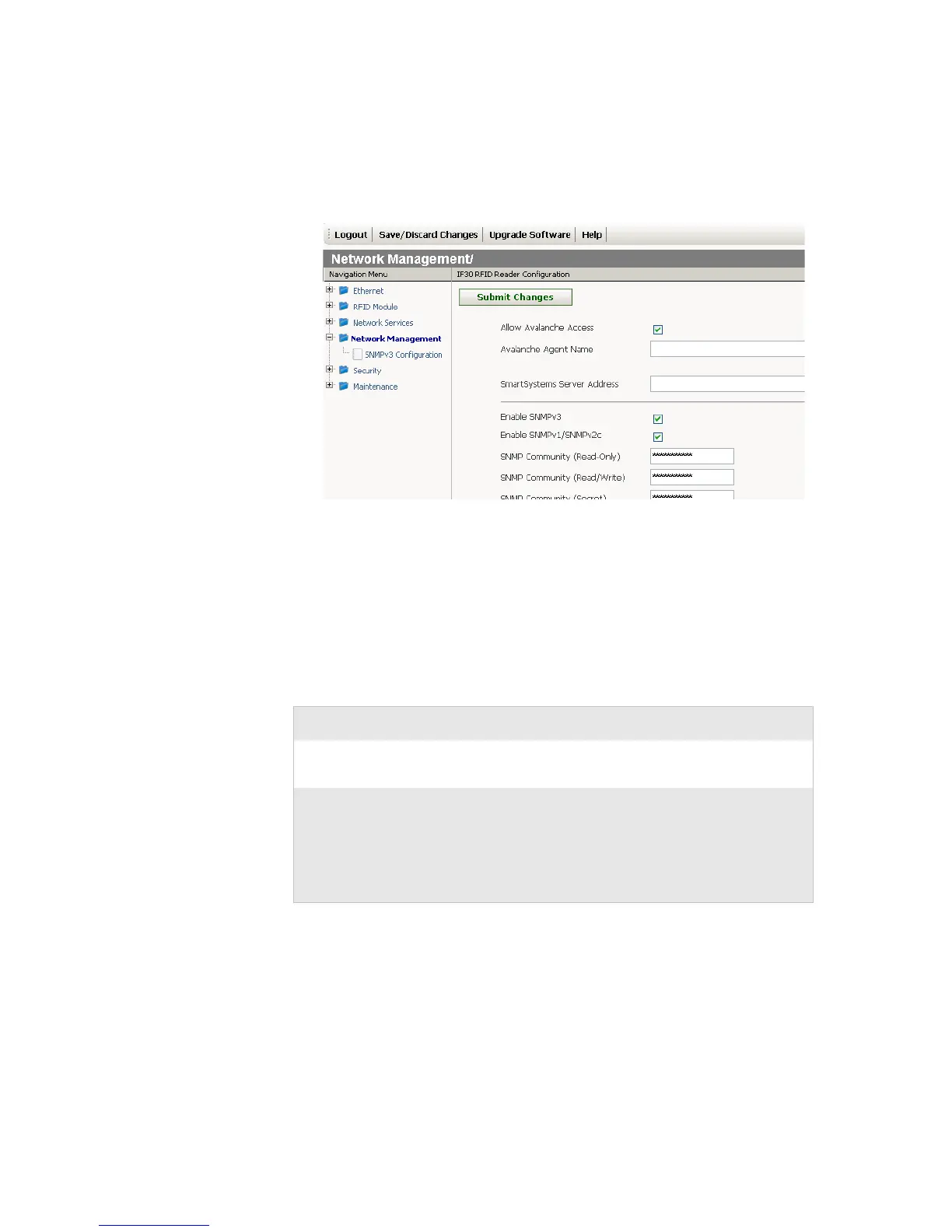
To configure the IF30 to use Avalanche
1 From the menu, click Network Management. The Network
Management screen appears.
2 Configure Avalanche settings. For help, see the next table.
3 Click Submit Changes to save your changes. To activate your
changes, from the menu bar click Save/Discard Changes,
and then click Save Changes and Reboot. For help, see
“Saving Configuration Changes” on page 15.
Wavelink Avalanche Parameter Descriptions
Parameter Description
Allow Avalanche
Access
Enables/disables the Avalanche client
management system.
Avalanche Agent
Name
Specifies the IP address or DNS name of the
Avalanche console.
Or, leave this field blank and the IF30 sends out
a broadcast request looking for any available
agent.



 To Next Page