Chapter 4 — Managing, Upgrading, and Troubleshooting the IF30
58 IF30 Fixed Reader User’s Manual
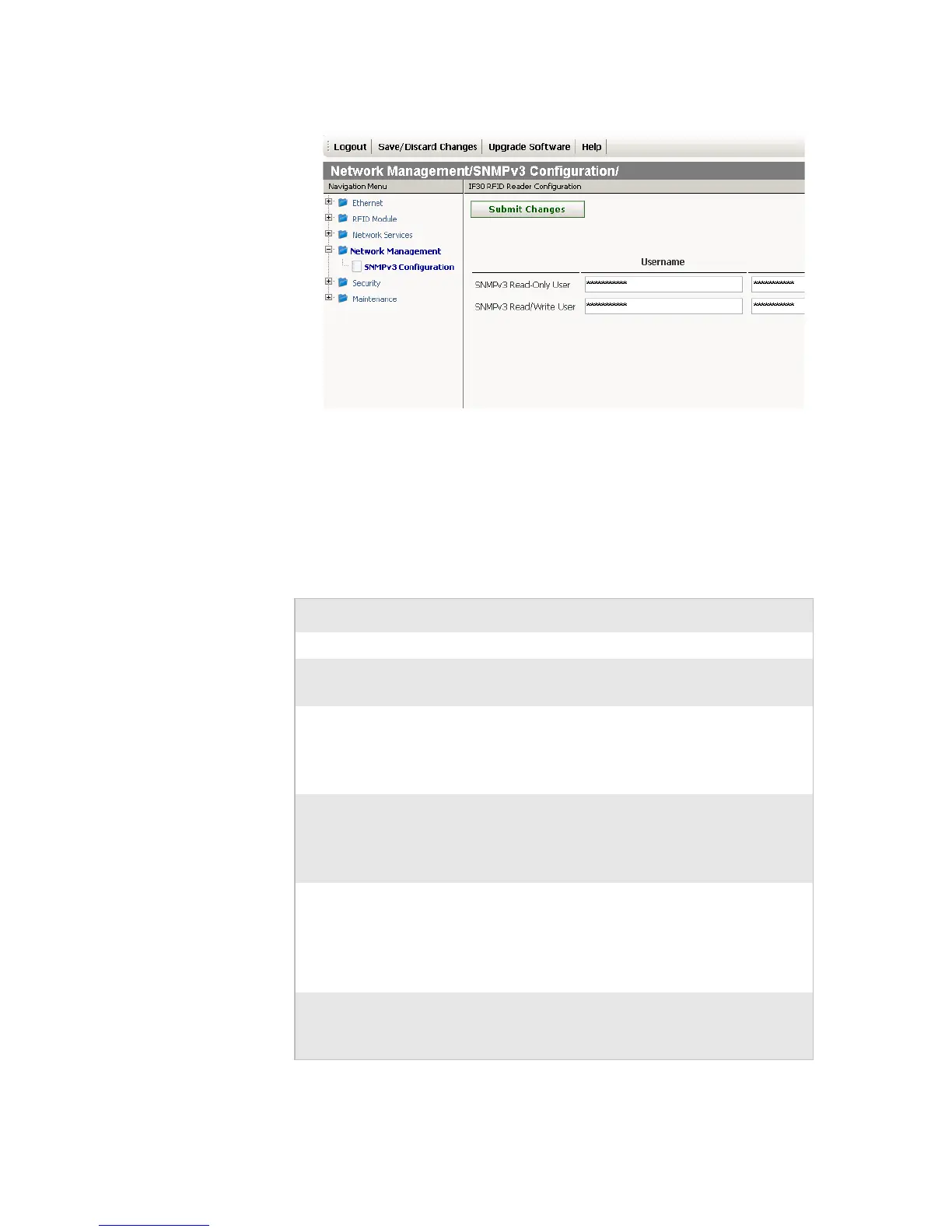
4 Change settings for SNMPv3. For help, see the next table.
5 Click Submit Changes to save your changes. To activate your
changes, from the menu bar click Save/Discard Changes,
and then click Save Changes and Reboot. For help, see
“Saving Configuration Changes” on page 15.
SNMP Community Parameter Descriptions
Parameter Description
Enable SNMPv3 Enables/disables SNMPv3.
Enables SNMPv1/
SNMPv2c
Enables/disables SNMPv1 and SNMPv2c.
SNMP Community
(Read-Only)
Specifies a password that provides read-only
access. This password can be from 1 to 15
characters and is case-sensitive. The default is
public.
SNMP Community
(Read/Write)
Specifies a password that provides read and
write access. This password can be from 1 to
15 characters and is case-sensitive. The
default is CR52401.
SNMP Community
(Secret)
Specifies a password that provides read and
write access and lets the user change the
community strings. This password can be
from 1 to 15 characters and is case-sensitive.
The default is secret.
SNMPv3 Read-Only
User
Specifies a password that provides read-only
access. This password can be from 1 to 15
characters and is case-sensitive.



 To Next Page