Chapter 4 PROGRAMMING MODE
IP-EMZ Operation Manual page 4-23
4.7 STORE NAME/ADDRESS REGISTRATION
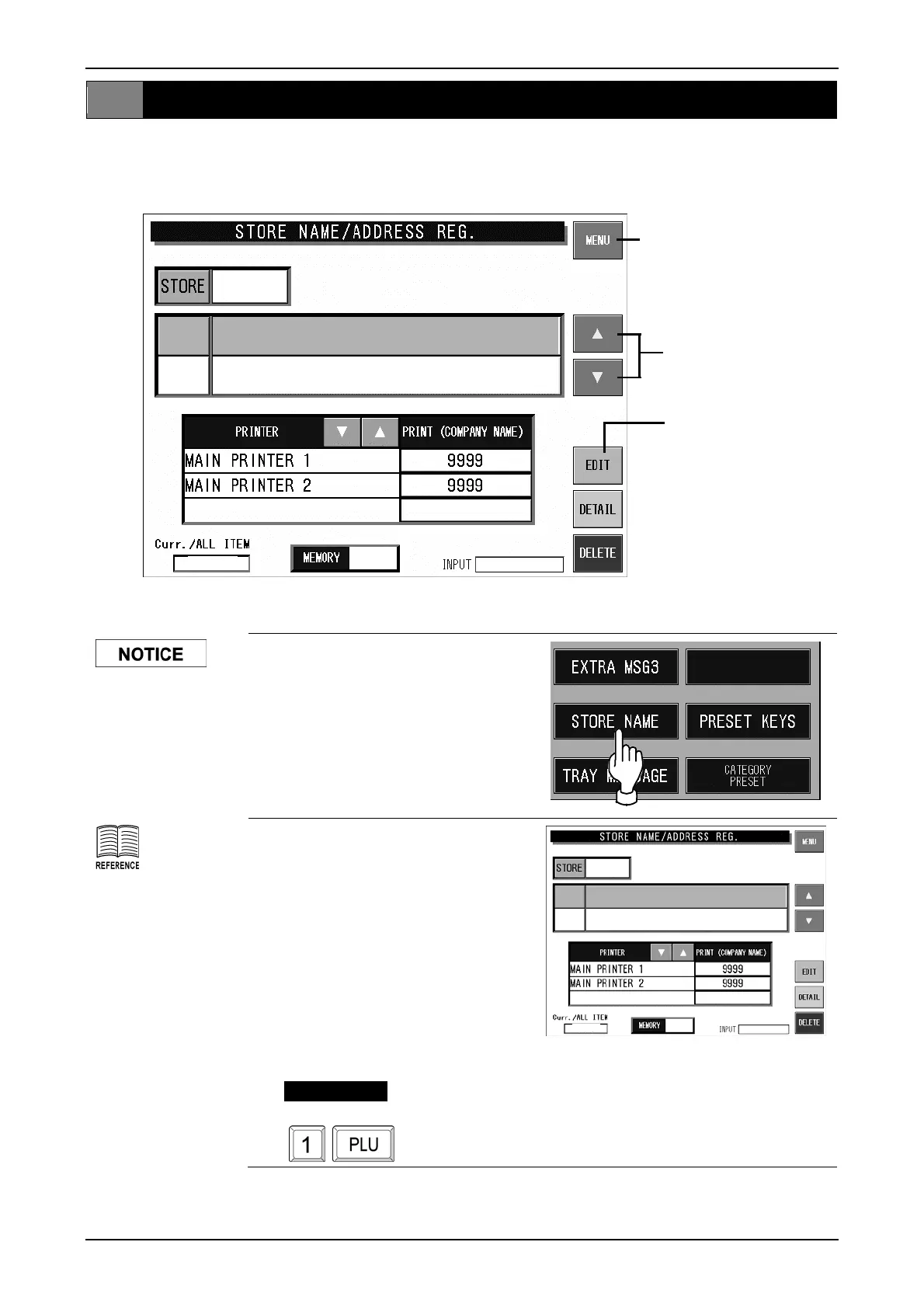
Various store names and addresses can be registered in the store name/address file. Register the
esired name and address after selecting the desired store number (1 – 9999). d
NAME ISHIDA 1
ADDRESS
SHIGA
1/1
94%
9999
Select “9999” for your
own store.
1. Press the [STORE NAME]
button on the Registration Menu
screen.
For character entry,
refer to section 4.12
“Text Editing”.
2. Store Name/Address Registration
screen for Store No.9999 is
displayed.
The [NAME] field is automatically
selected first.
When selecting a store number
other than “9999”, press [] []
to find the desired number, or
enter the store number (1 - 9999)
and press the [PLU] stroke key.
EXAMPLE
Store No. "1"
NAME SUPER ISHIDA
DDRESS
KYOTO
1/1
94%
9999
Returns to Registration Menu
screen.
Selects the store data
back and forth.
Displays the text edit
screen.



 To Next Page