Quick Reference
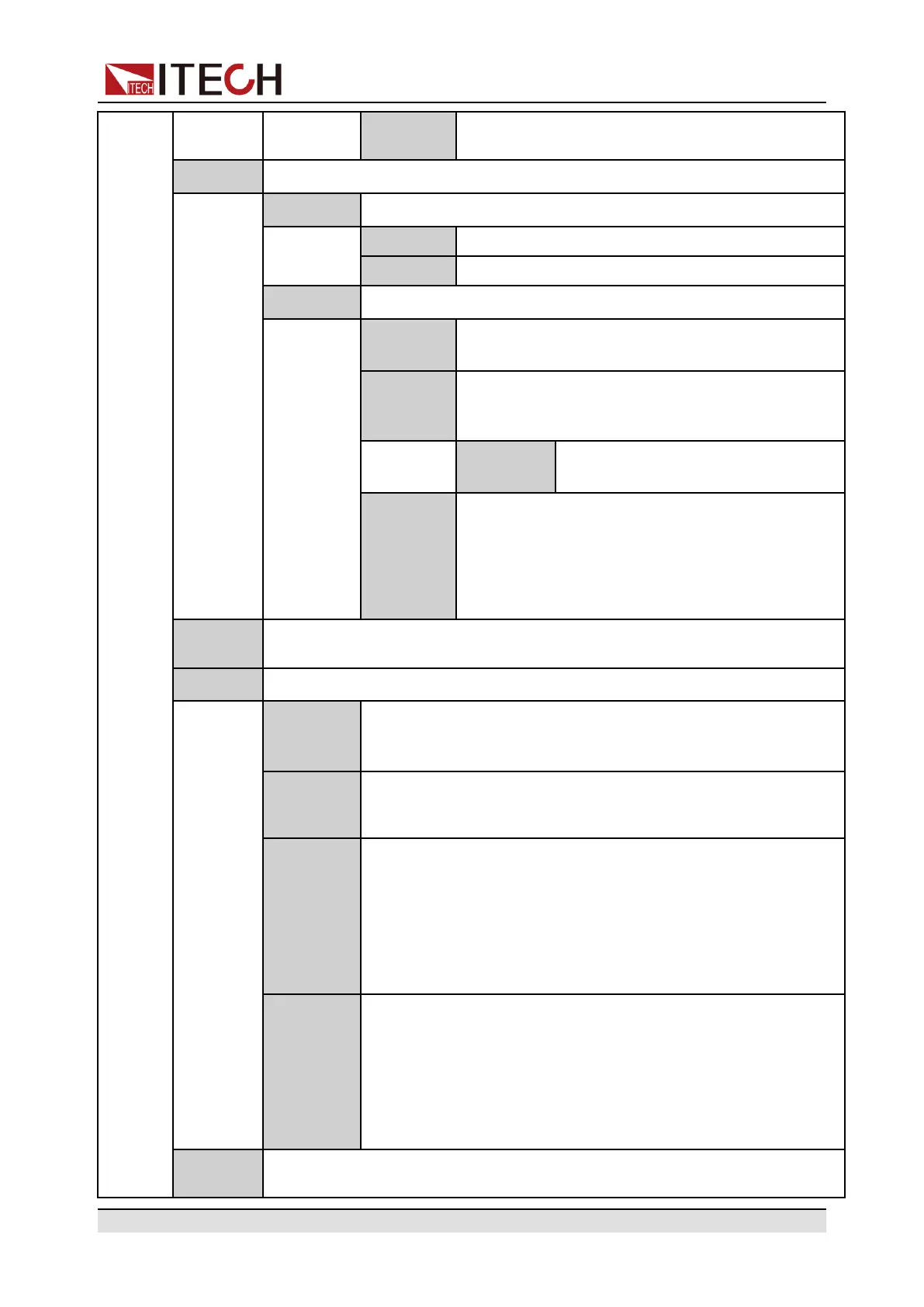
RS485
Addr
RS485 communication address. Setting range:
0~127.
Link
Set the instruments to synchronized operation mode.
Status
Set the synchronized state. Same function as the [Link] key.
Offline Disable the Link function.
Online Enable the Link function.
Mode Set the synchronized mode.
On/Off
Only
Set multiple units to output on/off and Save/Recall
synchronization.
Track Set multiple units to output on/off, Save/Recall
synchronization and voltage proportional
changing.
Reference
Set the voltage proportional relation-
ship among multiple units.
Duplicate Set multiple units to output on/off synchronization,
voltage/current setting value changing synchroni-
zation, Save/Recall synchronization, priority
mode synchronization, voltage/current rising/fall-
ing synchronization and Protect menu function
synchronization.
Chan
Number
Set channel number value: 1, 3, 5, 7, 9, 11, 13, 15.
Ext IO
Set the rear panel interface TRIG± function.
Trig Out
When the trigger source is set to Keypad or Bus and the trig-
ger happens, the TRIG± interface generates a high pulse trig-
ger signal.
Trig In
When the trigger source is set to Ext, inputting a high pulse
trigger signal through TRIG± interface can trigger the
instrument
Sync Out
By default, it is used as the indicator signal of the output state
of the instrument. Channels can be selected via submenus.
• CH1: Select channel 1.
• CH2: Select channel 2.
The On/Off light is off, the pin outputs 0V low level; the On/Off
light is on, the pin outputs 5V high level.
Sync In
Used to control the output state of the instrument. Channels
can be selected via submenus.
• CH1: Select channel 1.
• CH2: Select channel 2.
When the pin inputs 0V low level, the On/Off light is off; when
the pin inputs 5V high level, the On/Off light is on.
System
Reset
Select whether to restore the factory default settings or not.
Copyright © Itech Electronic Co., Ltd.
12





 To Next Page