42
4.4 VersiLAM - Camera Setup Tool
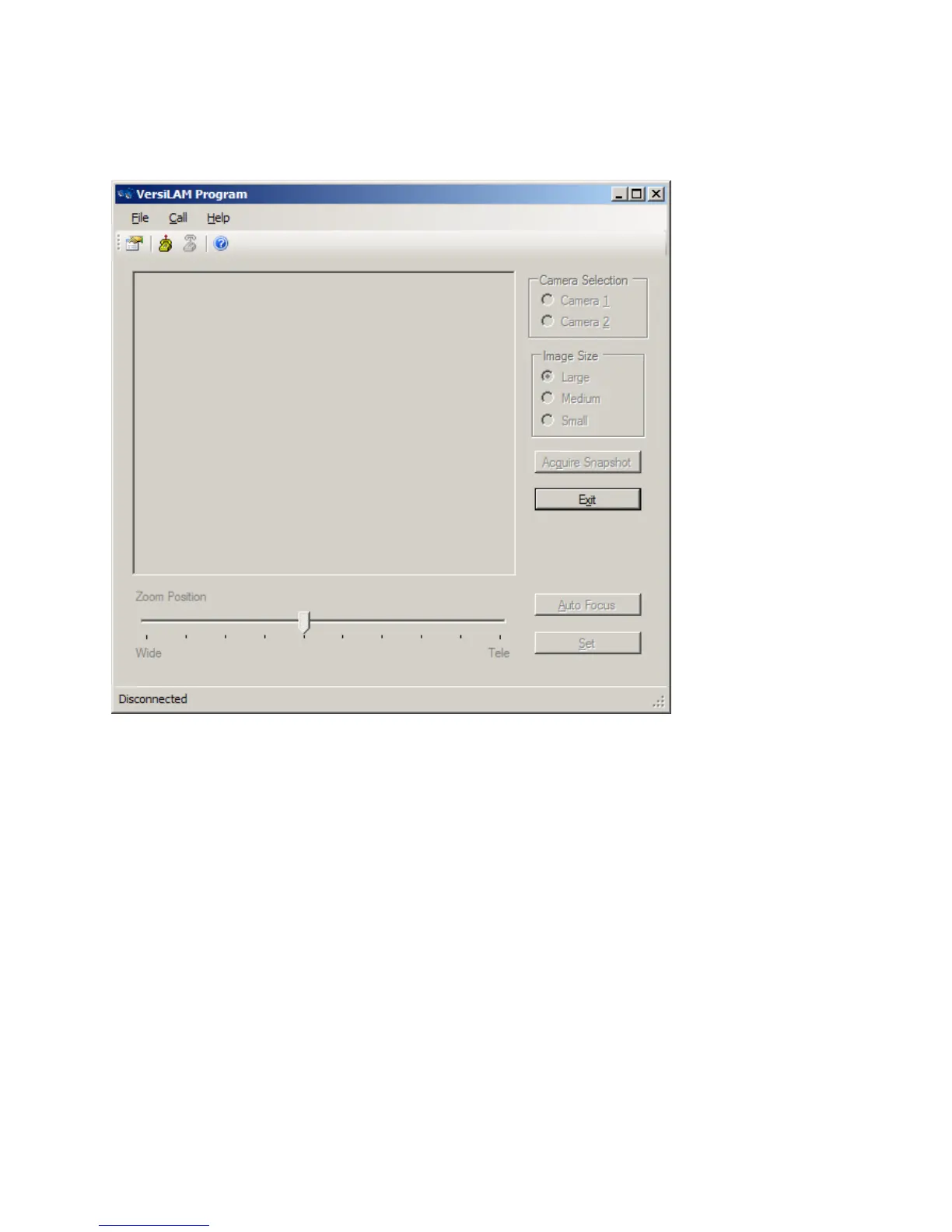
ClickontheiconfortheCameraSetupTool(VersiLAM).ThescreenisFigure4.4(a)willbedisplayed.
Figure4.4(a)
Click on the connect icon at the top of the screen. The system will identify which cameras have been
assignedtothenetwork.SelecteitherCamera1or2tostartthesetup.Thesystemwill interrogatethe
selected camera to determine the current zoom position. The current
position will be shown by the
position ofthepointeron the slider bar atthebottomofthescreen. Thereare10 steps between the
fully wide and the tele‐focused positions. Click on an image size and click on the “Acquire Snapshot”
button. Thesystem willbegintodownload
animage from theselectedcamera.Aprogress bar will be
displayed,seeFigure4.3(b).
Note:Wheneverthesystemisbusyalltheselectionoptionsandbuttonswillbe“greyedout”.


 To Next Page