Operating the Operating Panel
58
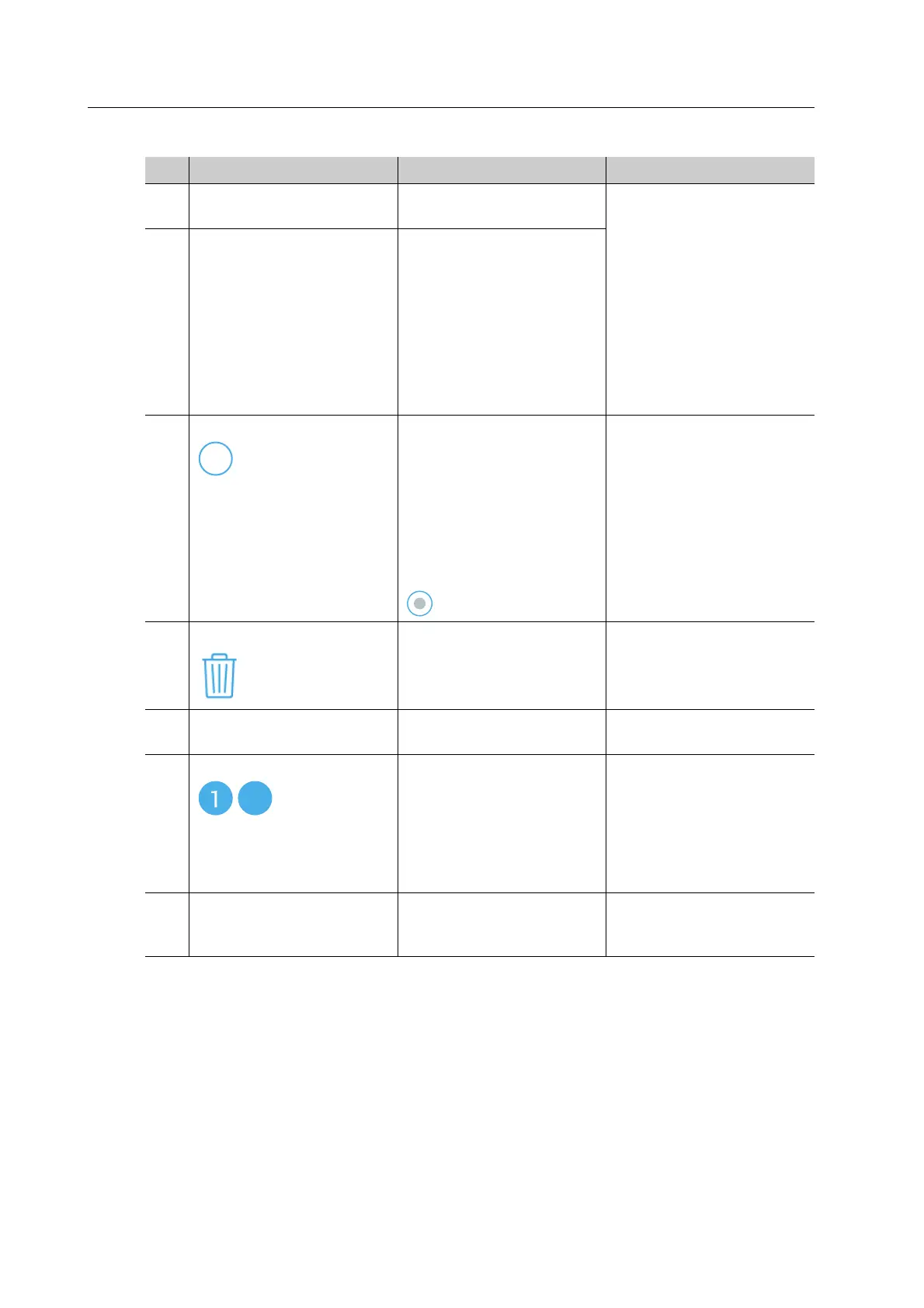
No. Element Description Reference
1 Milling job list List of all available milling
jobs
• “Preparing milling
jobs”, page 89
• “Starting several milling
jobs (Multi mode)”,
page 108
• “Deleting a not
required milling job”,
page 114
• “Starting individual
milling jobs (Single
mode)”, page 107
2 Milling job Details of the individual
milling job
3 Symbol The milling job cannot be
selected for processing (5
milling jobs have already
been selected).
If less than 5 milling jobs
have been selected (e.g.
further milling jobs can be
selected), the symbol will
change to
-
4 Symbol Delete the milling job
from the list and remove
from PrograMill One
“Deleting a not required
milling job”, page 114
5 Status of the milling job The colour of the outer
ring indicates the status
“Status of the milling job”,
page 59
6 Symbol
-
Milling job selected for
machining (max. 5 milling
jobs in the Multi mode).
The number indicates the
position of the milling job
in the processing
sequence.
• “Starting individual
milling jobs (Single
mode)”, page 107
• “Starting several milling
jobs (Multi mode)”,
page 108
7 Type of milling job The preview shows which
restoration is created with
the milling job
“Type of milling job”,
page 59
5



 To Next Page