Operating the Operating Panel
59
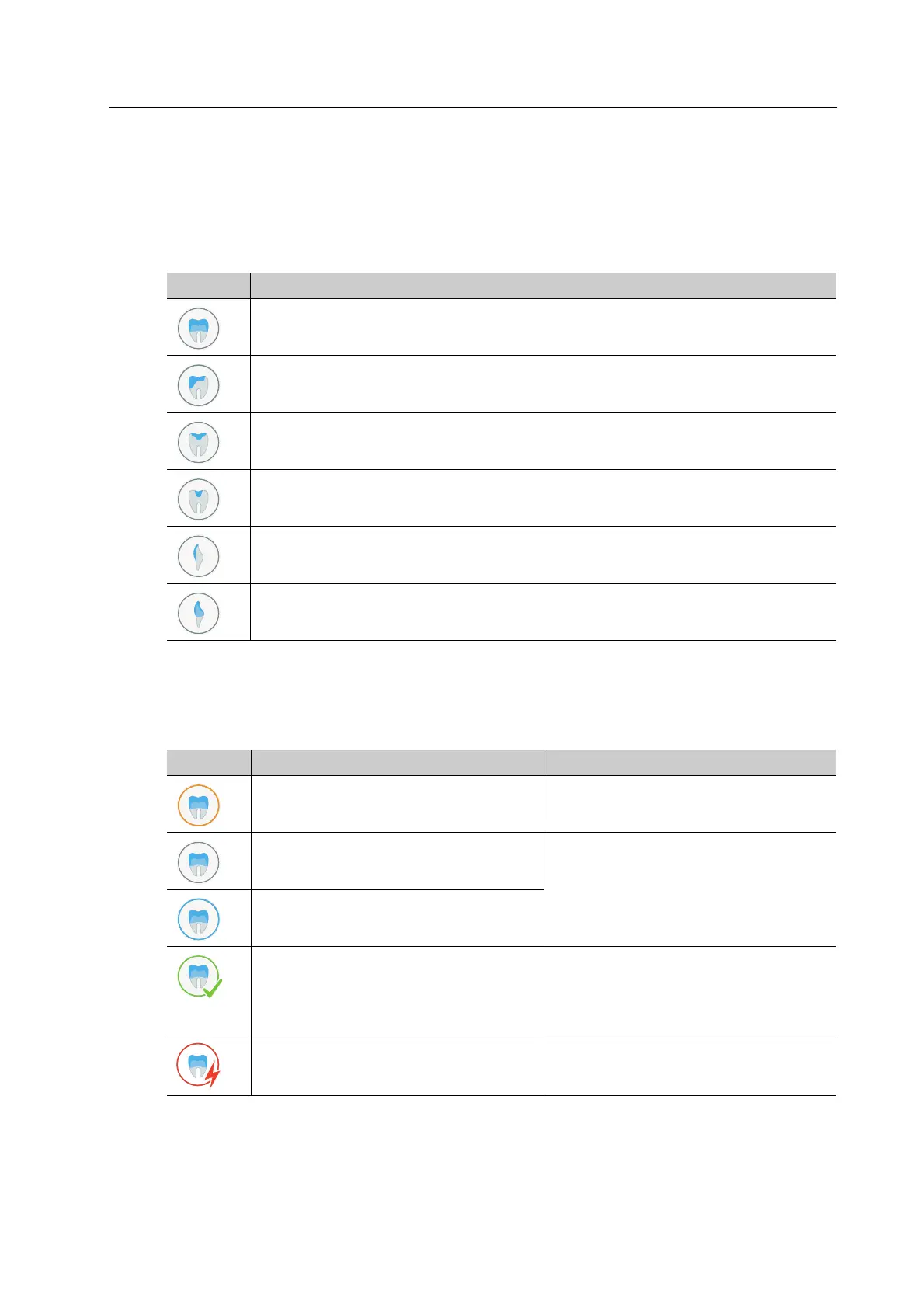
6.4.2 Type of milling job
The symbols show which type of restoration is produced with the milling job.
The list below corresponds to the state of knowledge of the device at the time of going to
print. The list will be continuously expanded with the introduction of new features.
6.4.3 Status of the milling job
The colour of the outer ring indicates the status of the milling job:
Element Description
Posterior crown
Partial posterior crown
Onlay
Inlay
Veneer
Anterior crown
Element Description Reference
Job not ready for milling: necessary
tool or block has not been inserted
• “Main menu [ToDo]”, page 66
• “Preparing milling jobs”, page 89
Job is ready for milling • “Tab [Selected]”, page 60
• “Starting individual milling jobs
(Single mode)”, page 107
• “Starting several milling jobs (Multi
mode)”, page 108
Job is being milled
Job successfully completed and ready
to unload
• “Structure of the tab [Finished]”,
page 65
• “Completing / unloading the
finished milling job”, page 112
Job error “Device Messages and Trouble-
shooting”, page 116



 To Next Page