© 2019 Jackson Labs Technologies, Inc. 55
Micro-JLT GNSS™ User Manual
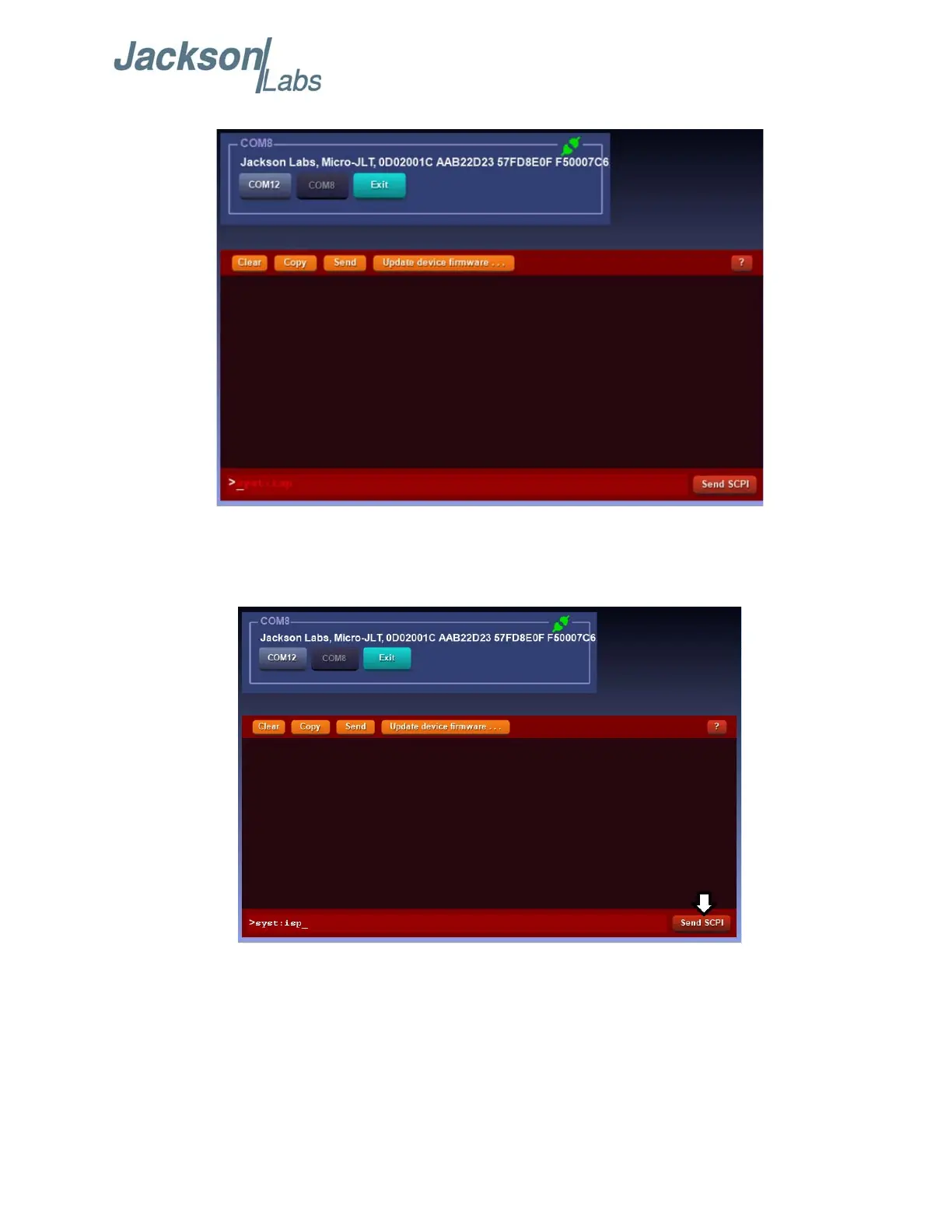
Figure 4.1 JLTerm COM port connection success
B) In the red command line, type the command “SYST:ISP” and click “Send SCPI” as shown in
Figure 4.2. This command must be sent to ensure that the unit is in ISP mode before programming
begins.
Figure 4.2 Properly Program the unit in ISP mode
It is important to put the device in ISP mode prior to conducting a firmware upgrade. Failure to send
the “SYST:ISP” command may result in programming errors such as the one shown in Figure 4.3. If
the error in Figure 4.3 occurs, power-cycle the unit and send the “SYST:ISP” command again in
JLTerm as shown in Figure 4.2. An alternative solution to this is to use Flash Magic and follow the
instructions in Section 4.4.2 .


 To Next Page