23
Configuration
LCD contrast
The preferred viewing direction for the LCD
display is from „below“. The user can adjust
the LCD contrast for the LCD display. The
contrast settimg can be changed within the
range of 10 to 50 in steps of 1.
10 = Characters very light
50 = Characters very dark
Factory setting: 20
CONF
EDIT
1
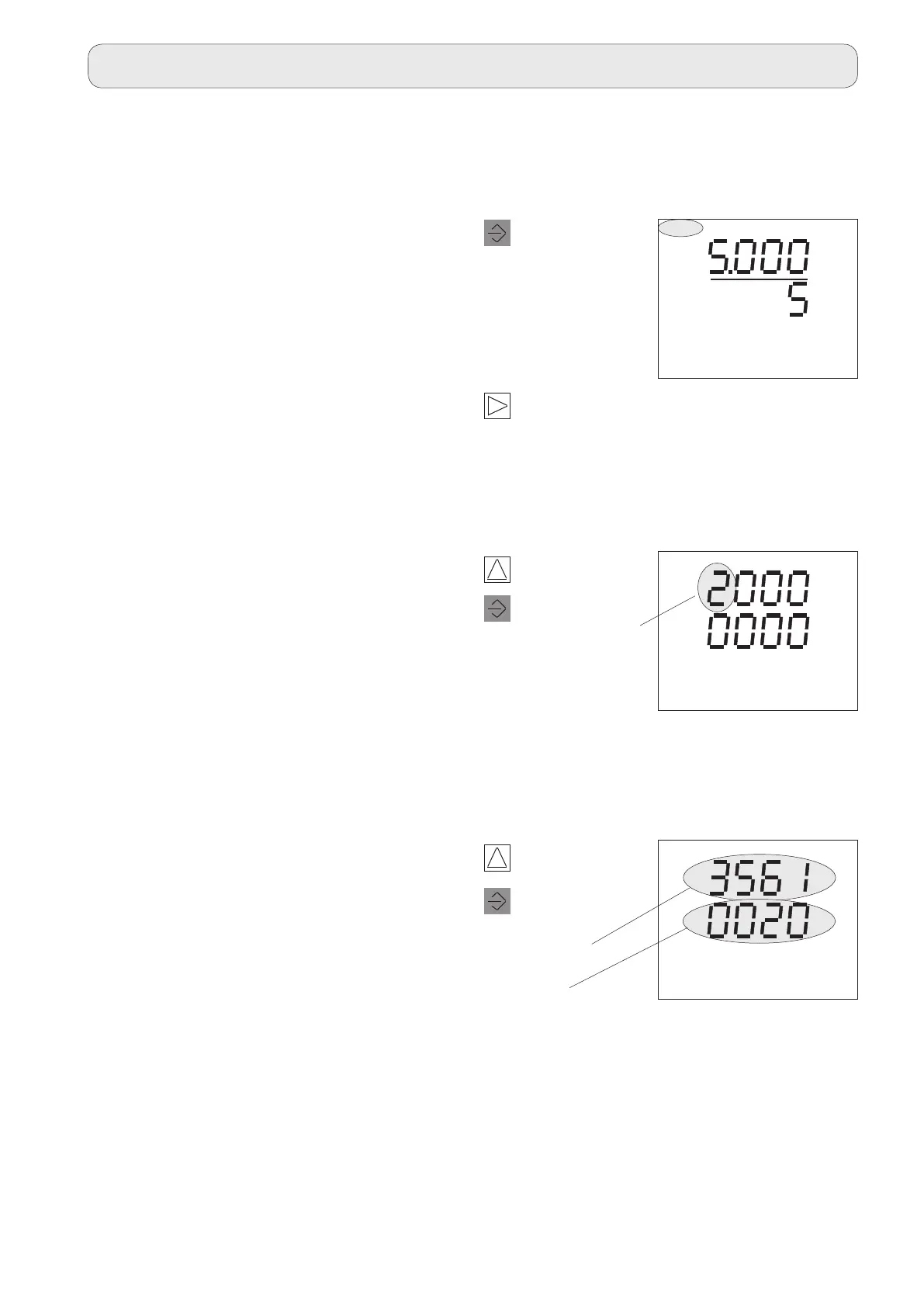
Press 2 times.
The Select text
flashes.
The current
transformer set-
ting is displayed.
1
Press once.
The first digit
flashes.
Program LCD contrast
The value for the LCD contrast is entered di-
rectly in the address 3561.
SELECT CT
CONF
A
A
2
Press once.
The Select text disappears.
The device is in Programming mode.
3
Press 9 times.
Switch to the „Free parameter input“ menu
item.
Enter the address 3561 first and then the re-
quired value.
Change digit.
3
Select digit.
1
Address
Value
CONF



 To Next Page