26
Voltage transformer
The pre-programmed voltage transformer
ratio only has to be changed if voltage trans-
formers are connected. The outer conductor
to outer conductor (L-L) voltage is given as
the secondary and primary voltage in the dis-
play of the UMG507.
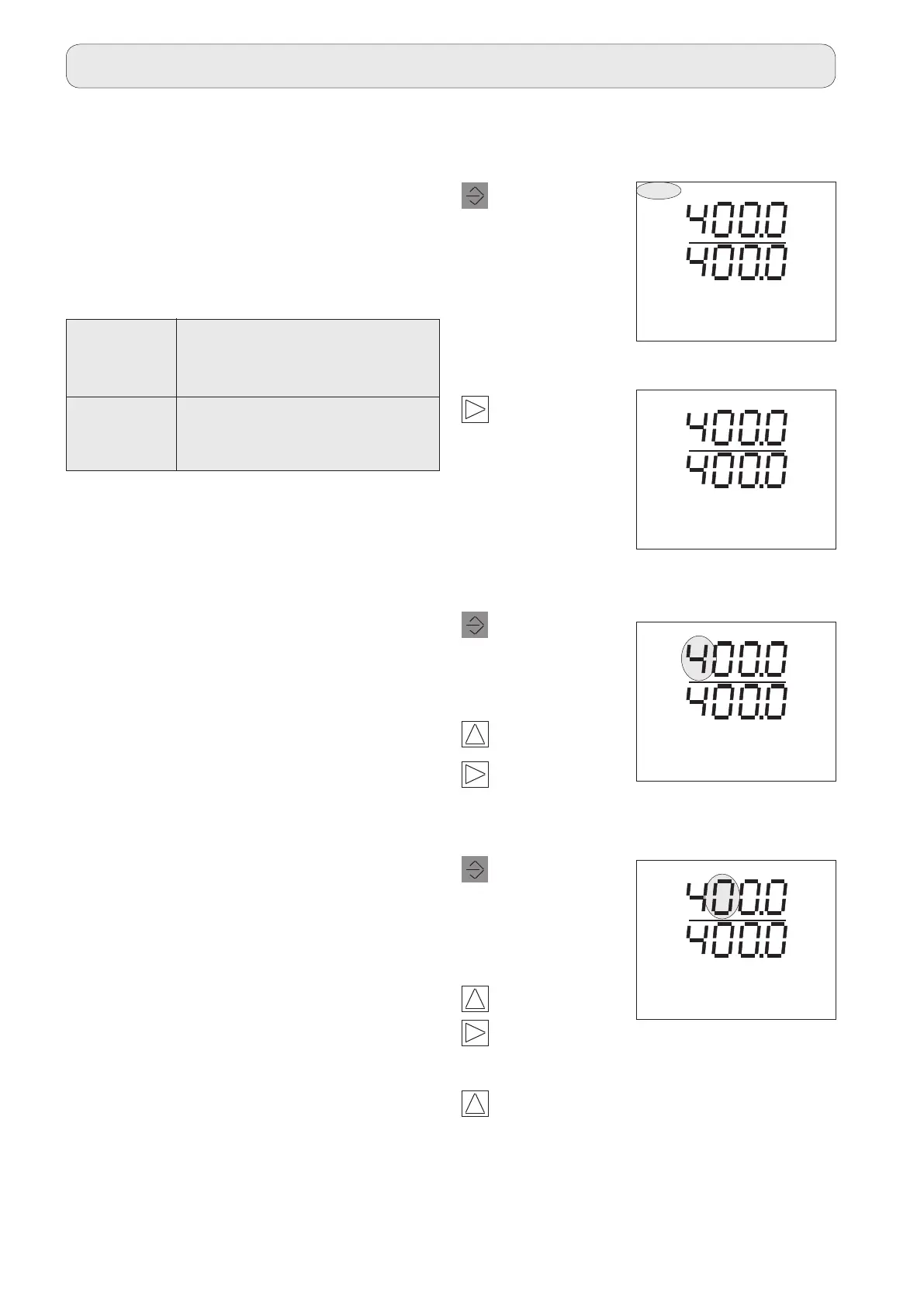
Program voltage transformer
2
1
Press 2 times.
Auswahl bestätigen.
Press once.
The Select text
flashes.
The Select text
disappears.
2
1
3
Press once.
The first digit of
the primary cur-
rent flashes.
Change digit.
Change voltage transformer setting.
1
Select the next digit.
Press once.
The second dig-
it of the primary
current flashes.
2
Change digit.
3
Move decimal
point.
Move decimal
point.
If none of the digits are flashing any more,
you can use Key 3 to switch to the voltage
transformer display.
3
SELECT VT
CONF
V
V
VT
EDIT CONF
V
V
VT
CONF
V
V
VT
EDIT CONF
V
V
Voltage
transformer Set range Preset
(L-L)
Primary 100V .. 999.9MV 400V
Secondary 100V .. 500V 400V
Configuration



 To Next Page