EVOLVE 200 USER MANUAL
11
2. Instructions for welding function
2.1 Welding mode instructions
Welding mode includes: MMA mode, TIG mode and MIG mode.
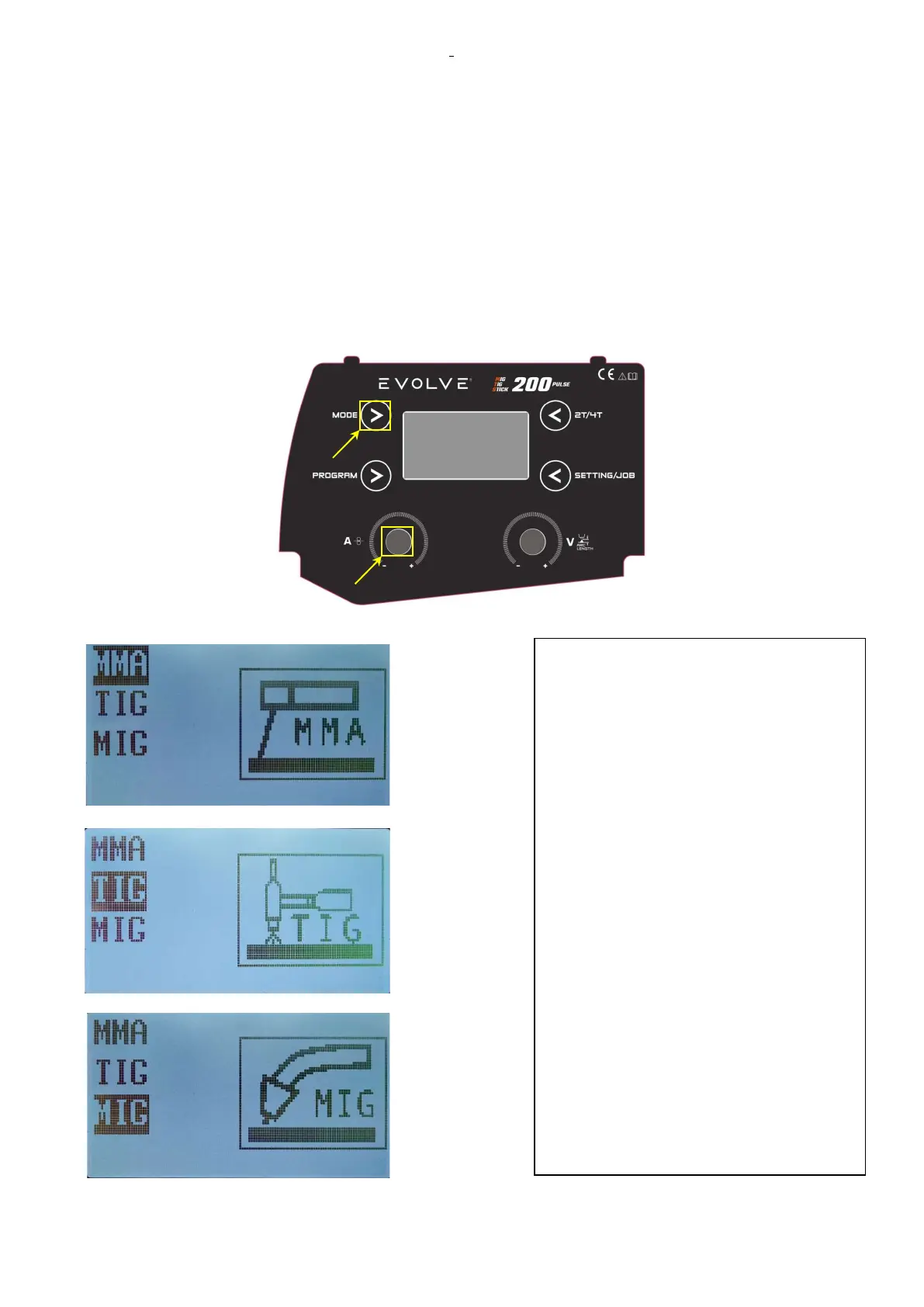
By pressing the MODE button, the work mode starts flashing. By the left knob on the front panel, it is
possible to choose between MMA to TIG or MIG mode. Turning the knob clockwise or counterclockwise
scrolls through the three selections.
Select MMA
Select TIG
Select MIG
Push the knob to confirm the selected welding mode. Press MODE button to esc without changing selection.
What explained is related to the solution for
choosing the MIG or MMA or TIG working
mode with the mode button. The simplest
solution to change the work mode is to press
the torch button for the 2T/4T you want to
use.
For example, if the machine is set in MMA
mode and the operator wants to weld in
MIG, it is sufficient that he presses the
button of the MIG torch. At that point, the
machine returns to the MIG program
previously used without requiring the
operator to perform any other operation, in
fact he will find the last setting and the last
adjustment. Same thing happens by
pressing the button of the TIG torch.
For MMA selection, on the other hand, it is
always necessary to use the mode button
also because before changing the working
mode, the generator checks whether the
output of the machine is short-circuited.










 To Next Page