EVOLVE 200 USER MANUAL
14
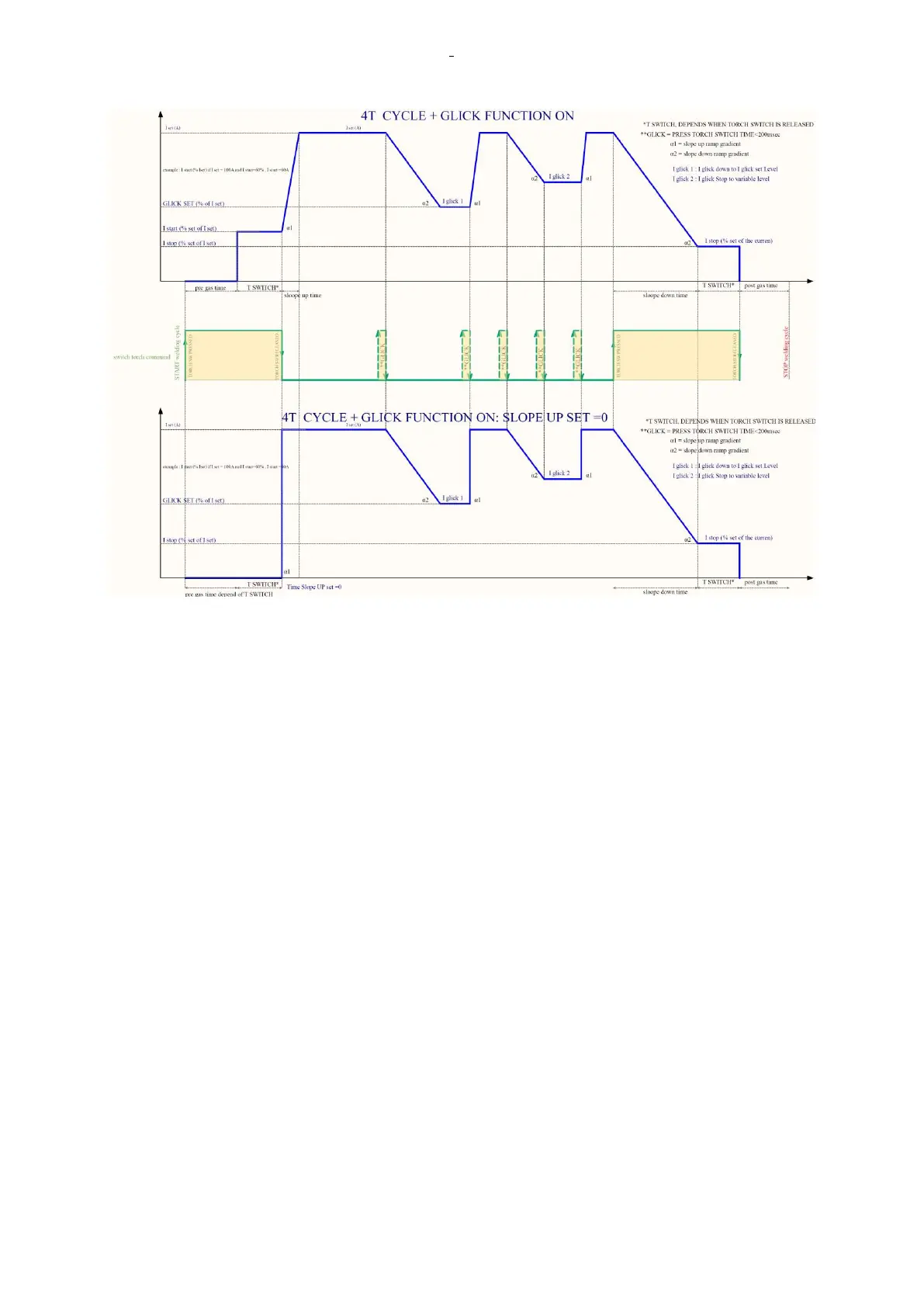
4T 2T/4T + GLICK FUNCTION ON Slope UP set to 0 (example)
2.3 Welding materials selection instructions
MMA, TIG and MIG mode all contain Welding materials, specifications and synergic select functions. Select
Welding materials and specifications by pushing the PROG button, the program will match the corresponding
welding condition automatically according to the selected welding materials and specifications.
2.4 Welding technology parameter selection instruction
MMA, TIG and MIG mode correspond to different welding technology parameters, it can be used to adjust
the welding technology of the specified mode parameters, and the welding technology menu can be
extended by pushing the SET/JOB button, rotating the encoder KNOB1/KNOB2 to choose the specified
welding parameters.
2.5 Welding storage group selection instructions
TIG and MIG mode contain functions of welding data storage group, used to store multiple sets of welding
process parameters.











 To Next Page