94
The battery is now accessible on the back of the remote.
To replace the remote on the wall bracket:
○ Hook the top of the remote back on the top of the wall bracket.
○ Push the bottom of the remote back in place. You will again hear an audible
snap as it attaches to the mount.
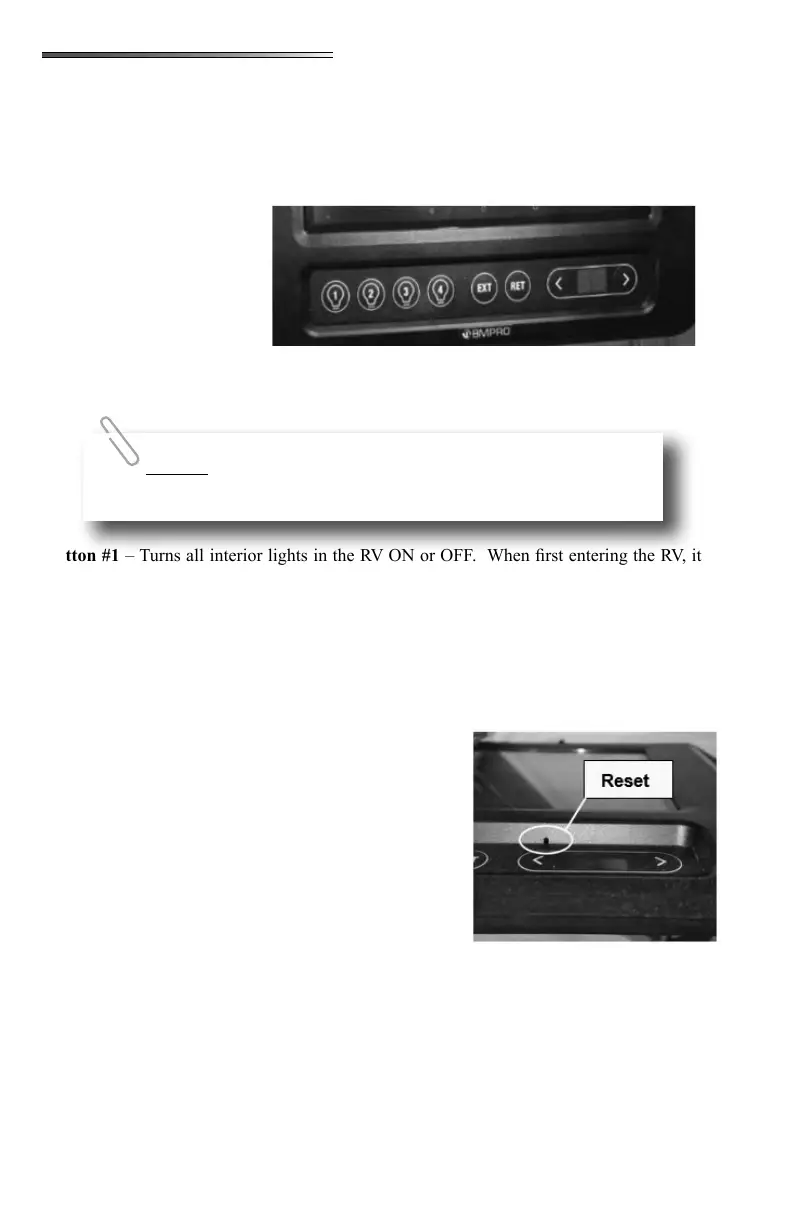
There are a row of buttons
along the bottom of the touch-
screen. These buttons control
certain pre-programmed fea-
tures and allow control of the
slideouts, awnings, lights and
water pump. In the event the
touchscreen is not working
for some reason, this Control Panel will allow manual operation of the lights, slides, awnings
and water pump separate from the touchscreen.
– Turns all interior lights in the RV ON or OFF. When rst entering the RV, it
provides a quick and easy way to turn lights on in a dark RV. Press once for ON, press again
for OFF.
– Turns all outside lights on the RV ON or OFF. This would be security lights,
awning lights, and ramp door lights (toyhauler). Does not operate the front cap LED lights.
Press once for ON, press again for OFF.
– Turns inside and outside lights ON or OFF. Press once for ON, press again
for OFF.
– Turns water pump ON or OFF. Press once
for ON, press again for OFF.
Arrow Buttons – Used to select awnings or slideouts,
used to pair your smart phone or tablet to the touchscreen
system, used in pairing the dedicated remotes, or is used
to turn the touchscreen display OFF.
- There is a small pinhole above the left
arrow on the Menu Display. This will reset the touch-
screen if you insert the end of a paperclip in the hole.
– Is used to Extend either slideouts or aw-
nings. Used in conjunction with the arrow buttons to se-
lect an awning or slideout. (also used when pairing your
smart phone or tablet to the system)
– Is used to Retract either slideouts or awnings. Used in conjuction with the
arrow buttons to select an awning or slideout. (also used when pairing wall mounted remotes
to the system)
(between arrow buttons) use the arrow keys to scroll through the following
selections:
Buttons #1through #4 are pre-programmed from the factory and
cannot be changed to perform other functions.











 To Next Page