P/N 960-000180R_Rev. 1 {EDP #233427} © 2016, JAPAN CASH MACHINE CO., LTD.
Calibration and Testing DBV® Series DBV-400 Banknote Validator Section 6
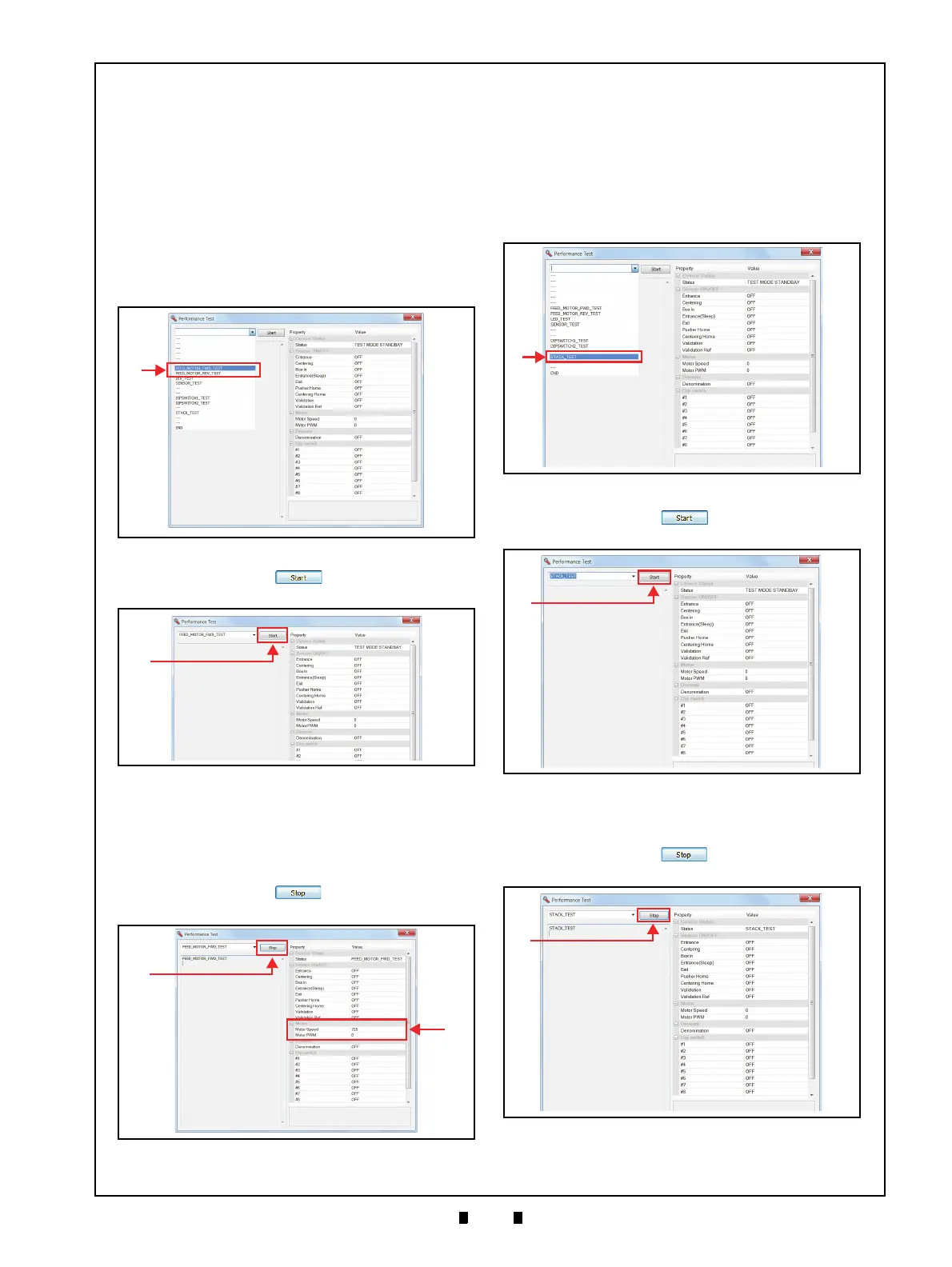
Feed Motor Test
Perform the following steps to begin the Feed
Motor Test:
1. Launch the Main Screen
(refer to “Performance Test Preparation” on
page 6-10).
2. Click the “Performance Test” Pull-down Menu,
and select the desired performance test item from
the available selections (Figure 6-48 a)
(refer to “Performance Test Items Using a PC and
Test Menu Selections” on page 6-10 for a test
item to select).
3. Click the “
Start” Screen Button (Figure
6-49 a) to begin the test.
4. Confirm that the Feed Motor rotates in the proper
direction and at an acceptable rate of speed
(within approximately 600mm/s to 800mm/s).
The measured speed will appear in the “Motor”
area (Figure 6-50 b).
5. Click the “
Stop” Screen Button (Figure
6-50 a) to end the test.
Stacking Test
Perform the following steps to begin the Stacking
Test:
1. Launch the Main Screen
(refer to “Performance Test Preparation” on
page 6-10).
2. Click the “Performance Test” Pull-down Menu
(Figure 6-51 a), and select “STACK_TEST”.
3. Click the “
Start” Screen Button (Figure
6-52 a) to begin the test.
4. Confirm that the Stacker mechanism movement is
performing a normal rotation.
5. Click the “
Stop” Screen Button (Figure
6-53 a) to end the test.
Figure 6-48 Feed Motor Test Selections
Figure 6-48 Feed Motor Test Selections
Figure 6-49 Feed Motor Test Screen 1
Figure 6-49 Feed Motor Test Screen 1
Figure 6-50 Feed Motor Test Screen 2
Figure 6-50 Feed Motor Test Screen 2
Figure 6-51 Stacking Test Selections
Figure 6-51 Stacking Test Selections
Figure 6-52 Stacking Test Screen 1
Figure 6-52 Stacking Test Screen 1
Figure 6-53 Stacking Test Screen 2
Figure 6-53 Stacking Test Screen 2



 To Next Page