About the type with 10 " NVR monitor(V16)
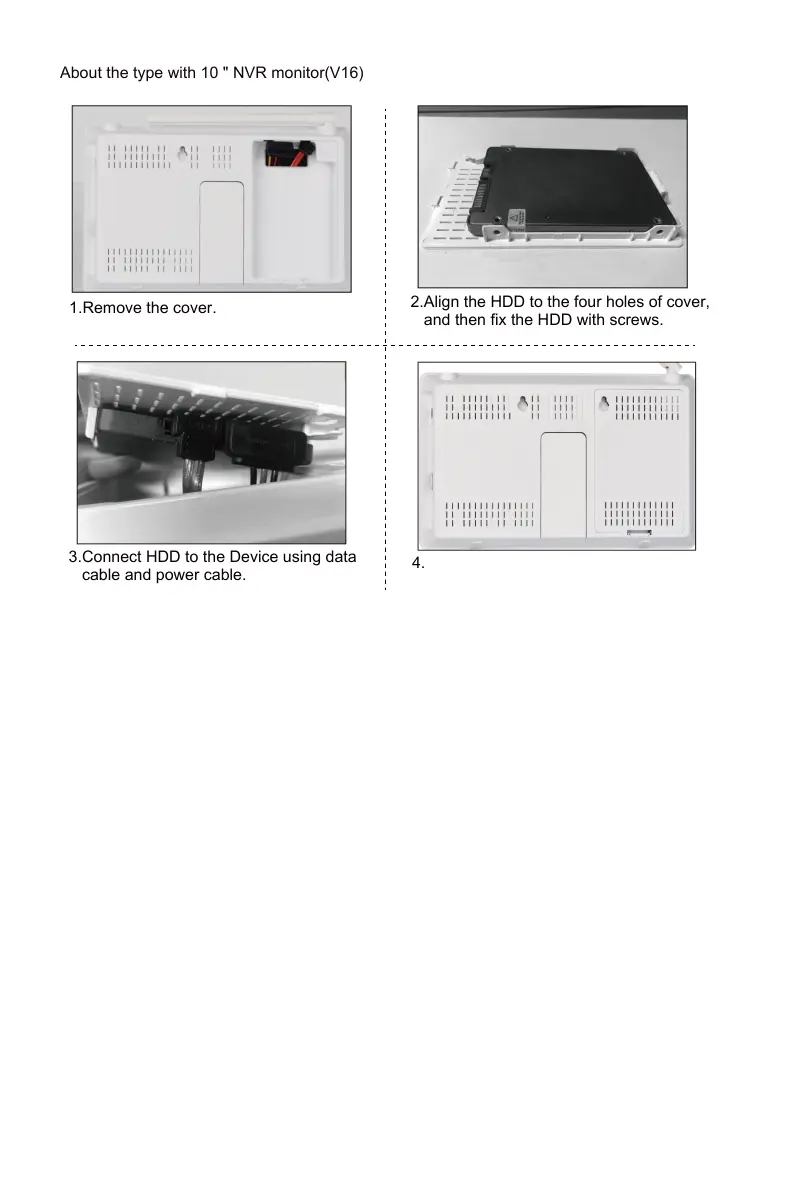
Please turn off the recorder when installing the hard disk.
4.Push the cover and fit it into the main body.
3.Connect HDD to the Device using data
cable and power cable.
2.Align the HDD to the four holes of cover,
and then fix the HDD with screws.
1.Remove the cover.
- 01 - - 02 - - 03 - - 04 - - 05 -
- 06 - - 07 - - 08 - - 09 - - 10 - - 11 - - 12 - - 13 - - 14 - - 15 -
- 16 - - 17 - - 18 - - 19 - - 20 - - 21 - - 22 - - 23 - - 24 - - 25 -
- 26 - - 27 - - 28 - - 29 - - 30 - - 31 - - 32 - - 33 - - 34 - - 35 -
- 36 - - 37 - - 38 - - 39 - - 40 - - 41 - - 42 - - 43 - - 44 - - 45 -


 To Next Page
 Loading...