radio control system
EN
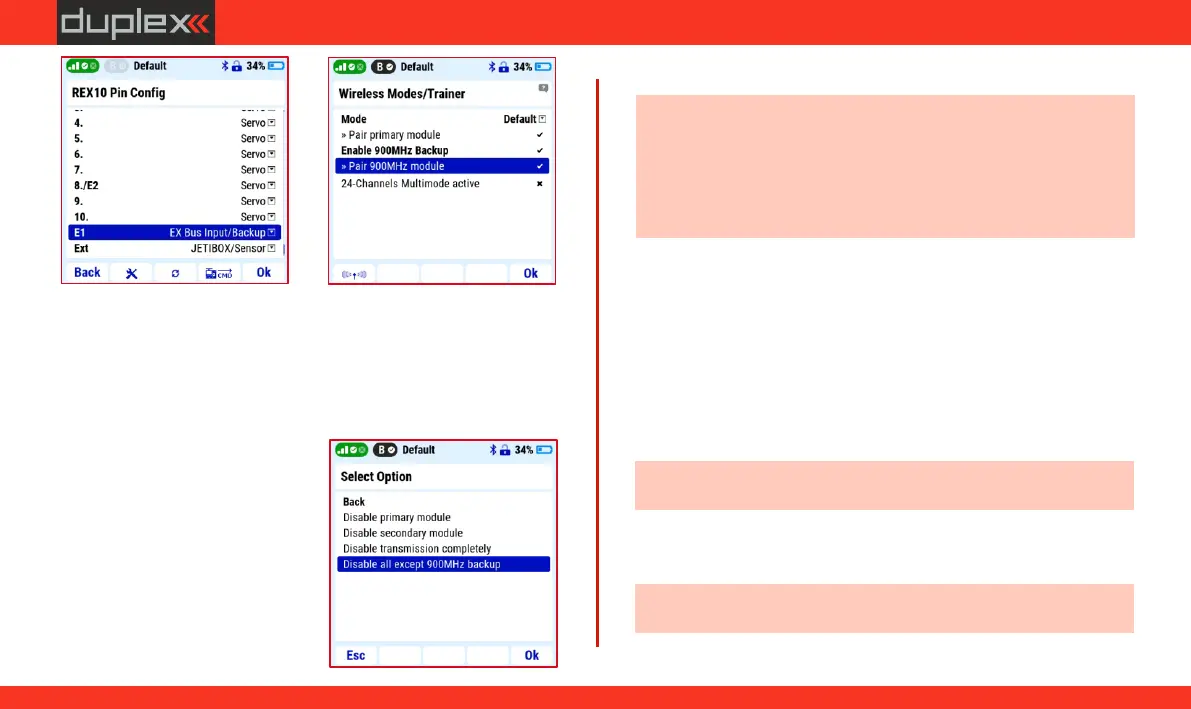
Verification of the functionality of the dual-band connection
and receiver settings
With the button "F1 (antenna icon)" in on the same screen
("Wireless Modes"), open a window with options for verifying the
functionality of individual HF modules.
1. Choose the option "Disable all
except 900MHz backup" and
confirm the choice. Data
transmission is now active only
in the 900MHz band.
2. Verify that the servos respond to
commands, i.e. that
transmission in the 900 Mhz
backup band is functional.
3. Press the "F1 (antenna icon)"
button to return to dual-band
transmission mode.
Note: every time the transmitter is switched on, it checks all HF
modules and if it detects a fault, it will not allow the receiver's servo
outputs to be activated. This means that if you disconnect the
satellite receiver for the 900MHz band, you have to also disable the
"Enable 900MHz backup" item in the transmitter "Main
menu/Advanced properties/Wireless Mode".
3.11.6 Servo setup
Menu for setting the direction (reverse) and deflections of servos,
neutrals and delay. The current deflection of the selected function is
shown in the upper part of the display, below it is the name of the
function with the number of the receiver's output channel (in
brackets).
Subtrim: center (neutral) setting of the servo.
Max. positive/negative: setting deflection of the servo at the
max./min. positions of the controller.
Note: this position may be exceeded due to mix, dual rate or trim.
Max. positive/negative limit: setting the maximum deflection of
the servo.
Note: this deflection will not be exceeded with any combination
of other function settings.
32
www.modellmarkt24.ch



 To Next Page