radio control system
EN
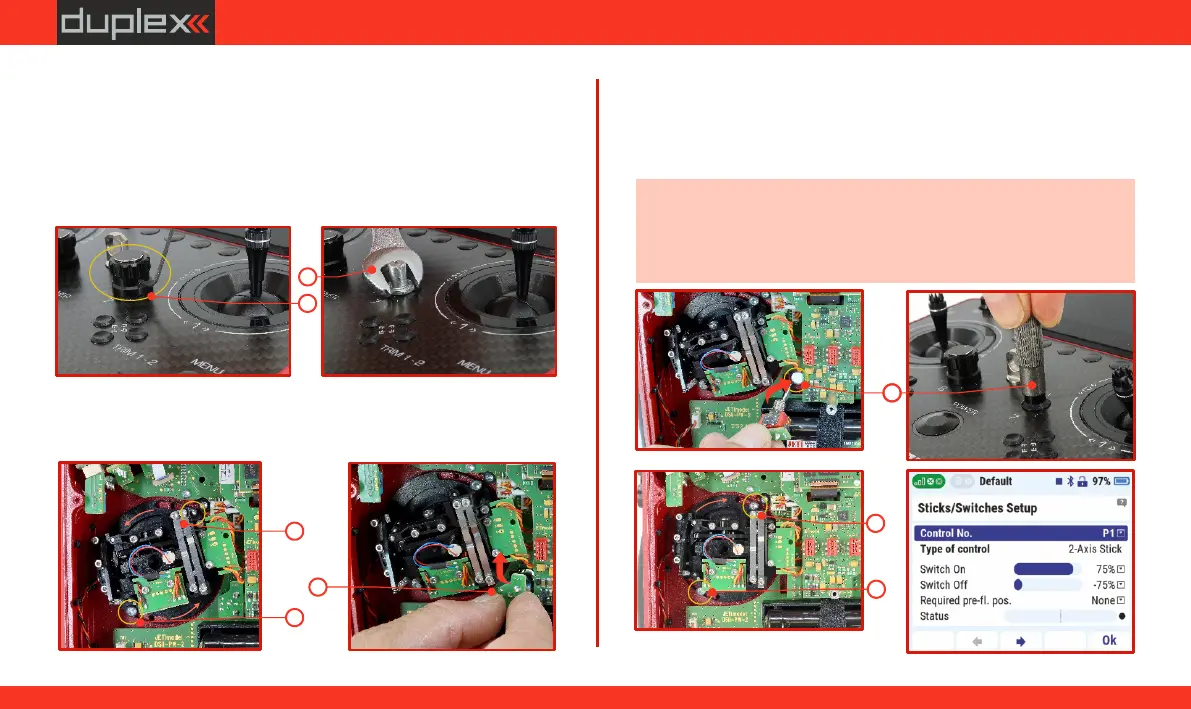
6.2.2 Procedure for Replacing Potentiometer "P7" and "P8"
with a Switch
1. Turn off the transmitter and unscrew the screws of the rear cover
of the transmitter.
Disconnect the battery connector.
2.
Loosen the locking allen screw 1.3 on the potentiometer knob
and pull it upwards.
3. Unscrew the 10 mm nut holding the body of the potentiometer.
4. Loosen the screws of the gimbal using the included tool (Torx T9)
and rotate it to allow the potentiometer to be removed (see
(a)
fig. ).
2
3
5. Gently push the shaft of the potentiometer towards the
transmitter and remove this potentiometer from the inside of the
transmitter.
6.(b) Insert the new switch and secure it from the front of the
transmitter with the nut .
(c)
Note: - The replacement nut is not included in the package and
can be purchased as an accessory.
- We recommend using the original mounting tool JMS-DC-SNS to
tighten the switch nut.
4
4
5
(a)
7
7
(a)
6
(b)
(c)
70
www.modellmarkt24.ch



 To Next Page