4.
4.
computer
radio
control
system
EN
“Instruc
tor
”
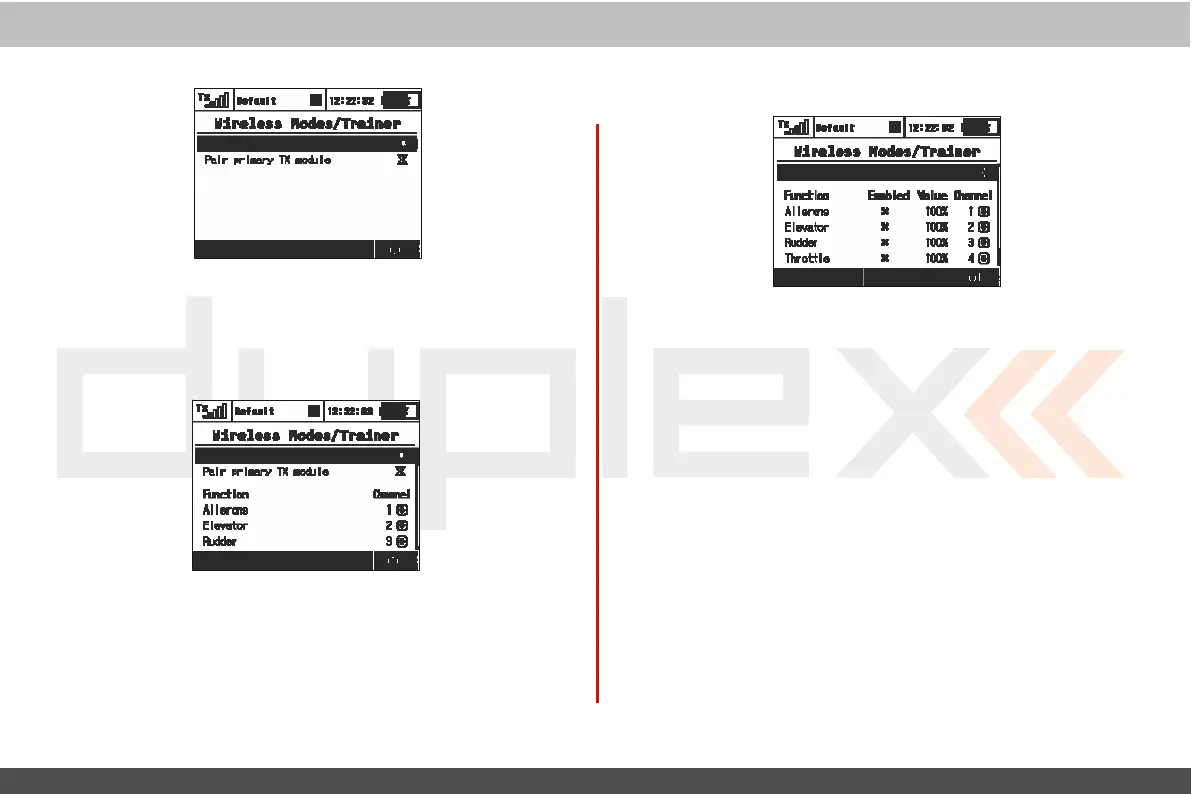
Wireless
Mode
“Default”Wireless
Mode
a.
S
elec
tion
b.
Primary
RF
module bind control menu
line
“Student”Wireless
Mode
I
f
student
’
s
transmitter
if
set
t
o
“Student
”
mode;
any
dual-rat
es
,
mix
es
or any other advanced features are disabled in the
student
’
s
transmitt
er
.
a) Mode
S
elec
tion.
b) Binding initialization of the
I
nstruc
t
or
transmitt
er
‘
s
primary
RF
module or special wireless
“
T
r
ainer
”
module by Jeti.
c) Channel function
assig
nment.
a) Mode
S
elec
tion.
b) Assigned trainer function switch, when the switch
is
activat
ed
,
control of the model
is
transferred to the
student.
c) Binding initialization of the
I
nstruc
t
or
transmitt
er
‘
s
sec
ondar
y
RF
module with
student
’
s
transmitt
er
.
d) Channel function assignment. Some or
all
of the functions
can
be controlled by
student.
e)
I
nstruc
t
or/Student
control authority
values
.
This
setting limits
the amount of control for the student.
If
the instructor is
assigned a 60% control value to a particular
channel
,
and
student
only assigned a 40%
value
.
T
he
instructor can easily
override
student
’
s
input and correct the
model
’
s
flight.
f
) Assignment for the input channel from the
s
t
u
de
n
t
’
s
t
r
a
n
s
m
i
tt
e
r
to the Control function of the
i
n
s
t
r
u
c
t
o
r
’
s
transmitt
er
.



 To Next Page