computer
radio
control
system
EN
9.5.
S
y
st
em
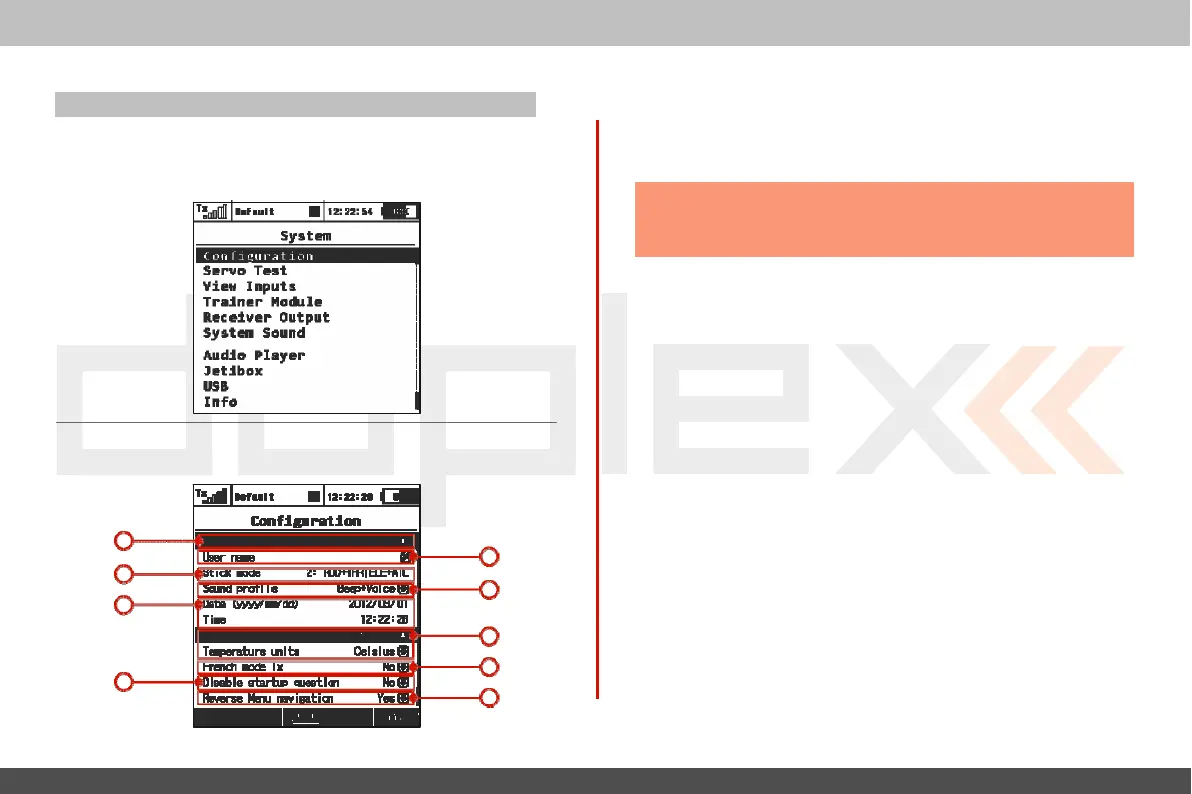
- Use this menu to configure the system functions of
y
our
transmitter.
All
of the settings in this menu are global and do
not
change when you switch
bet
w
een
models
.
9.5.1
C
onfigura
tion
Basic
transmitter
settings
1
2
1. Language
S
etting
U
se
this menu to select the
transmitt
er
’
s
language
setting
.
All
of the
transmitt
er
’
s
text and sounds will changed based
upon
your
selec
tion.
Warning: After changing the
transmitter
’
s
language you need
to
turn the
transmitter
off and back on for the change
to
take
effec
t
.
2.
U
ser
Name
Enter the user name that you want to appear in the
U
ser
block on
the
deskt
op
.
3. Stick
Mode
T
he
transmitter supports Modes 1-4.
To
change the stick mode
y
ou
can either use the „3D button“ to highlight and select the line
it
em
or simply press the
„F3“
button. Either
will
take you into the Stick
Mode
menu
.
Use the
„F1-F4“
buttons
to make your selection
and
then press the
„F5(Ok)“
button
to confirm.
T
he
mode change will
only be effective
f
or
new
models
.
All
of your stored models
will
r
etain
their existing
stick
modes
.
4. Sound
P
r
ofile
This
item allows you to select the sound profile for your
transmitt
er
.
3
4
This
determines
how your transmitter will audibly c
ommunicat
e
5
with
y
ou
.
Y
ou
can select between; quiet (mute), beep
only,
beep
and
6
voice (sound
file)
or voice (sound
file)
only
.
5. Date and
T
ime
7
8
Here is where you set the current date and
time
.
T
he
DC/DS-16
will
10
automatically observe the time change for Daylight Saving
T
ime
.
T
he
time and date information is used when creating new
models
and
f
or
t
elemetr
y
.



 To Next Page