Page 9
John Bean VPI System III Operators Manual
3.0 TERMINOLOGY
Before using the wheel balancer it is suggested that
you become familiar with the terminology and features
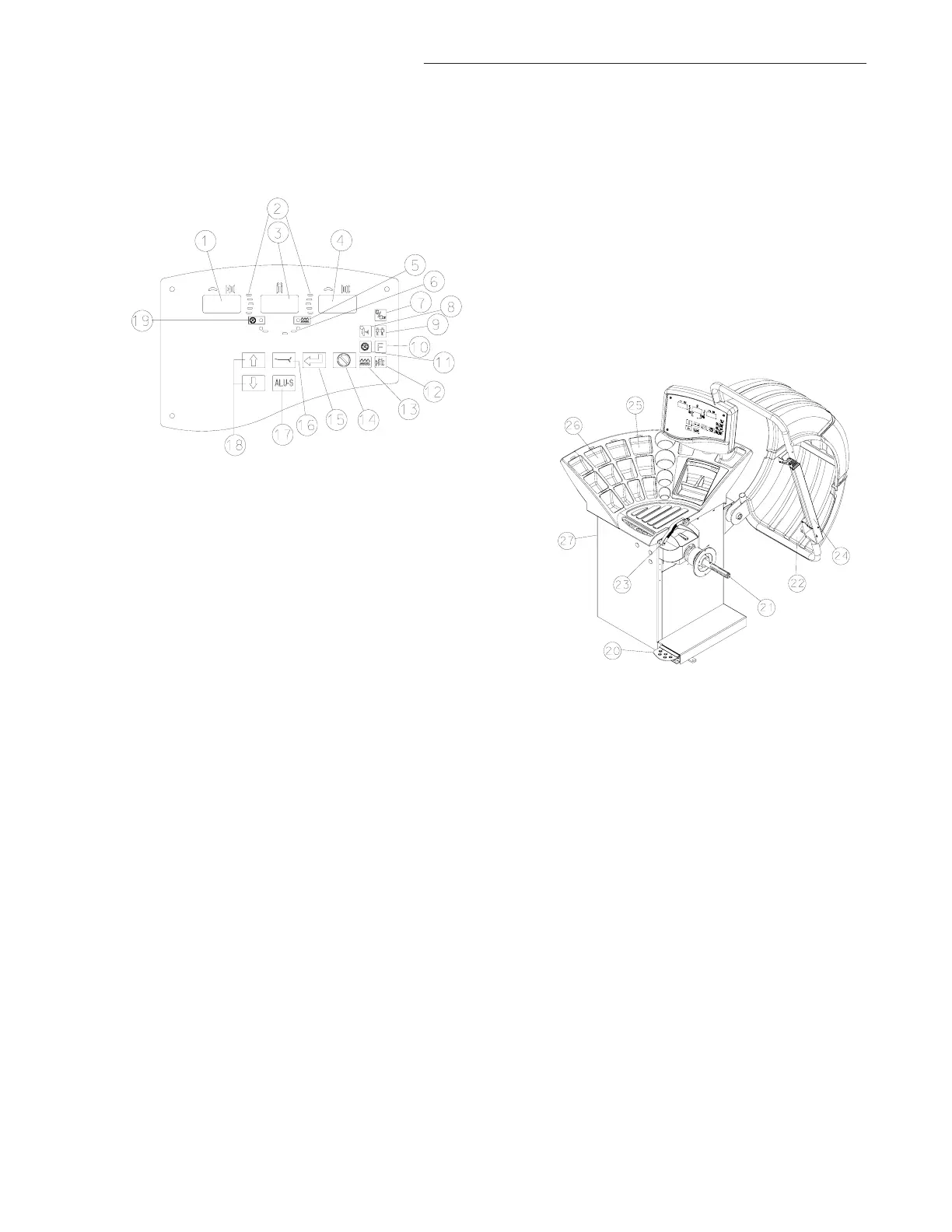
of the machine’s components. Refer to Figures 2-1
and 2-2 for identification and location.
1. Inside Weight Amount and Function Display Win-
dow - Shows inside or left weight amount and vari-
ous operation messages.
2. Position Indicator LEDs - Displays the location for
wheel weight placement.
3. Middle Display - Used to display wheel parameters
or messages.
4. Outside Weight Amount and Function Display
Window Shows outside or right weight amount and
various operation messages.
5. Fine Mode Indicator - When lit indicates the bal-
ancer is in the “Fine Mode”.
6. Weight Mode and Placement Display - Displays
a pictorial reference of the chosen balance mode.
7. Oz/Gr - Toggles between display values in Ounces
or Grams.
8. Weight Miser
™™
™™
™ - Toggles the Weight Miser
™™
™™
™ fea-
ture on and off. The LED is illuminated when active.
9. Multi-Operator Selection - This key toggles be-
tween four operators designated as A, B, C, and D
then P1 thru p4 for more stored parameters. Wheel
parameters are recalled upon command.
NOTE: ROTATING THE SHAFT IN EITHER DIRECTION
WILL ALSO VARY DISPLAYED VALUES.
10. Function Button - Used to activate the various func-
tions. Press this button followed by pressing the up
or down arrow buttons until the desired number is
displayed. Press the “Enter” button to active the
function.
11. Spoke Mode - Activates the Spoke Mode.
12. Parameters - Rim Offset - Key is used to enter the
rim offset position using numbers from the distance
gauge. Rim Diameter - Enter the rim diameter.
Read the size stated on the tire sidewall. Rim Width
- Press this key to enter the rim width. Use the rim
width calipers for measurement
13. Fine Weight Toggle - In normal mode “FIN OFF”
round off is 0.25 oz or 5 gram, fine mode “FIN ON”
round off is 0.05 oz. or 1 gram.
14. Cancel - Pressing this key interrupts any process.
15. Enter - This key activates whatever selection has
been requested, it also spins the wheel if guard frame
is down.
16. Mode Selection - A series of placement locations
for custom weight location. Useful for the wide vari-
ety of custom wheels on today's market.
17. ALU-S Activates the ALU-S mode.
18. Up and Down Value - Buttons are used to raise or
lower displayed values for parameter entry or func-
tion code activation.
19. Spoke Mode Indicator - When lit indicates the bal-
ancer is in the “Spoke Mode”.
20. Foot Operated Shaft Lock - A foot operated shaft
lock is used to stabilize the shaft during the weight
placement process.
21. Shaft Adapter - A common 40 mm size shaft is
used. The easily removable shaft can be replaced
for service or during use of certain wheel adapters.
22. Wheel Guard - The standard wheel guard is a safety
feature for prevention of operator injury in the event
of loose weights, debris or wheel mounting failure.
The balancer is programed to spin upon guard clo-
sure as well as brake when the guard is raised.
23. Semi-Automatic Parameter Arm - Rim distance
is automatically input with the SAPE. The SAPE is
also used in several procedures for determining ac-
curate rim profiles.
24. 3DP SAPE - Rim width is automatically input with
the SAPE by touching the outside of the wheel where
the weight will be located.
25. Display - Easy to read, user friendly display featur-
ing large LEDs and one button functions.
26. Weight Storage Tray - Generous storage for a va-
riety of weight profiles and sizes as well as built in
storage pockets for the standard centering cones.
27. Accessory Storage - Four sturdy side mounted pegs
are supplied for storage.



 To Next Page