Page 21
John Bean VPI System III Operators Manual
7.1 ALU-S SINGLE-PLANE (STATIC)MODE
This is a mode similar to a conventional Static mode.
The difference is that the distance and diameter param-
eters are accurately defined for a more exacting weight
placement, therefore improving the likelihood of a single
spin balance. Follow the procedures below:
1. Press the Alu-s button to activate the ALU-S 1-PL
mode, the display will read " --- ALU - S 1-PL" when
activated. Each depression of the Alu-s button will toggle
between a 2-plane mode and a single plane mode.
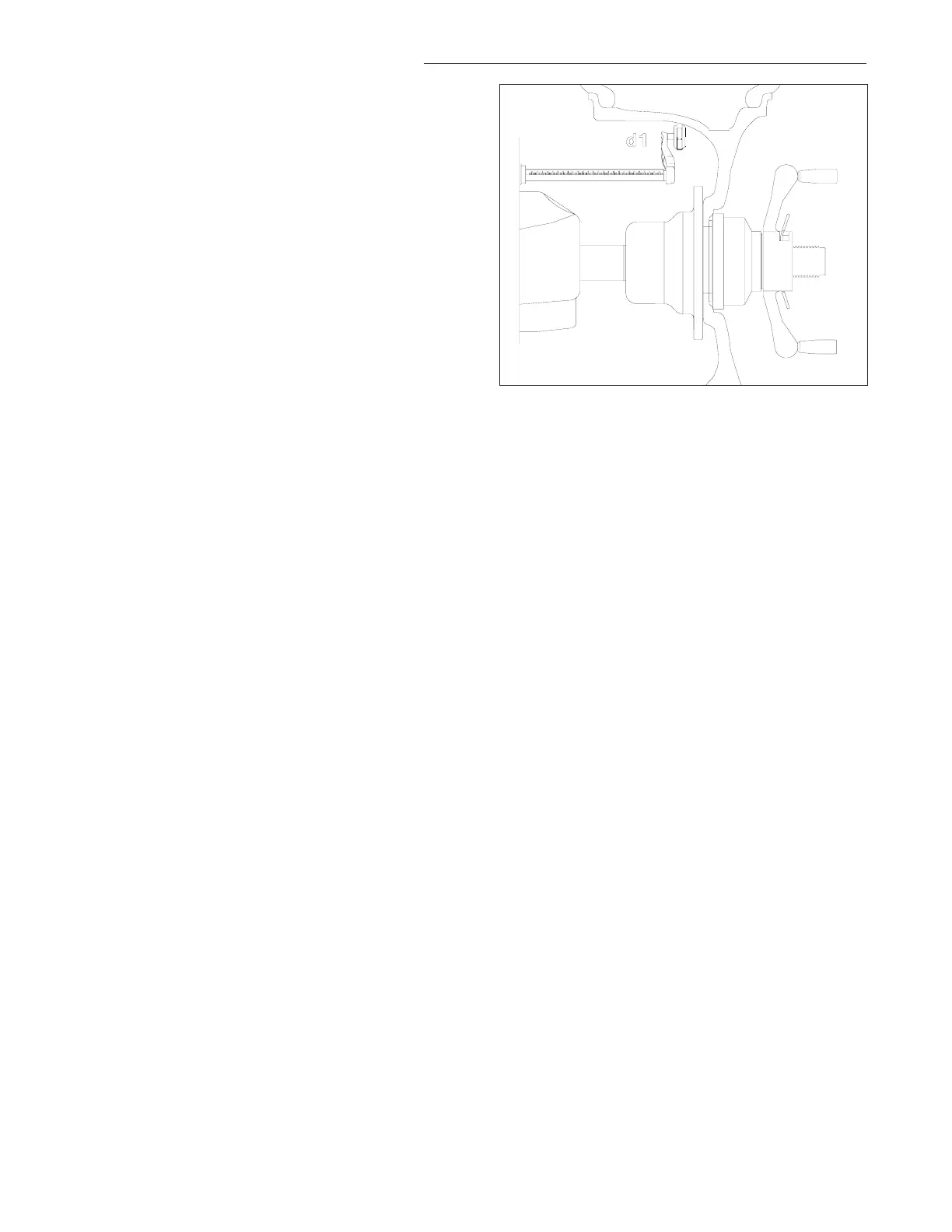
2. Extend the rim offset gauge arm and touch the posi-
tion of the desired single weight position. See Figure
33. The display will read “d - I”. A tone will sound when
dimension is entered. Return the gauge arm to the home
rest position, a low pitch tone will indicate when it is OK
to proceed.
NOTE: The width arm is not used in this procedure.
3. Lower the wheel guard or press “Enter” to spin the
wheel. The display will read “ALU 1 PL” during the spin
cycle.
4. After spinning, The wheel/tire assembly will stop with
the imbalance plane at top. The display reads both the
imbalance weight and position.
5. Extend the gauge arm to locate the place of imbal-
ance. The right display shows the weight amount to be
applied, the left display shows the distance the gauge
arm has to travel to get to the correction plane. The sape
arm will lock when the correct distance position is
reached, at the same time the display will read “0“ when
the proper position is attained. A “beep” will accompany
the lock position. Apply the weight amount indicated using
the tape weight applicator mounted on the SAPE exten-
sion.
6. Perform a check spin if desired
NOTE: TO EXIT ANY ALU-S MODE AND RETURN TO
TWO PLANE DYN (DYNAMIC) MODE PRESS “MODE”
BUTTON. THE MACHINE DISPLAYS "ALU OFF" FOR
ONE SECOND AND THEN ENTERS IDLE STATE IN
THE 2-PL DYN MODE
NOTE: INSPECT THE RIM AND AVAILABLE WEIGHTS
AND USE GOOD JUDGEMENT IN YOUR SELECTION.
WEIGHTS SHOULD NOT INTERFERE WITH ANY SUS-
PENSION PARTS OR MAKE CONTACT DURING RO-
TATION. IF A WEIGHT DOES MAKE CONTACT, USE
AN ALTERNATE LOCATION AND SELECT AN APPRO-
PRIATE MODE.
Figure 33



 To Next Page