39
© 2017 JTECH Medical MN022_M
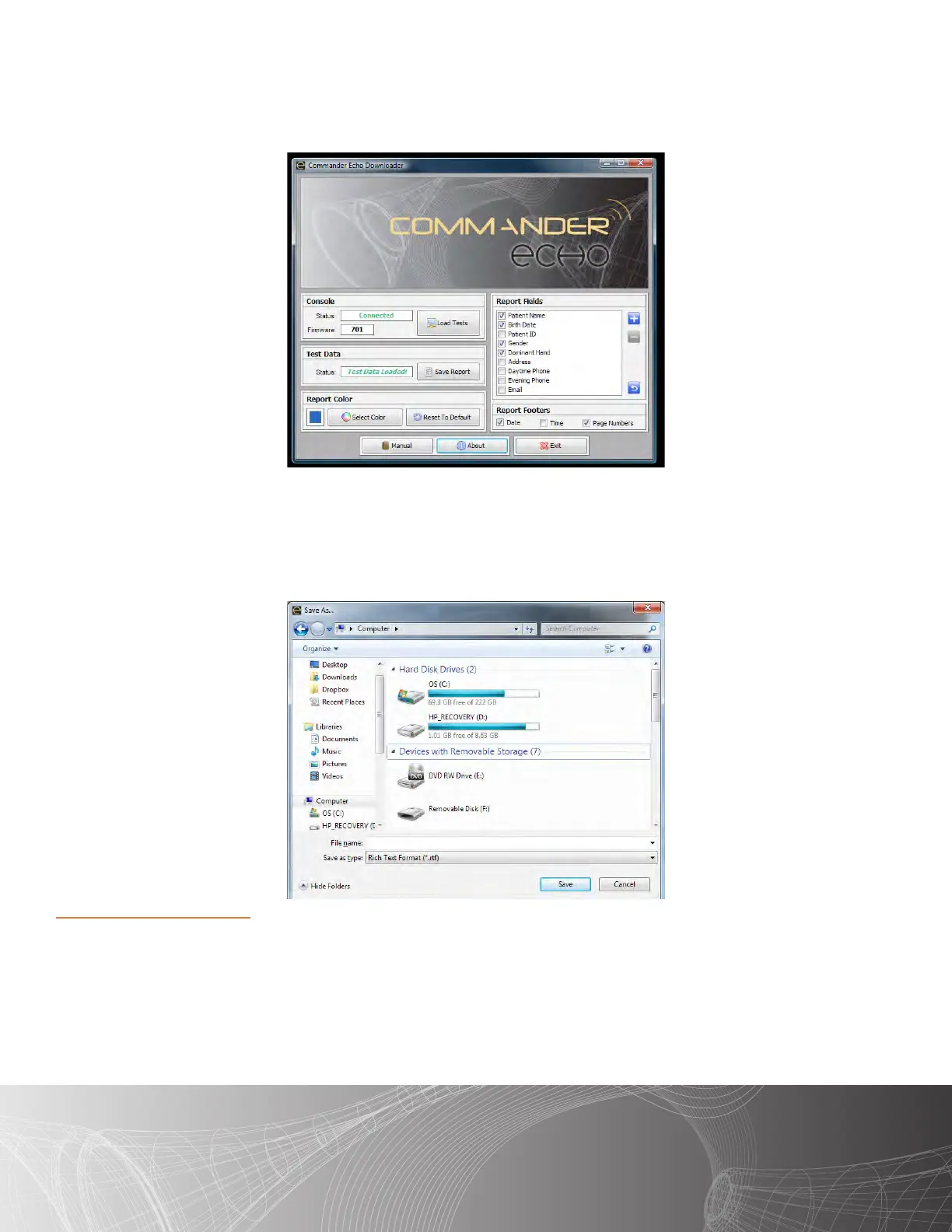
Once the tests have been loaded, the soware will display “Test Data Loaded!”
Choose any opons you would like to include on the reports from the “Report Fields” and “Report Footer”
boxes. You may also change the color that the report uses for its headers and table elds.
Once you have these opons selected, press the “Save Report” buon.
A dialogue box will launch, at which point you will choose a name and locaon to save the document onto your
computer.
Once you have chosen a name and locaon for your report, click on the “Save” buon. Your report will be
saved, and the computer will automacally open the report with the program you have chosen as the default
for opening .r les, at which point you can review and print your reports.
Notes about the Soware
Click the “Manual” buon to open the Commander Echo manual through the soware. It will automacally
aempt to open the manual with the program you have chosen as the default for opening .pdf les.
Click the “Exit” buon, or the ‘X’ in the top-right of the soware, to close the soware and save your current
program sengs.
Click the “About” buon to open the About Form. The About Form provides soware version informaon as
well as JTECH contact informaon and links to our websites. The “License” buon on the About Form will close
the About Form and open up the JTECH Soware Licensing form.



 To Next Page