-
28
-
6. OPERATION OF THE SEWING MACHINE (ADVANCED)
P-No. Selection key P-No. Selection key P-No. Selection key P-No. Selection key
P1 P1 P8 P1+P4 P15 P4+P5 P22 P2+P3+P4
P2 P2 P9 P1+P5 P16 P1+P2+P3 P23 P2+P3+P5
P3 P3 P10 P2+P3 P17 P1+P2+P4 P24 P2+P4+P5
P4 P4 P11 P2+P4 P18 P1+P2+P5 P25 P3+P4+P5
P5 P5 P12 P2+P5 P19 P1+P3+P4
P6 P1+P2 P13 P3+P4 P20 P1+P3+P5
P7 P1+P3 P14 P3+P5 P21 P1+P4+P5
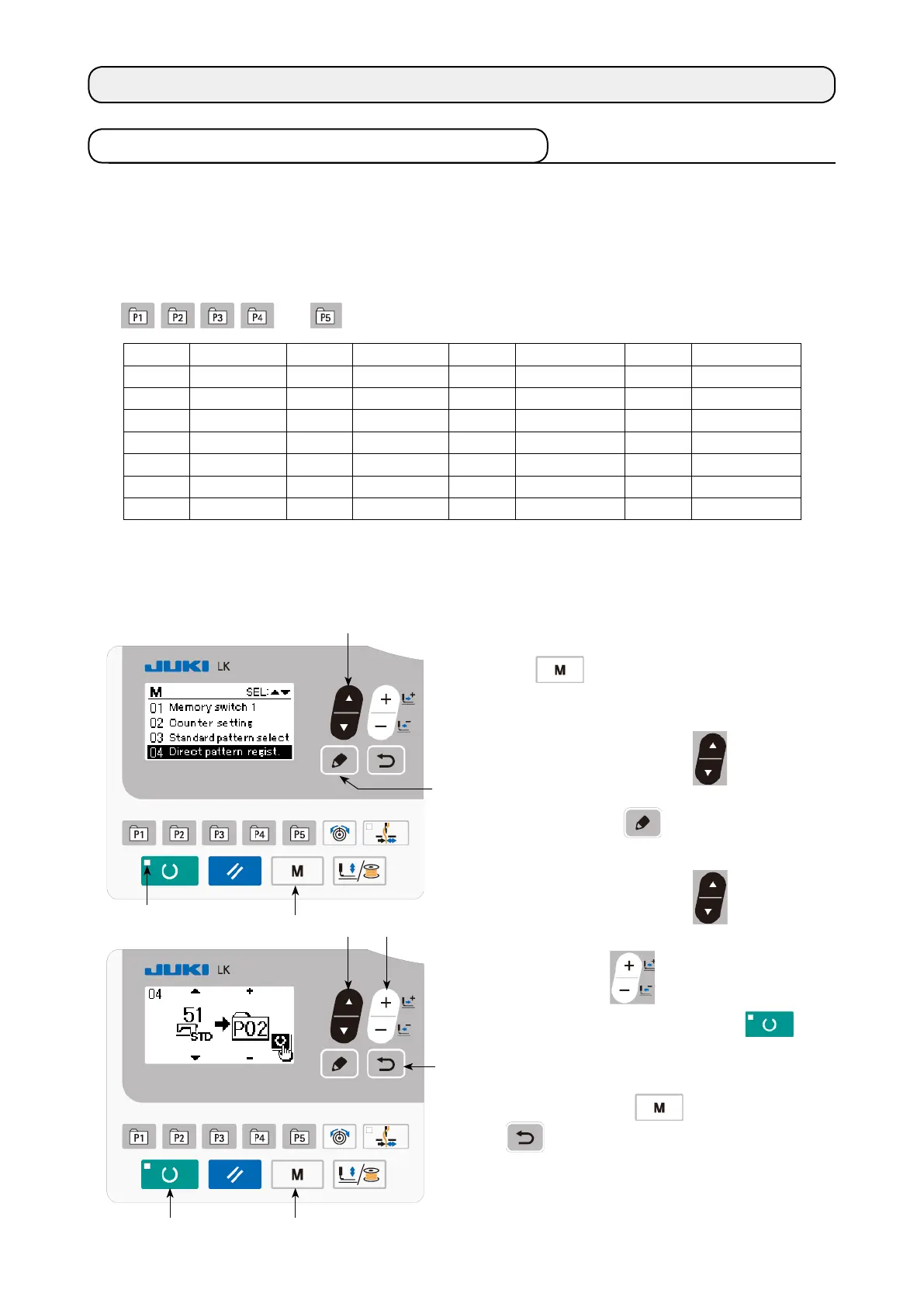
(1) Register to the pattern key
Setting example : Register pattern No. 51 to P2 while setting the X scale to 50 %, Y scale to 80 % and
the max. speed limitation to 2,000 sti/min.
1) Turn ON the power switch and press MODE
key
❹
to enter mode setting (memory
switch setting). (SET READY LED
should
be put out.)
Press ITEM SELECT key
❻
to select
"04 Direct pattern regist".
Press EDIT key
❽
to display the pat-
tern registration mode.
2) Press ITEM SELECT key
❻
to set
the standard pattern to No. 51. Press DATA
CHANGE key
❼
to set P-No. to 2.
When you press the READY key
❷
,
P2 is registered and the mode screen is dis-
played.
Press MODE key
❹
or RETURN key
❾
.
* When the select key is held pressed for one
second in the state where the standard pat-
tern or user pattern is selected on the data
input screen, this screen can be displayed.
❷ ❹
❹
❻
❻ ❼
❾
❽
6-1. Performing sewing using the pattern keys
User patterns (Nos. 1 to 200) and old user patterns (Nos. 1 to 99), which have already been registered,
can be registered to P1 to P50. It is possible to change and register the scale and max. speed limita-
tion. Same as the patterns (Nos. 1 to 200), patterns are used by selection by scrolling the pattern Nos.
It should be remembered that P1 to P25 can also be called through one-touch operation.
* When selecting P6 to P25, perform the selection by combination (simultaneous pressing) of
and ) keys as shown in the table below.



 To Next Page